How to Use Precision Finding to Locate an AirTag With iPhone 11 and iPhone 12 - MacRumors
Skip to Content

How to Use Precision Finding to Locate an AirTag With iPhone 11 and iPhone 12

by

Apple's AirTags are small, button-shaped devices that are designed to be attached to items like keys and wallets to allow these accessories to be tracked using Bluetooth right alongside Apple devices in the Find My app.
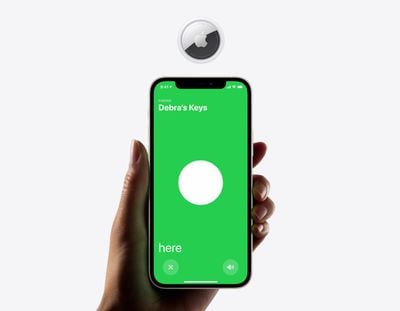
Apple airtag finding screen 042021
If you've set up an AirTag and attached it to an item, you can track said item in the ‌Find My‌ app, should you misplace it. ‌Find My‌ uses Bluetooth signals from a lost ‌AirTag‌ to relay its location back to its owner. Apart from Bluetooth, however, each ‌AirTag‌ is also equipped with a U1 Ultra Wideband chip, and on devices that also have U1 chips, there's a Precision Finding feature that enables you to more accurately determine the distance and direction of a lost ‌AirTag‌ when it's in range, when compared to Bluetooth alone.

If you're aiming to find a lost item and you have an ‌iPhone 11‌ or 12, Precision Finding will direct you to the exact location of your lost ‌AirTag‌ using input from the camera, accelerometer, and gyroscope, with guidance provided through sound, haptics, and visual feedback. Here's how to use it.

How to Find the Precise Location of an AirTag

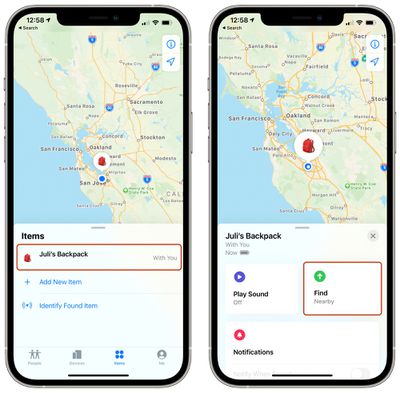
  1. Launch the Find My app on your iPhone.
  2. Tap Items.
  3. Tap the ‌AirTag‌ you want to get the precise location for. airtag precision finding 1
  4. Tap Find. It should say "Nearby" underneath if the Precision Finding feature is available.
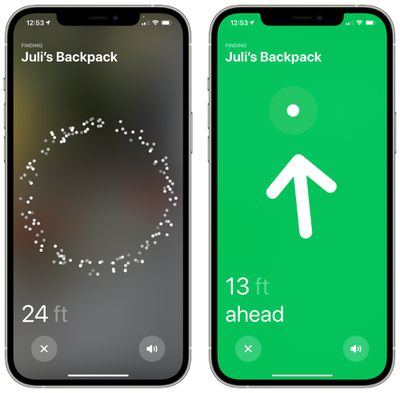
  5. Now start moving around to locate the ‌AirTag‌ and follow the onscreen instructions. You should see an arrow pointing in the direction of the ‌AirTag‌, an approximate distance telling you how far away it is, and a note if it's located on a different floor. airtag precision finding 2
As you approach an item, you'll feel haptic feedback from your phone and there will be audio cues to let you know that you're approaching an item. The ‌AirTag‌ graphic on the iPhone will also shift as you get nearer to it. Precision Finding exits when you've successfully located your ‌AirTag‌ and your iPhone or Apple device is in very close proximity.
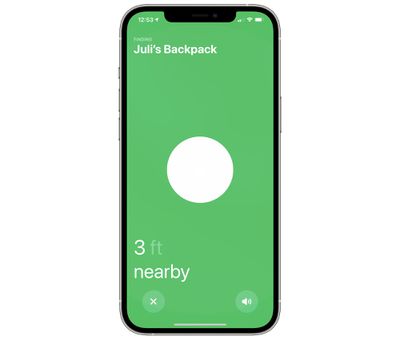
precision finding 3
Note that Ultra Wideband isn't universally supported worldwide, therefore Precision Finding won't work in some countries. For more details, see our guide on what to know if you plan to travel abroad with AirTags.


Related Roundup: AirTag
Buyer's Guide: AirTag (Buy Now)

Top Rated Comments

Knightcastle Avatar
64 months ago

Honestly, without the AR and the fact that these are 2019 tech, I am going to wait for AirTag2
it’s $29.
Score: 8 Votes (Like | Disagree)
TheDailyApple Avatar
64 months ago

I just realized I bought a four pack of AirTags and nothing to mount them. Whoops. Well, one of them I wanted to go into a case for my new Apple TV remote and one of them I wanted to stick on my drone with some 3M strips or something.
I don’t have a drone, but using an AirTag on one is a great idea. I’ve had friends who searched HOURS for crashed drones.
Score: 4 Votes (Like | Disagree)
64 months ago

Honestly, without the AR and the fact that these are 2019 tech, I am going to wait for AirTag2
I’m going to wait for airtag 3.
Score: 3 Votes (Like | Disagree)
64 months ago

I’m going to wait for airtag 3.
At that point you should just wait for the AirTag Pro.
Score: 2 Votes (Like | Disagree)
64 months ago
I want a credit card size\shaped AirTag. Even if it’s disposable after the life of the battery.
Score: 2 Votes (Like | Disagree)
64 months ago
Real question: why does this not have a reverse page function? Get X distance from an AirTag and it sounds off, to avoid you walking away from your keys in the first place……or does it? Mine aren’t to be delivered until Wednesday…
Score: 1 Votes (Like | Disagree)

Popular Stories

iOS 26

iOS 26.4 Adds Two New Features to CarPlay

Tuesday March 24, 2026 1:55 pm PDT by
iOS 26.4 was released today, and it includes a couple of new features for CarPlay: an Ambient Music widget and support for voice-based chatbot apps. To update your iPhone 11 or newer to iOS 26.4, open the Settings app and tap on General → Software Update. CarPlay will automatically offer the new features so long as the iPhone connected to your vehicle is running iOS 26.4 or later....
Apple Business hero

Apple Unveils 'Apple Business' All-in-One Platform

Tuesday March 24, 2026 8:53 am PDT by
Apple today announced Apple Business, a new all-in-one platform that unifies device management, productivity tools, and customer outreach features. The service is designed to be a consolidated replacement for several of Apple's existing business-focused offerings, including Apple Business Essentials, Apple Business Manager, and Apple Business Connect. It provides organizations with a single...
AirPods Pro Firmware Feature

Apple Releases New Firmware for AirPods Pro 3, AirPods Pro 2 and AirPods 4

Tuesday March 24, 2026 12:31 pm PDT by
Apple today released new firmware for the AirPods Pro 2, AirPods Pro 3, and the AirPods 4. The firmware has a version number of 8B39, up from 8B34 on the AirPods Pro 3, 8B28 on the AirPods Pro 2, and 8B21 on the AirPods 4. There is no word on what's included in the firmware, but Apple has a support document with limited notes. Most updates are limited to bug fixes and performance...