
iOS 18: How to Use Safari's New Highlights Feature - MacRumors
Skip to Content

iOS 18: How to Use Safari's New Highlights Feature

by

Safari in iOS 18 introduces a new feature called Highlights, which is designed to enhance your browsing experience by intelligently surfacing key information from webpages. The tool uses machine learning to identify and extract the most relevant details, and present them to you in an easily accessible format.

safari icon blue banner
Think of Highlights as a kind of smart assistant within Safari, saving you time and effort by eliminating the need to manually search through lengthy web content. Whether you're looking up a restaurant, researching a historical figure, or checking out a new movie, Highlights can often quickly provide the essential information you need.

The feature is particularly useful for various types of content:

  • For businesses and locations, it can display address details, operating hours, and quick access to directions.
  • When browsing pages about people, it might show brief biographical information.
  • For entertainment content, it can offer direct links to play songs or summarize reviews for movies and TV shows.

Highlights aims to streamline your browsing by providing these bite-sized pieces of information right when you need them.
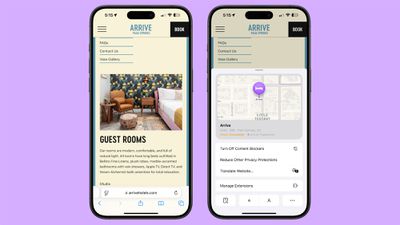
ios 18 safari highlights
Here's how to use the new feature in iOS 18:

  1. Open Safari and navigate to a supported webpage.
  2. Look for a purple sparkle over the tool icon in the browser bar. This indicates Highlights are available.
  3. Tap the sparkle to open the Highlights window.
  4. Review the summarized information presented in the Highlights window, and interact with the information you need, such as tapping on directions or playback links.

By keeping an eye out for the sparkle icon as you browse, you can take full advantage of this time-saving feature and quickly access the most pertinent information from websites. Note that Highlights is currently only available in the U.S. and only works for English websites.


Top Rated Comments

jz0309 Avatar
20 months ago
“Open Safari and navigate to a supported webpage”

How would one know that a webpage is supported???
Score: 12 Votes (Like | Disagree)
20 months ago
didn't work on this article
Score: 6 Votes (Like | Disagree)
20 months ago
I am not enabling this feature since I don’t want to share my browsing with Apple.
Score: 3 Votes (Like | Disagree)
NightFox Avatar
20 months ago
I always feel like these features are designed for the way people use the internet in adverts, and not how and why the internet gets used in real life. Maybe I'm just not using it right though.
Score: 3 Votes (Like | Disagree)
20 months ago
Some commenters seem to be confusing "summary" with highlight. This article is about highlights - from apple.com "Safari will automatically detect relevant information on a page and highlight it as you browse. Highlights display helpful information like directions and quick links to learn more about people, music, movies, and TV shows." The example given in the article does work. It "highlights" the location of the hotel. As you can see in the screen capture I just did on 15.1 beta4.

Attachment Image
Score: 2 Votes (Like | Disagree)
20 months ago

Now let’s use AI to extract from AI written webpages. What could go wrong?:)
This is client side, but yep it’s a valid concern! Hopefully there will be standardised tags/markup to signify server side AI content is machine generated. Without that the web will turn into some kind of self referencing nonsense soup, not that it isn’t close to that already.
Score: 2 Votes (Like | Disagree)

Popular Stories

iOS 26

iOS 26.4 Adds Two New Features to CarPlay

Tuesday March 24, 2026 1:55 pm PDT by
iOS 26.4 was released today, and it includes a couple of new features for CarPlay: an Ambient Music widget and support for voice-based chatbot apps. To update your iPhone 11 or newer to iOS 26.4, open the Settings app and tap on General → Software Update. CarPlay will automatically offer the new features so long as the iPhone connected to your vehicle is running iOS 26.4 or later....
Apple Business hero

Apple Unveils 'Apple Business' All-in-One Platform

Tuesday March 24, 2026 8:53 am PDT by
Apple today announced Apple Business, a new all-in-one platform that unifies device management, productivity tools, and customer outreach features. The service is designed to be a consolidated replacement for several of Apple's existing business-focused offerings, including Apple Business Essentials, Apple Business Manager, and Apple Business Connect. It provides organizations with a single...
AirPods Pro Firmware Feature

Apple Releases New Firmware for AirPods Pro 3, AirPods Pro 2 and AirPods 4

Tuesday March 24, 2026 12:31 pm PDT by
Apple today released new firmware for the AirPods Pro 2, AirPods Pro 3, and the AirPods 4. The firmware has a version number of 8B39, up from 8B34 on the AirPods Pro 3, 8B28 on the AirPods Pro 2, and 8B21 on the AirPods 4. There is no word on what's included in the firmware, but Apple has a support document with limited notes. Most updates are limited to bug fixes and performance...















