How to Use Screen Time on Mac - GeekWebGuides
Skip to Content

How to Use Screen Time on Mac

by

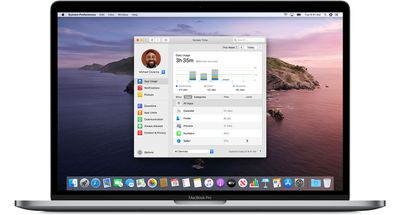
With the release of macOS Catalina, Apple introduced Screen Time functions that enable users to keep track of their usage and place self-imposed limits on the time they spend using their Mac. Screen Time also serves as a parental control system, since it can be used to place restrictions on what a child can access, who they can contact, and how long they spend on apps, websites, and more.
macos catalina 10 15 4 screen time hero
This article explains how to use Screen Time on your Mac and covers the following subjects. Click one to go straight to it.

How to Enable Screen Time on Mac

Make sure that your Mac is running macOS Catalina, then follow these steps:

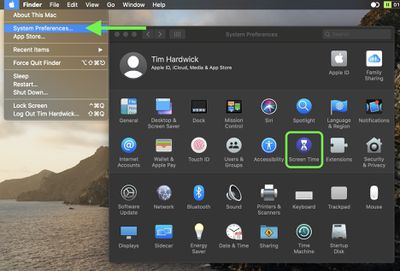
  1. Launch System Preferences from your Mac's Dock, from the Applications folder, or from the Apple menu bar ( -> System Preferences...).
  2. Select Screen Time in the preference panel.
    sys prefs

  3. Click the Options button in the bottom-left corner.
  4. Click the Turn On button in the top-right corner.
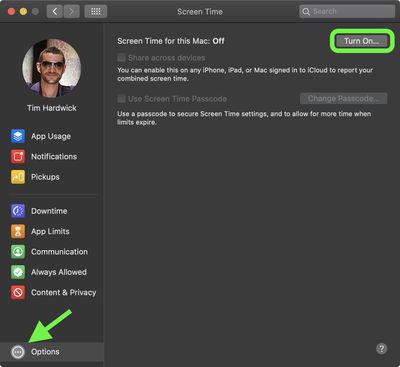
    turn on screen time mac

How to Disable Screen Time on Mac

To stop using Screen Time on Mac, follow these steps:

  1. Launch System Preferences from your Mac's Dock, from the Applications folder, or from the Apple menu bar ( -> System Preferences...).

  2. Select Screen Time in the preference panel.
  3. sys prefs

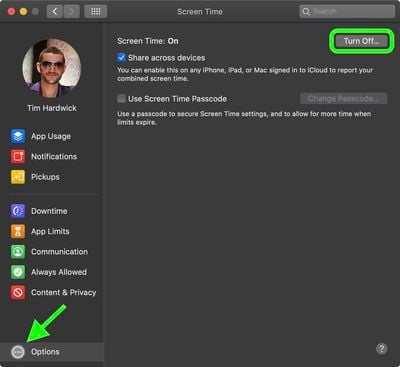
  4. Click the Options button in the bottom-left corner.
  5. Click the Turn Off button in the top-right corner.
  6. turn off screen time mac

How to Use a Screen Time Passcode on Mac

Setting a password in Screen Time on Mac allows you to secure your settings. You can also use the password to extend the allotted time for users.

  1. Select Screen Time in System Preferences.

  2. Click the Options button in the bottom-left corner.

  3. Check the box next to Use Screen Time Password, then enter a passcode to use.
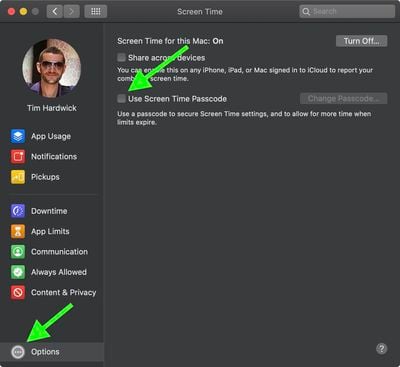
    screen time

How to Share Screen Time Across Devices on Mac

Sharing Screen Time across all of your devices allows you to get a more accurate idea of how much time you spend online. First though, you have to enable sharing:

  1. Select Screen Time in System Preferences.
  2. Click the Options button in the bottom-left corner.
  3. Check the box next to Share Across Devices.
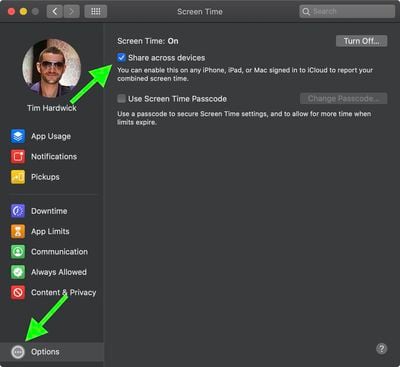
    screen time

How to View App Usage in Screen Time on Mac

  1. Select Screen Time in System Preferences.
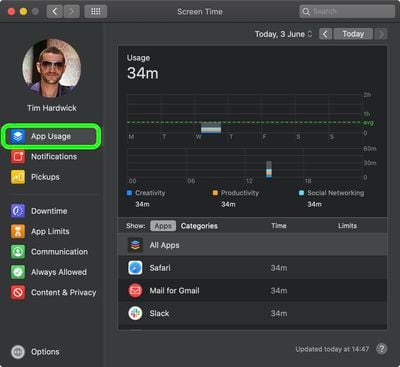
  2. Select App Usage in the sidebar.
  3. Check your app usage. You can break it down by day, by app, or by category. If there are limits, you'll see those here, too.
    screen time

How to Limit Usage in Screen Time on Mac

Screen Time allows you to set limits based on app categories. Here's how to go about it:

  1. Select Screen Time in System Preferences.
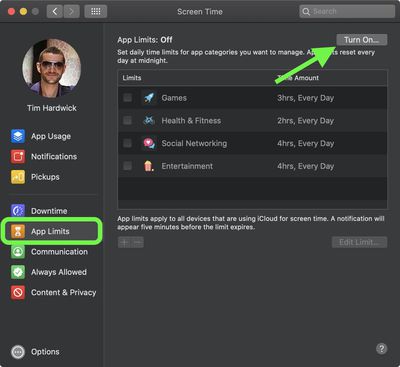
  2. Select App Limits in the sidebar.
  3. Click the Turn On button to activate App Limits.
  4. Click the plus (+) button to add an app category.
    screen time

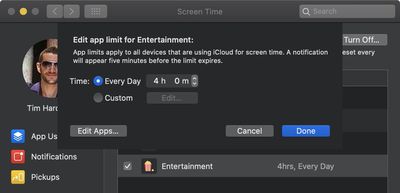
  5. Highlight the app category, then set the limit using the radio buttons. You can choose to set limits Every Day or create your own Custom schedule.
    screen time

  6. Repeat steps 5 to 6 for each app category you want to limit.

  7. Click Done to finish.

You can remove app limits by unchecking the box next to each app category you added, or you can turn off app tracking entirely by clicking the Turn Off... button in the top-right corner.

How to Approve Screen Time Requests on Mac

Screen Time shows Requests when you have unanswered requests from a child account. Here's how to find them:

  1. Select Screen Time in System Preferences.
  2. Select Requests in the sidebar.
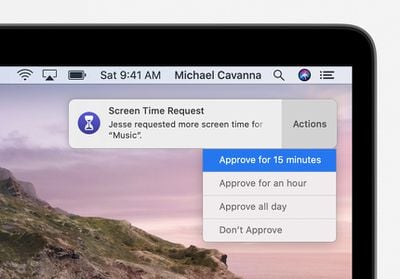
  3. Any requests for more time will appear under Requests. To manage a request, click Don't Approve or choose Approve..., then select one of three options from the dropdown: Approve for 15 minutes, Approve for an hour, or Approve all day.
    screen time

Requests for approval also arrive as notifications, and you can approve directly from the notification.

How to Schedule Downtime in Screen Time on Mac

During Downtime, only apps you choose to allow will be accessible, as well as phone calls, when applicable. Follow these steps to set up a Downtime schedule:

  1. Select Screen Time in System Preferences.
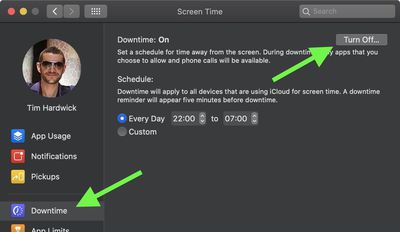
  2. Select Downtime in the sidebar.
  3. Click the Turn On button to activate Downtime.
  4. Click the radio button next to Every Day or Custom depending on the schedule you want to set.
    screen time

Every Day activates Downtime at the same time each day, while Custom allows you to adjust the time for each day of the week or turn off Downtime for certain days by unchecking the box next to them.

How to Set Always Allowed Content in Screen Time on Mac

You can allow certain things on your Mac such as communication with specific people or launching particular apps, regardless of other restrictions you might have set up. Here's how:

  1. Select Screen Time in System Preferences.
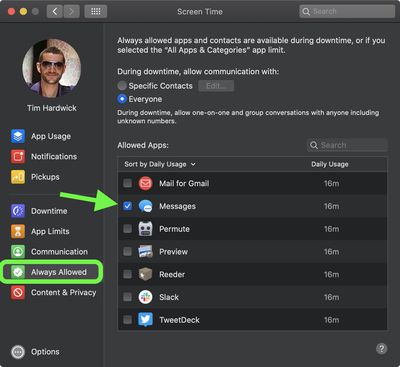
  2. Select Always Allowed in the sidebar.
  3. Check the box next to each item you want to always allow.
    screen time

How to Set Content and Privacy in Screen Time on Mac

To restrict content and adjust privacy controls in Screen Time, follow these steps:

  1. Select Screen Time in System Preferences.
  2. Select Content & Privacy in the sidebar.
  3. Click the Turn On button in the top-right corner to activate Content & Privacy.
  4. Use the tabs to select options for Content, Stores, Apps, and Other.
  5. Check the boxes next to the items you want to allow.
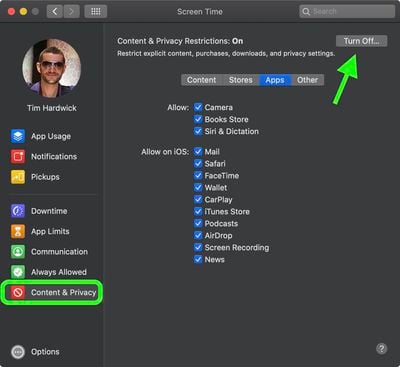
    screen time

With the release of macOS Catalina 10.15.4, Apple added new Screen Time options to let parents control who their children are able to contact on Mac. To learn more, check out our dedicated article detailing the new options.


Popular Stories

M5 MacBook Pro

RIP, MacBook Ultra

Monday October 19, 2026 9:37 am PDT by
Apple today sent out invites for an experience in Los Angeles on Wednesday, October 28, and the "Pro and tell" tagline on the invitation likely means that the rumored MacBook models with touch-enabled OLED displays will stick with MacBook Pro branding instead of the once-rumored "MacBook Ultra" name. The long-rumored "iPhone Ultra" ended up being named iPhone Duo, so speculation that Apple...
iPhone Duo Trio

Here's What Apple's Apps Look Like on the iPhone Duo

Tuesday October 20, 2026 11:12 am PDT by
With just three days to go until the iPhone Duo is released, Apple is getting ready for the launch. Behind the scenes, the App Store now has screenshots of Apple's built-in apps running on the Duo. We've seen some apps in marketing materials, but images of the ones we haven't seen give us an idea of what it will be like using the iPhone Duo day to day. Many apps are shown in landscape...
apple pro tell logo

Apple Announcing New Products Next Week: 'Pro and Tell'

Monday October 19, 2026 9:05 am PDT by
Apple's Greg Joswiak today hinted at new product announcements coming next week, sharing a social media post that says "Can't wait to pro and tell next week." Rumors suggest Apple is planning to debut the new MacBook Pro with an OLED touchscreen display, an M6 entry-level MacBook Pro, an M6 iMac, an iPad mini with an OLED display. Can't wait to pro and tell next week....
Latest Stories
Giant iPhone Duo Displays Coming to Four Apple Stores
29 minutes ago
Apple Pulls Keynote, Pages and Numbers From App Store [Update: Back]
1 hour ago
Apple Updates More Apps With iPhone Duo Support
2 hours ago
Apple Will Label Apps 'Made for iPhone Duo' in App Store
5 hours ago
Amazon Takes $49 Off iPad With Prices Starting at $399.99
5 hours ago
F1 on Apple TV Now Available in Dolby Atmos
6 hours ago
Apple Reveals More Than 50 Apps That Will Be Updated for iPhone Duo
6 hours ago
Apple Blocks Certificates That Could Help Attackers Fake Websites
8 hours ago
Giant iPhone Duo Installations Spotted at Apple Fifth Avenue
8 hours ago
iPhone Duo 2 Prototypes Include Under-Display Face ID
9 hours ago
Tesla App Gains iPad and iPhone Duo Support
13 hours ago
Apple Reportedly Boosts iPhone Duo Orders by 44%
13 hours ago
Fortnite Returning to Australian App Store After Court Ruling
13 hours ago
Apple Ordered to Open iPhone to Rival App Stores in Australia
14 hours ago
Apple Suppliers Face Hurdles Cutting Circuit Board Emissions
14 hours ago
Things Updated for iPhone Duo With Adaptive Layout
14 hours ago
Simplicity and Siri AI Are HomeView's Killer Features, Apple Says
15 hours ago
iPhone Duo Reviewers Really Miss Face ID
20 hours ago
Does the iPhone Duo Run Hot? Here's What Reviews Found
21 hours ago
Apple Music's New Look is Now Live on Apple's Website
22 hours ago
Anthropic Launches Claude Duet, a Proactive AI Agent
22 hours ago
What 32,000 Folds Did to the iPhone Duo's Hinge
23 hours ago
iPhone Duo's Hidden FaceTime Camera Takes 'Trash' Photos
1 day ago
iPhone Duo Has 'Edge Light' Feature That Debuted on Macs Last Year
1 day ago
Apple Support App Updated for iPhone Duo's Larger Display
1 day ago
Amazon Sweetens the Deal on Entry-Level 16-Inch MacBook Pro With $570 Off
1 day ago
iPhone Duo Tips Over on MagSafe Stands When Unfolded
1 day ago
Apple Music's New Look Officially Announced
1 day ago
iPhone Duo Supports Apple Pencil Starting With iOS 27.2
1 day ago
iPhone Duo Accessories Roundup: Cases and Screen Protectors From OtterBox, ZAGG, and More
1 day ago