
How to Use Secure Code AutoFill in iOS 12 and macOS Mojave - MacRumors
Skip to Content

How to Use Secure Code AutoFill in iOS 12 and macOS Mojave

by

Most readers will have at some point received a two-factor authentication code delivered to them by SMS text message. Many apps and websites send the one-time codes to confirm that the person attempting to log in to an account is the legitimate account holder, and not just someone using a stolen password.

Depending on how notifications are set up on your iPhone, receiving a code via text message may mean that you have to switch out from the app or website to read the message and memorize or copy the code, and then switch back to paste it or type it into the login screen manually.
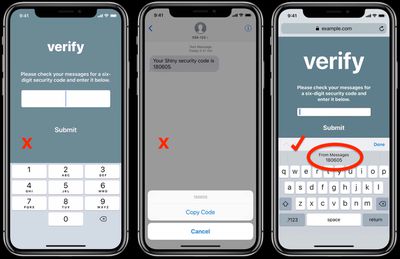
ios 12 secure code autofill 1
To make this process less of a hassle, Apple is introducing Security Code AutoFill for iOS 12. The new feature ensures that SMS one-time passcodes that you receive instantly appear as AutoFill suggestions in the QuickType bar above the virtual keyboard, letting you input them in the passcode field with a simple tap.

If you've enabled Text Message Forwarding on your iPhone, you can use the Secure Code AutoFill feature in macOS Mojave, too. The code should appear in Safari as an AutoFill option in the relevant field as soon as the SMS is delivered to Messages on your Mac.
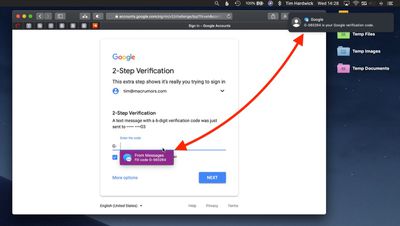
secure code autofil mojave 2
iOS and macOS use local data detector heuristics to work out whether an incoming message carries a security code, and Apple says the Security Code AutoFill feature does not alter the security of this two-factor authentication method.

So as long as developers craft their secure code text messages correctly, Security Code AutoFill should work in all third-party apps updated for iOS 12 and macOS Mojave, which are due for official public release this fall.


Related Forums: iOS 12, macOS Mojave

Top Rated Comments

99 months ago
Cool idea, but 2FA via SMS is inherently insecure and shouldn't be encouraged. However if Apple were to allow third-parties to deliver them over iMessage it would be secure and very convenient.
Score: 5 Votes (Like | Disagree)
99 months ago
I’m keen as for this feature!
Score: 2 Votes (Like | Disagree)
adrianlondon Avatar
99 months ago
Not working for me. I'm not currently testing on my phone, although when I did try it a few weeks ago it didn't work there either. Running 10.14 dev beta 7.

This is the SMS I got:
mTAN for your new login:123456

And attached is a pic showing the field that expects it. No auto-fill available. It's a shame, as it would be a great feature. Hopefully they'll enhance it over time as Apple learns the format of various SMS authentication texts.

Attachment Image
Score: 1 Votes (Like | Disagree)

Popular Stories

iOS 26

iOS 26.4 Adds Two New Features to CarPlay

Tuesday March 24, 2026 1:55 pm PDT by
iOS 26.4 was released today, and it includes a couple of new features for CarPlay: an Ambient Music widget and support for voice-based chatbot apps. To update your iPhone 11 or newer to iOS 26.4, open the Settings app and tap on General → Software Update. CarPlay will automatically offer the new features so long as the iPhone connected to your vehicle is running iOS 26.4 or later....
Apple Business hero

Apple Unveils 'Apple Business' All-in-One Platform

Tuesday March 24, 2026 8:53 am PDT by
Apple today announced Apple Business, a new all-in-one platform that unifies device management, productivity tools, and customer outreach features. The service is designed to be a consolidated replacement for several of Apple's existing business-focused offerings, including Apple Business Essentials, Apple Business Manager, and Apple Business Connect. It provides organizations with a single...
AirPods Pro Firmware Feature

Apple Releases New Firmware for AirPods Pro 3, AirPods Pro 2 and AirPods 4

Tuesday March 24, 2026 12:31 pm PDT by
Apple today released new firmware for the AirPods Pro 2, AirPods Pro 3, and the AirPods 4. The firmware has a version number of 8B39, up from 8B34 on the AirPods Pro 3, 8B28 on the AirPods Pro 2, and 8B21 on the AirPods 4. There is no word on what's included in the firmware, but Apple has a support document with limited notes. Most updates are limited to bug fixes and performance...














