
Make Calls Faster With This New iOS 18 Feature - MacRumors
Skip to Content

Make Calls Faster With This New iOS 18 Feature

by

Apple has finally brought T9 dialing support to the iPhone with iOS 18, a feature long available on Android devices. This addition to the Phone app allows users to quickly find and call contacts using the number pad, which can streamline the process of making calls if you've used the feature before.
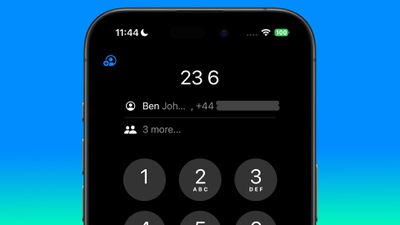
t9 dialing phone keypad ios 18
T9 dialing, or Text on 9 keys, is a predictive text technology that emerged in the late 90s to make it easier to type text messages on devices with limited input options, such as traditional mobile phones with numeric keypads. Each number key (2-9) on a T9 keypad is mapped to a set of letters. For example, the key "2" corresponds to "ABC," "3" to "DEF," and so on.

The best match appears first above the keypad, and tapping the person's name will call them. If there are several possible matches in your contacts, they can be revealed as a list by tapping "X more..." below the first match. Taken together, the new options should enable faster calling.

Here's how to use T9 dialing in iOS 18:

  1. Open the Phone app and tap the keypad tab.
  2. Type the contact's name using the number keys (e.g., for "Dad," press 3-2-3).
  3. Above the keypad, tap the matching contact to call, or "X more..." to see additional matches.

This feature aims to speed up the calling process, especially for users who prefer the number pad or have difficulty navigating contact lists. It's particularly useful for one-handed operation or when quick dialing is necessary.

Add Contacts From the Keypad

iOS 18 also introduces new options for adding numbers to contacts directly from the keypad. When entering a new number:

  1. After entering a new number, tap the new button in the top-left corner of the keypad screen.
  2. Choose "Create New Contact" or "Add to Existing Contact" as needed.
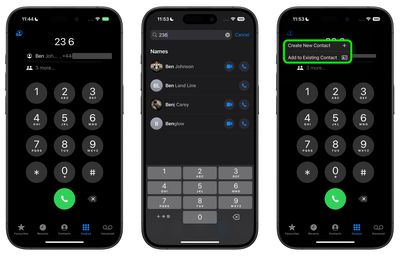
t9 phone dialing ios 18 keypad
That's all there is to it. In addition to the new features described above, Apple has also added the ability to search recent calls. Simply look for the search field at the top of your recent calls list and start typing into it to find the contact or number you're looking for.


Top Rated Comments

WarmWinterHat Avatar
20 months ago
I never knew that this was a feature on any phones, and I've been using cell phones once 1998.

Mom is 666, btw. 👹
Score: 18 Votes (Like | Disagree)
Hopefully Smarter Avatar
20 months ago
Siri, call Bob.

Done
Score: 10 Votes (Like | Disagree)
diego.caraballo Avatar
20 months ago

Siri, call Bob.

Done
Siri: Sorry, I can't kill Bob right now
Score: 9 Votes (Like | Disagree)
pdaholic Avatar
20 months ago

Siri, call Bob.

Done
Siri: “okay, calling Tom.”
Score: 9 Votes (Like | Disagree)
theinstructor Avatar
20 months ago

Siri, call Bob.

Done
Did you say call Debbie? Calling your ex-girlfriend from 30 years ago, Debbie.
Score: 5 Votes (Like | Disagree)
20 months ago

Still not going to IOS 18, I just don't see why
RCS
Score: 3 Votes (Like | Disagree)

Popular Stories

iOS 26

iOS 26.4 Adds Two New Features to CarPlay

Tuesday March 24, 2026 1:55 pm PDT by
iOS 26.4 was released today, and it includes a couple of new features for CarPlay: an Ambient Music widget and support for voice-based chatbot apps. To update your iPhone 11 or newer to iOS 26.4, open the Settings app and tap on General → Software Update. CarPlay will automatically offer the new features so long as the iPhone connected to your vehicle is running iOS 26.4 or later....
Apple Business hero

Apple Unveils 'Apple Business' All-in-One Platform

Tuesday March 24, 2026 8:53 am PDT by
Apple today announced Apple Business, a new all-in-one platform that unifies device management, productivity tools, and customer outreach features. The service is designed to be a consolidated replacement for several of Apple's existing business-focused offerings, including Apple Business Essentials, Apple Business Manager, and Apple Business Connect. It provides organizations with a single...
AirPods Pro Firmware Feature

Apple Releases New Firmware for AirPods Pro 3, AirPods Pro 2 and AirPods 4

Tuesday March 24, 2026 12:31 pm PDT by
Apple today released new firmware for the AirPods Pro 2, AirPods Pro 3, and the AirPods 4. The firmware has a version number of 8B39, up from 8B34 on the AirPods Pro 3, 8B28 on the AirPods Pro 2, and 8B21 on the AirPods 4. There is no word on what's included in the firmware, but Apple has a support document with limited notes. Most updates are limited to bug fixes and performance...














