
In macOS, a Text Clipping is a selection of text that you've dragged from an application to another location on your Mac, where it becomes a unique kind of standalone file.

The relatively little-known feature has been around since at least Mac OS 9, and it offers a convenient way to save out pieces of text from pretty much anywhere for later use in another app or document.
how to use text clippings mac 1
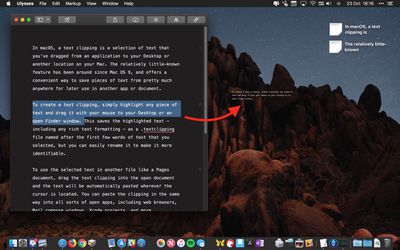
To create a Text Clipping, simply highlight any piece of text and drag it with your mouse to your Desktop or an open Finder window.

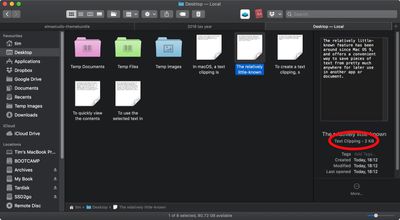
This saves the highlighted text – including any rich text formatting – as a .textclipping file named after the first few words of text that you selected, but you can easily rename it to make it more identifiable.
how to use text clippings macos 1b
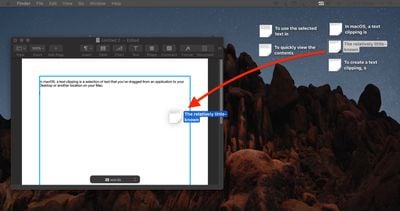
To use the selected text in another file like a Pages document, drag the Text Clipping into the open document and the text will be automatically pasted wherever the cursor is located.

You can paste the clipping in the same way into all sorts of open files and apps, including browser search engines, Mail compose windows, Xcode projects, and more.
how to use text clippings 2
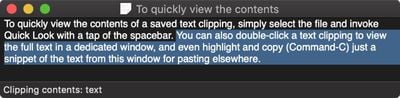
To quickly view the contents of a Text Clipping, simply select the file and invoke Quick Look with a tap of the spacebar.

You can also double-click a Text Clipping to view the text in a dedicated window, and even highlight and copy (Command-C) just a snippet of the text from this window for pasting elsewhere.
text clipping macos 1
Text clippings can speed up many repetitive tasks, making things like reusing email/letter templates and code snippets a cinch. If clippings become indispensable to your workflow, consider creating a dedicated folder to store them, otherwise they can quickly clutter up your desktop.


Top Rated Comments

roguedaemon Avatar
95 months ago
Can I just say I absolutely love this series of how to’s. Really sets MacRumors apart, and stands out from the crowd of copy past “news” sites.

While most of this stuff I know, I always read them because I invariably get at least a little tidbit out of it, like how this feature’s been around since OS 9.

Great stuff guys, keep it up!!
Score: 14 Votes (Like | Disagree)
xflashx Avatar
95 months ago
Im a mac user since 2007, but this is actually new for me. Thanks!
Score: 4 Votes (Like | Disagree)
woefi Avatar
95 months ago
You have to wait (hover) above the text for about 5 seconds before dragging
You don't have to hover 5 seconds – you can immediately click - but you have to hold there a second - then drag.

And yes, I use this great feature since classic MacOS days. Unfortunately at the start of iCloud (maybe yosemite idk) this .textclipping files were destroyed when synced to iCloud and you could never rely on it. I thought they were about to abandon it...

But now (I'm on Sierra) it works again well in the cloud.
Score: 3 Votes (Like | Disagree)
Deedolito Avatar
95 months ago
A big thank you for the 'how to'

Wasn't aware the function was there, and will implement it into my work flow.
Score: 2 Votes (Like | Disagree)
Scooz Avatar
95 months ago
Ah, we‘re so dark mode now.

Looks pretty in these small pics but I really only missed it for Xcode and other „lab“ environments that usually already came with a dark mode.

Any way to set dark mode per app?
Score: 2 Votes (Like | Disagree)
neliason Avatar
95 months ago
This has existed since Classic Mac OS. Not sure exactly which version, but it has to go back at least to Mac OS 8. Probably earlier. I never found it very useful in general. Only used it a few times in a couple of decades of Mac use.
These little niceties are why I like Mac so much. This isn’t something I use or likely will. But these sort of intuitive features that make using a computer easy are what I think set macOS apart.
Score: 1 Votes (Like | Disagree)

Popular Stories

Apple Logo Zoomed

Tim Cook Teases Plans for Apple's Upcoming 50th Anniversary

Thursday February 5, 2026 12:54 pm PST by
Apple turns 50 this year, and its CEO Tim Cook has promised to celebrate the milestone. The big day falls on April 1, 2026. "I've been unusually reflective lately about Apple because we have been working on what do we do to mark this moment," Cook told employees today, according to Bloomberg's Mark Gurman. "When you really stop and pause and think about the last 50 years, it makes your heart ...
wwdc sans text feature

Apple Rumored to Announce New Product on February 19

Thursday February 5, 2026 12:22 pm PST by
Apple plans to announce the iPhone 17e on Thursday, February 19, according to Macwelt, the German equivalent of Macworld. The report, citing industry sources, is available in English on Macworld. Apple announced the iPhone 16e on Wednesday, February 19 last year, so the iPhone 17e would be unveiled exactly one year later if this rumor is accurate. It is quite uncommon for Apple to unveil...
Finder Siri Feature

Why Apple's iOS 26.4 Siri Upgrade Will Be Bigger Than Originally Promised

Friday February 6, 2026 3:06 pm PST by
In the iOS 26.4 update that's coming this spring, Apple will introduce a new version of Siri that's going to overhaul how we interact with the personal assistant and what it's able to do. The iOS 26.4 version of Siri won't work like ChatGPT or Claude, but it will rely on large language models (LLMs) and has been updated from the ground up. Upgraded Architecture The next-generation...
iOS 26

iOS 26.3 and iOS 26.4 Will Add These New Features to Your iPhone

Tuesday February 3, 2026 7:47 am PST by
While the iOS 26.3 Release Candidate is now available ahead of a public release, the first iOS 26.4 beta is likely still at least a week away. Following beta testing, iOS 26.4 will likely be released to the general public in March or April. Below, we have recapped known or rumored iOS 26.3 and iOS 26.4 features so far. iOS 26.3 iPhone to Android Transfer Tool iOS 26.3 makes it easier...
iphone 17 pro dark blue 1

iPhone 18 Pro Max Rumored to Deliver Next-Level Battery Life

Friday February 6, 2026 5:14 am PST by
The iPhone 18 Pro Max will feature a bigger battery for continued best-in-class battery life, according to a known Weibo leaker. Citing supply chain information, the Weibo user known as "Digital Chat Station" said that the iPhone 18 Pro Max will have a battery capacity of 5,100 to 5,200 mAh. Combined with the efficiency improvements of the A20 Pro chip, made with TSMC's 2nm process, the...















