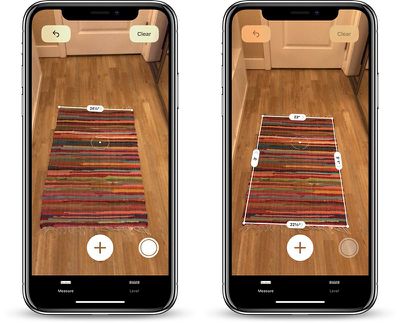
One of the new features in iOS 12 is an augmented reality app called Measure, which Apple has designed to make it easier for you to measure various real-world objects using 3D spatial detection techniques.
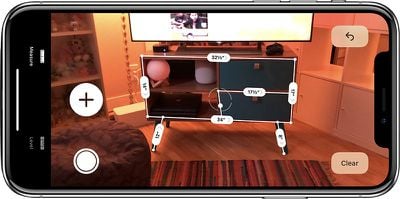
measureappinaction

  1. Open up the Measure app.
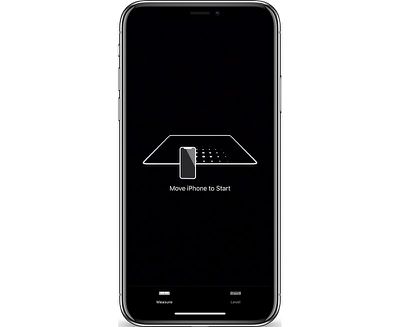
  2. Follow the on-screen instructions and move your iPhone around the room so that it can get the dimensions of various objects. measureappsetup
  3. Once it's calibrated, denoted by a white dot in a circle, you're ready to start measuring.
  4. To take a measurement, line the white dot up with the corner of an object and then press the "+ button to create an anchor point.
  5. From the anchor point, pan the iPhone over to the other edge of the object. measureappmanual
  6. Press the "+" button again to get the final measurement of the line.
You can continue using this method to get the full dimensions of different objects in your room, with the ability to set multiple anchor points if desired.

Haptic feedback is included in the Measure app, so you'll feel little haptic taps whenever you set an anchor point, for physical feedback. Haptic taps are also included whenever the app detects an obvious stopping point for a measurement, such as the end of a wall.

To clear your anchor points and start over at any time, tap the "Clear" button.
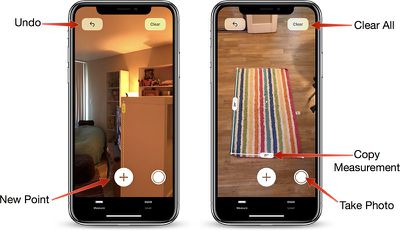
measurementappicons
Once all of your measurements are in place, tap the white camera button to take a photo that displays all of the measurements overlaid on the object you're measuring.
measureappsharebutton
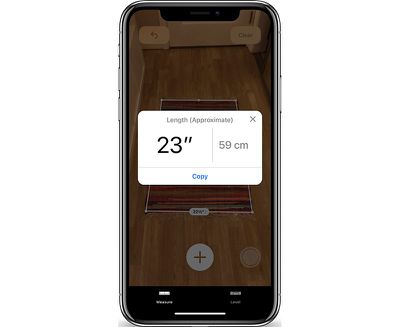
You can also tap on the arrow of one of the measurements to get a pop up with the current readings that you can copy and paste into another app like Messages or Notes.

Measurement Automatic Detection

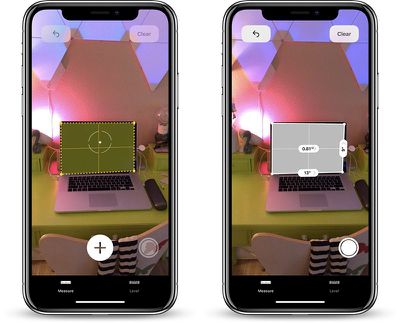
For certain square-shaped objects that the Measure app detects, the detection of the dimensions will be automatic. To get an automatic measurement, choose a square or rectangular object and hold the iPhone in front of it.
measureappautomaticdetection
If it's going to take an automatic measurement, you'll see a yellow square appear, which you can then tap to get dimensions. If it's not going to do automatic detection, you're going to need to use the tap method to draw individual lines.

Accuracy

The accuracy of the Measure app depends heavily on the precision of where the end points are placed, so there's room for error.

It's great for quick measurements to get an idea of size, but where precise measurements are required, it's probably best to double check with a physical measuring method.

Level Feature

In iOS 12, the Measure app is also home to the Level feature that lets you use the iPhone to detect whether a surface is level. Prior to iOS 12, the Level feature was in the Compass app, so it's not new, just relocated.
measureapplevel
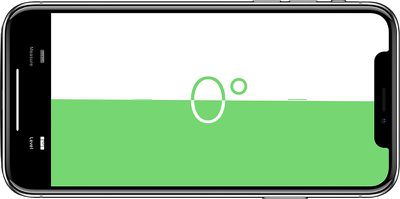
To use it, tap over to the level portion of the app, which is located at the bottom. Hold the iPhone in either portrait or landscape orientation with no case and balance it on an object such as a picture frame to get a reading.

If you tap the screen when using the level app, you can set a 0 degree reference angle to make measurements from, and laying the iPhone flat allows it to be used as a bubble level.


Related Forum: iOS 12

Top Rated Comments

nerfjames Avatar
99 months ago
It keeps saying 4.5 inches, but I swear it’s 8.
Score: 27 Votes (Like | Disagree)
xflashx Avatar
99 months ago
Apparently someone at Macrumors really loves to make tutorials :D
Score: 12 Votes (Like | Disagree)
happygodavid Avatar
99 months ago
This is one of those features that won’t work perfectly at first. We will complain. Then, in 10 to 20 years when it’s the only scientifically accurate way to measure things, we will take it for granted and wonder how we ever knew the size of anything. This is huge. (No pun intended.)
Score: 5 Votes (Like | Disagree)
carlfleming Avatar
99 months ago
The ability to modify your anchor points is very snazzy. Just hold and drag a point and while you’re doing that your device will zoom in a little to give you a little more precision.
Score: 5 Votes (Like | Disagree)
jedwards87 Avatar
99 months ago
Measurements seem very off, like ~20-30% off (running iPhone SE)
I have been quite impressed with the measurements I get on my iPhone X. I haven't used it a lot but I have probably tested it with about 10 or so things. Seems accurate enough to be useful for general measurements.
Score: 4 Votes (Like | Disagree)
Swampthing Avatar
99 months ago
I realize MacRumors is trying to stay relevant and talk about everything Mac. But I have a problem with constantly explaining how to use beta features.

New features need to be intuitive. That’s part of Apple’s whole philosophy. But if we have a website constantly jumping in to say look look this is how you use it, that defeats the purpose. Testers will be less likely to notify Apple that they couldn’t figure out a feature on their own.

This needs to be part of the beta testing process. When it’s deployed, that will ensure the feature is much more intuitive for the user. There is a reason why Apple never includes instruction manuals.

Apart from that, constant detailed articles about things that aren’t even released yet and which might change significantly before release seem pointless.

Yes, people want to know about beta features. But there’s a line between being informational and providing fully detailed instructional tutorials, and I think it’s crossed waaaay too often here. How about waiting until we have a released product to provide that information?
Score: 4 Votes (Like | Disagree)

Popular Stories

Apple Logo Zoomed

Tim Cook Teases Plans for Apple's Upcoming 50th Anniversary

Thursday February 5, 2026 12:54 pm PST by
Apple turns 50 this year, and its CEO Tim Cook has promised to celebrate the milestone. The big day falls on April 1, 2026. "I've been unusually reflective lately about Apple because we have been working on what do we do to mark this moment," Cook told employees today, according to Bloomberg's Mark Gurman. "When you really stop and pause and think about the last 50 years, it makes your heart ...
wwdc sans text feature

Apple Rumored to Announce New Product on February 19

Thursday February 5, 2026 12:22 pm PST by
Apple plans to announce the iPhone 17e on Thursday, February 19, according to Macwelt, the German equivalent of Macworld. The report, citing industry sources, is available in English on Macworld. Apple announced the iPhone 16e on Wednesday, February 19 last year, so the iPhone 17e would be unveiled exactly one year later if this rumor is accurate. It is quite uncommon for Apple to unveil...
Finder Siri Feature

Why Apple's iOS 26.4 Siri Upgrade Will Be Bigger Than Originally Promised

Friday February 6, 2026 3:06 pm PST by
In the iOS 26.4 update that's coming this spring, Apple will introduce a new version of Siri that's going to overhaul how we interact with the personal assistant and what it's able to do. The iOS 26.4 version of Siri won't work like ChatGPT or Claude, but it will rely on large language models (LLMs) and has been updated from the ground up. Upgraded Architecture The next-generation...
iOS 26

iOS 26.3 and iOS 26.4 Will Add These New Features to Your iPhone

Tuesday February 3, 2026 7:47 am PST by
While the iOS 26.3 Release Candidate is now available ahead of a public release, the first iOS 26.4 beta is likely still at least a week away. Following beta testing, iOS 26.4 will likely be released to the general public in March or April. Below, we have recapped known or rumored iOS 26.3 and iOS 26.4 features so far. iOS 26.3 iPhone to Android Transfer Tool iOS 26.3 makes it easier...
iphone 17 pro dark blue 1

iPhone 18 Pro Max Rumored to Deliver Next-Level Battery Life

Friday February 6, 2026 5:14 am PST by
The iPhone 18 Pro Max will feature a bigger battery for continued best-in-class battery life, according to a known Weibo leaker. Citing supply chain information, the Weibo user known as "Digital Chat Station" said that the iPhone 18 Pro Max will have a battery capacity of 5,100 to 5,200 mAh. Combined with the efficiency improvements of the A20 Pro chip, made with TSMC's 2nm process, the...