
The ever-present Help menu in your Mac's menu bar is an easily overlooked aspect of macOS, but it's home to some surprising and extremely handy features that every user can benefit from.

how to use macos help menu
Apart from being a useful first port of call for any queries you may have about the application in use or your Mac in general, it also serves as a menu navigator. Let's take a closer look.

How to Use the Mac Help Menu

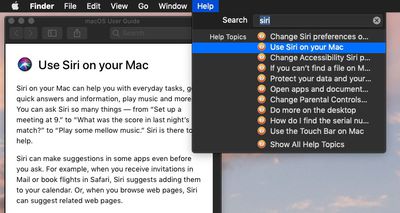
You can use the keyboard shortcut Command-Shift-/ to quickly access the macOS Help Menu. At the top of the Help menu is a Search field for typing in the subject you need help with. Below this, you'll also see a direct link to the help documentation for the currently active application, which is useful for looking up topics manually.
how to use macos help menu 2
If it's an Apple app you're using, search results come from the official macOS User Guide, while the direct help link below the search field takes you straight to the relevant section of the guide, or in the case of Finder, the main contents page.
how to use macos help 3
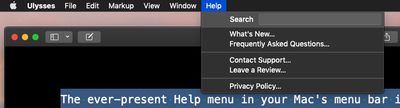
It's important to remember that if the active app is a third-party one, the contents of the Help menu can differ depending on how much effort the developer has put into it. For example, some apps may include FAQs, manuals, or links to online help, while others may offer very little.

How to Use Help's Action Search Feature

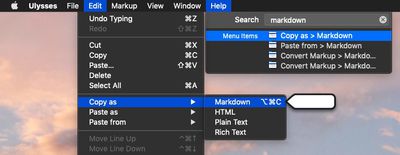
Another neat built-in feature of the Help menu is its ability to point to available actions in other menus for the currently active app.
how to use macos help menu 4
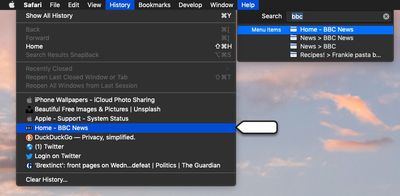
Next time you type into the Help menu's Search field, check to see if the results include any Menu Items. Hover over one of these with your mouse, and macOS will locate the action for you by pointing an arrow at it in the corresponding menu. Hit Enter, and the action will be performed for you.
how to use macos help menu 5

Depending on the app, this feature can even extend to contextual menu functions. For instance, you can use Safari's Help field to search your bookmarks and recent browsing history for keywords to quickly navigate back to web pages. Next time you're in your favorite app, try out its Help menu functions to see how deeply they've been implemented.


Top Rated Comments

edgonzalez32 Avatar
92 months ago
How to call Apple Support.
How to read MacRumors help articles.
How to read English.
Don't bash. When I first got a Mac In 07, after graduating hs, I had no one to show me how to do the simplest of tasks. And I know my way around a computer.

Tips like these are valuable to almost anyone. If they're not to you, there's no reason to be rude.
Score: 6 Votes (Like | Disagree)
MacHiavelli Avatar
92 months ago

You can use the keyboard shortcut Command-Shift-/ to quickly access the macOS Help Menu. At the top of the Help menu is a Search field for typing in the subject you need help with. Below this, you'll also see a direct link to the help documentation for the currently active application, which is useful for looking up topics manually.
According to Apple, you're inadvertently giving key commands incorrectly. For Help, it should be COMMAD QUESTION MARK, not COMMAND SHIFT SLASH. This (1) makes sense as the user wants to ask a question in looking for help, and (2) the slash and the question mark aren't always positioned together on all keyboards, so telling people to type COMMAND SHIFT SLASH might well lead them up a blind alley.

https://developer.apple.com/design/human-interface-guidelines/macos/user-interaction/keyboard/


Attachment Image
Score: 3 Votes (Like | Disagree)
ArtOfWarfare Avatar
92 months ago
How to call Apple Support.
How to read MacRumors help articles.
How to read English.
Score: 3 Votes (Like | Disagree)
sailmac Avatar
92 months ago
These articles may seem trivial to users who already know the commands, tips, and tricks being explained. In my case, I've been using Macs regularly since 1990 and appreciate learning things I didn't know, along with reminders about things I've forgotten. Thanks, MR.
Score: 3 Votes (Like | Disagree)
szw-mapple fan Avatar
92 months ago
The help menu search is one of my favorite things about macOS. You can just hit the keyboard shortcut and start typing what you want. Really handy when you want something quickly without knowing which menu it’s under.
Score: 2 Votes (Like | Disagree)
TheFluffyDuck Avatar
92 months ago
This is pretty meta guys
Score: 1 Votes (Like | Disagree)

Popular Stories

Apple Logo Zoomed

Tim Cook Teases Plans for Apple's Upcoming 50th Anniversary

Thursday February 5, 2026 12:54 pm PST by
Apple turns 50 this year, and its CEO Tim Cook has promised to celebrate the milestone. The big day falls on April 1, 2026. "I've been unusually reflective lately about Apple because we have been working on what do we do to mark this moment," Cook told employees today, according to Bloomberg's Mark Gurman. "When you really stop and pause and think about the last 50 years, it makes your heart ...
wwdc sans text feature

Apple Rumored to Announce New Product on February 19

Thursday February 5, 2026 12:22 pm PST by
Apple plans to announce the iPhone 17e on Thursday, February 19, according to Macwelt, the German equivalent of Macworld. The report, citing industry sources, is available in English on Macworld. Apple announced the iPhone 16e on Wednesday, February 19 last year, so the iPhone 17e would be unveiled exactly one year later if this rumor is accurate. It is quite uncommon for Apple to unveil...
Finder Siri Feature

Why Apple's iOS 26.4 Siri Upgrade Will Be Bigger Than Originally Promised

Friday February 6, 2026 3:06 pm PST by
In the iOS 26.4 update that's coming this spring, Apple will introduce a new version of Siri that's going to overhaul how we interact with the personal assistant and what it's able to do. The iOS 26.4 version of Siri won't work like ChatGPT or Claude, but it will rely on large language models (LLMs) and has been updated from the ground up. Upgraded Architecture The next-generation...
iOS 26

iOS 26.3 and iOS 26.4 Will Add These New Features to Your iPhone

Tuesday February 3, 2026 7:47 am PST by
While the iOS 26.3 Release Candidate is now available ahead of a public release, the first iOS 26.4 beta is likely still at least a week away. Following beta testing, iOS 26.4 will likely be released to the general public in March or April. Below, we have recapped known or rumored iOS 26.3 and iOS 26.4 features so far. iOS 26.3 iPhone to Android Transfer Tool iOS 26.3 makes it easier...
iphone 17 pro dark blue 1

iPhone 18 Pro Max Rumored to Deliver Next-Level Battery Life

Friday February 6, 2026 5:14 am PST by
The iPhone 18 Pro Max will feature a bigger battery for continued best-in-class battery life, according to a known Weibo leaker. Citing supply chain information, the Weibo user known as "Digital Chat Station" said that the iPhone 18 Pro Max will have a battery capacity of 5,100 to 5,200 mAh. Combined with the efficiency improvements of the A20 Pro chip, made with TSMC's 2nm process, the...















