
All of Apple's Macs come with Preview, the powerful file viewer that's built into macOS. Preview is the default app that opens up whenever you double-click an image or a PDF, and features several annotation tools for you to use when working with these file types.

The most obvious and oft-used markup tools include things like arrows, lines, ovals, rectangles, and text, but in this article we're highlighting what is arguably one of the more under-appreciated of Preview's annotation options: the Loupe tool.
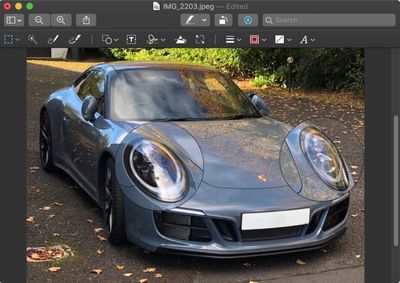
how to use the preview loupe tool
The Loupe tool is useful if you want to zoom in on certain areas in an image or document for the purposes of clarity or to bring attention to something in particular.
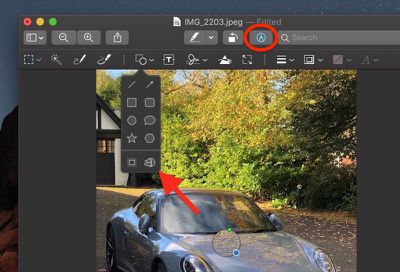
2 loupe markup icon
You can access the Loupe tool by selecting Tools -> Annotate -> Loupe from the Preview menu bar, or by enabling the Markup toolbar and then clicking the bottom right icon in the Shape menu.

3 magnify loupe
Once you've added a loupe to your image, you can easily increase or decrease its magnification level by dragging the green circle along the loupe's circumference.

4 make loupe larger
Similarly using your mouse, drag the blue circle outwards or towards the center of the loupe to expand or contract the area of magnification.

You can add multiple loupes to the same image or document, and even have them overlap to zoom in on an area that's already magnified.

5 loupe last
Additionally, if you arrange two loupes so that one is stacked on top of or behind the other, you can right-click (or Ctrl-click) them to rearrange their order using the contextual menu options Bring Forward, Bring to Front, Send Backward and Send to Back.

You can easily delete a selected loupe with the Delete key, just remember that the Loupe is an annotation tool rather than a simple zoom function, so if you save or export the file with a loupe still in use then it becomes a permanent feature of that image or document.


Top Rated Comments

allygill Avatar
96 months ago
Now we just need the feature built into Apple Photos like it used to be in Aperture!
Score: 2 Votes (Like | Disagree)
jonnysods Avatar
96 months ago
Funny enough I just noticed this tool yesterday and I use Preview constantly!


Yeah, it's incredibly powerful, and so nicely integrated into the OS, you don't have to think about "What app do I need to use?" for so many tasks. Daily I do a screen shot, review, email, annotate type workflow for UI work.
One thing I've used it for extensively the past year is resizing and reducing file sizes in bulk for web design.

I'm also screen shorting hundreds of things a day it seems. And with the video capture feature that I just discovered in Mojave I've ditched other apps and just started to use the OS.

MacOS is just so flipping awesome.
Score: 2 Votes (Like | Disagree)
Scooz Avatar
96 months ago
The visual highlighting of that loupe tool result needs an overhaul with some love (and mabye some shadow and distortion if you want that). It‘s not always immediately understandable for the viewer that you used a loupe to highlight something.

The car example works somehow, but there are other cases with less perspective where it just looks weird. Like a black hole in a static image of space and stars, where you can‘t immediately say what‘s going on. Gets better when adding arrows, but still, some UI designer should give it some more thought.

More frame and shifting options might also help.
Score: 2 Votes (Like | Disagree)
KazKam Avatar
96 months ago
Preview truly is the under-appreciated, yet indispensable, step-child of Mac OS. I take it for granted until I have to use a computer (Windows o_O) that doesn't have anything close to it.

I think my favorite thing about it is that it (along with QT) open damn near anything which means I don't have to open Photoshop, Excel, or other dedicated apps, with all their overhead, just to read or look at something. Love it.
Score: 1 Votes (Like | Disagree)
jonnysods Avatar
96 months ago
Wow this is cool I didn't know preview had that zoom tool! Preview is a highly underrated feature of MacOS.
Score: 1 Votes (Like | Disagree)

Popular Stories

Apple Logo Zoomed

Tim Cook Teases Plans for Apple's Upcoming 50th Anniversary

Thursday February 5, 2026 12:54 pm PST by
Apple turns 50 this year, and its CEO Tim Cook has promised to celebrate the milestone. The big day falls on April 1, 2026. "I've been unusually reflective lately about Apple because we have been working on what do we do to mark this moment," Cook told employees today, according to Bloomberg's Mark Gurman. "When you really stop and pause and think about the last 50 years, it makes your heart ...
wwdc sans text feature

Apple Rumored to Announce New Product on February 19

Thursday February 5, 2026 12:22 pm PST by
Apple plans to announce the iPhone 17e on Thursday, February 19, according to Macwelt, the German equivalent of Macworld. The report, citing industry sources, is available in English on Macworld. Apple announced the iPhone 16e on Wednesday, February 19 last year, so the iPhone 17e would be unveiled exactly one year later if this rumor is accurate. It is quite uncommon for Apple to unveil...
Finder Siri Feature

Why Apple's iOS 26.4 Siri Upgrade Will Be Bigger Than Originally Promised

Friday February 6, 2026 3:06 pm PST by
In the iOS 26.4 update that's coming this spring, Apple will introduce a new version of Siri that's going to overhaul how we interact with the personal assistant and what it's able to do. The iOS 26.4 version of Siri won't work like ChatGPT or Claude, but it will rely on large language models (LLMs) and has been updated from the ground up. Upgraded Architecture The next-generation...
iOS 26

iOS 26.3 and iOS 26.4 Will Add These New Features to Your iPhone

Tuesday February 3, 2026 7:47 am PST by
While the iOS 26.3 Release Candidate is now available ahead of a public release, the first iOS 26.4 beta is likely still at least a week away. Following beta testing, iOS 26.4 will likely be released to the general public in March or April. Below, we have recapped known or rumored iOS 26.3 and iOS 26.4 features so far. iOS 26.3 iPhone to Android Transfer Tool iOS 26.3 makes it easier...
iphone 17 pro dark blue 1

iPhone 18 Pro Max Rumored to Deliver Next-Level Battery Life

Friday February 6, 2026 5:14 am PST by
The iPhone 18 Pro Max will feature a bigger battery for continued best-in-class battery life, according to a known Weibo leaker. Citing supply chain information, the Weibo user known as "Digital Chat Station" said that the iPhone 18 Pro Max will have a battery capacity of 5,100 to 5,200 mAh. Combined with the efficiency improvements of the A20 Pro chip, made with TSMC's 2nm process, the...














