In iOS 26, Apple has extended Visual Intelligence to work with content that's on your iPhone, allowing you to ask questions about what you're seeing, look up products, and more.
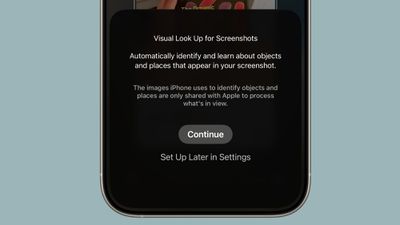
visual lookup ios 26
Visual Intelligence started out in iOS 18.2 as a Camera Control button function that can describe what you are looking at, get details about a restaurant or business, translate text, and the like.

But in iOS 26, Visual Intelligence is no longer just for learning more about your physical surroundings. You can also use the feature to analyze content on your iPhone screen, simply by pressing the same buttons you use to take a screenshot.

You can search across apps, go straight to relevant websites, add an event to your calendar, and more. Keep reading to learn what you can do with it. Note that Visual Intelligence is an Apple Intelligence feature of iOS 26 that's exclusive to the iPhone 15 Pro, iPhone 16 series, and iPhone 17 series (including iPhone Air).

Use Visual Intelligence With Screen Content

Start by taking a screenshot: Quickly press and release the iPhone's Side button and the Volume Up button at the same time.
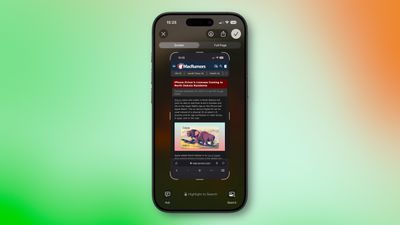
screenshot ios 26
Once the screenshot interface appears, you'll see Visual Intelligence options along the bottom. The options offered up will depend on the content, but they let you interact with what you've just captured in several ways.

  • Search for Similar Items: Tap Search to look up the selected item on the web. This is useful when you want to find matching products, related images, or more information about what's in the screenshot.
  • Highlight and Search a Specific Item: If only part of the screenshot interests you, swipe your finger over that area to highlight it, then tap Search. The search will focus on the highlighted object rather than the whole image.
  • Ask a Question About What's Onscreen: Tap Ask to open a text box where you can pose a question to ChatGPT about the screenshot's contents. For example, you can ask for an explanation of a term or details about an object.
  • Add an Event to Your Calendar: If the screenshot includes a date or event information, tap Add to Calendar to create a new calendar entry without leaving the screenshot view.
  • Open a Website: When the screenshot contains a web link, you'll see tappable links at the bottom that will take you straight to the relevant site.
  • Summarize Text: Tap Summarize to generate a concise summary of the visible text.
  • Listen to Text: Tap Read Aloud to have the text in the screenshot spoken to you.
  • Identify Plants or Animals: If the screenshot contains a plant or animal, tapping its tag will reveal its name and further information about it.

When you're done with the screenshot, you can either tap ✖ to discard it or ✔ to keep it in your Photos library.


Top Rated Comments

cbaca51 Avatar
19 weeks ago
Wish there was a dedicated app to access this and having to screenshot a screenshot if I wanna search a screenshot. Very annoying
Score: 3 Votes (Like | Disagree)
Fraserpatty Avatar
19 weeks ago
I know this is a dumb question please bear with me. Is this an iPad feature also?
Score: 2 Votes (Like | Disagree)
nikhsub1 Avatar
19 weeks ago
Wow, just made a discovery! If your language in Siri is Britain, You can NOT turn apple intelligence on - the toggle disappears! Once I set the language to US English, the toggle slider appeared. Wild.
Score: 1 Votes (Like | Disagree)
macdaddy43 Avatar
19 weeks ago
Very poor implementation of “Apple Intelligence”. This is literally google reverse image search that has been around for AGES, or you can upload it to a competent AI (ChatGPT) and get an actual response.

I’ve tried it probably a dozen times already and every single time it has either been completely inaccurate, or completely irrelevant. This is just another Apple Intelligence gimmick, locking basic computing behind AI. For those of you that don’t have Apple Intelligence, I promise, you aren’t missing out on anything.
Score: 1 Votes (Like | Disagree)
jm22381 Avatar
19 weeks ago
I can't believe that what is a glorified Google Lens can't be used on older iPhones.
Score: 1 Votes (Like | Disagree)
Alhagar Avatar
19 weeks ago
I am most excited about add to calendar but cannot for the life of me get it to work even when there are clearly dates and times on the screenshot. What does the “Add to Calendar” button look like? Can someone share a screenshot? Thanks!
Score: 1 Votes (Like | Disagree)

Popular Stories

Apple Logo Zoomed

Tim Cook Teases Plans for Apple's Upcoming 50th Anniversary

Thursday February 5, 2026 12:54 pm PST by
Apple turns 50 this year, and its CEO Tim Cook has promised to celebrate the milestone. The big day falls on April 1, 2026. "I've been unusually reflective lately about Apple because we have been working on what do we do to mark this moment," Cook told employees today, according to Bloomberg's Mark Gurman. "When you really stop and pause and think about the last 50 years, it makes your heart ...
iOS 26

iOS 26.3 and iOS 26.4 Will Add These New Features to Your iPhone

Tuesday February 3, 2026 7:47 am PST by
While the iOS 26.3 Release Candidate is now available ahead of a public release, the first iOS 26.4 beta is likely still at least a week away. Following beta testing, iOS 26.4 will likely be released to the general public in March or April. Below, we have recapped known or rumored iOS 26.3 and iOS 26.4 features so far. iOS 26.3 iPhone to Android Transfer Tool iOS 26.3 makes it easier...
imac video apple feature

Apple Makes Its Second-Biggest Acquisition Ever

Tuesday February 3, 2026 12:45 pm PST by
Apple recently acquired Israeli startup Q.ai for close to $2 billion, according to Financial Times sources. That would make this Apple's second-biggest acquisition ever, after it paid $3 billion for the popular headphone maker Beats in 2014. This is also the largest known Apple acquisition since the company purchased Intel's smartphone modem business and patents for $1 billion in 2019....
wwdc sans text feature

Apple Rumored to Announce New Product on February 19

Thursday February 5, 2026 12:22 pm PST by
Apple plans to announce the iPhone 17e on Thursday, February 19, according to Macwelt, the German equivalent of Macworld. The report, citing industry sources, is available in English on Macworld. Apple announced the iPhone 16e on Wednesday, February 19 last year, so the iPhone 17e would be unveiled exactly one year later if this rumor is accurate. It is quite uncommon for Apple to unveil...
Finder Siri Feature

Why Apple's iOS 26.4 Siri Upgrade Will Be Bigger Than Originally Promised

Friday February 6, 2026 3:06 pm PST by
In the iOS 26.4 update that's coming this spring, Apple will introduce a new version of Siri that's going to overhaul how we interact with the personal assistant and what it's able to do. The iOS 26.4 version of Siri won't work like ChatGPT or Claude, but it will rely on large language models (LLMs) and has been updated from the ground up. Upgraded Architecture The next-generation...