

Community-driven GPS navigation app Waze recently gained support for Apple Music integration, making it easier and safer for Waze users to enjoy the Apple Music catalog from within the Waze app while traveling. This article explains how to set up the feature.
Waze is a popular Google-owned maps app that is unlike many other maps apps because it uses user-submitted travel times and information about accidents, hazards, speed checks, and more, to show specific information about a route in real-time. Even if you know the way, Waze tells you instantly about traffic, construction, police, crashes, and more, and if traffic is bad on your route, Waze will change it to save you time.
In May 2022, Google added support for Apple Music integration, allowing users to access Apple Music content directly from the Waze Audio Player. The following steps show you how to set up a direct connection to Apple Music from within Waze. Note that you must have an active Apple Music subscription to integrate the two services.
- If you don't have Waze installed on your iPhone, download it from the App Store.
- Open Waze and log in using your account credentials.
- Tap the music note icon in the top-right corner of the map. (If it isn't showing, go into the app's settings and enable Audio Player -> Show on the map.)
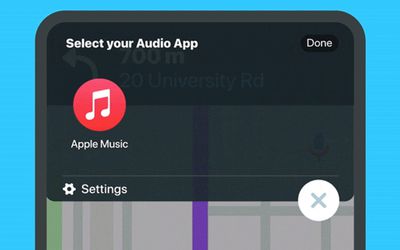
- Select Apple Music from the list of Music apps.
- Tap OK at the prompt to give Waze access your Apple Music library.
- Using the in-app Audio Player, select the song or playlist that you want to hear. If it doesn't appear automatically the first time, launch the Apple Music app, play some music, then re-open Waze.
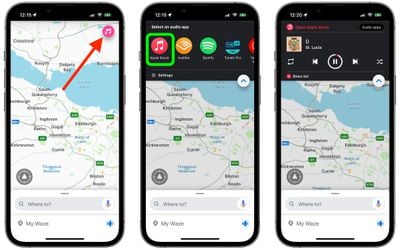
With Apple Music successfully integrated into Waze, you can now use the in-app playback buttons to control your music while you're on the go. Note that there's also a Show list button to see your upcoming tracks and select any album or song from the list.
















