

WhatsApp has rolled out multi-device support to all users on iOS and Android, allowing WhatsApp to be used on up to four linked devices without users needing to be connected via a smartphone.

Previously, the WhatsApp mobile app was required to authenticate an account used on another device, such as a computer, and used a QR code to link a user account to a web browser or desktop app. While that initial link is still required, the connected phone that has the WhatsApp app on it is no longer required once the link has been made.
The following steps show you how to link your WhatsApp account to your Mac using the service's new Multi-Device support, currently in beta.
- Launch WhatsApp on your iPhone.
- Select Settings -> Linked Devices.
- Tap Multi-Device Beta, then tap the blue Join Beta button.
- Tap Back and select Link a Device on the previous screen.

- On your Mac, launch the WhatsApp app or go to web.whatsapp.com in a web browser, then scan the QR code that appears using your iPhone.
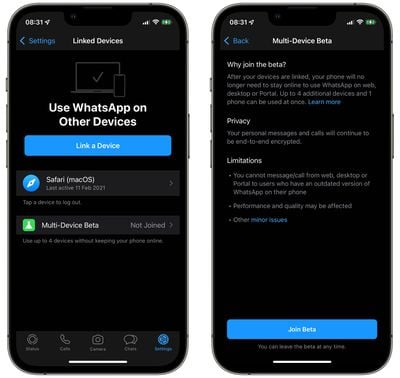
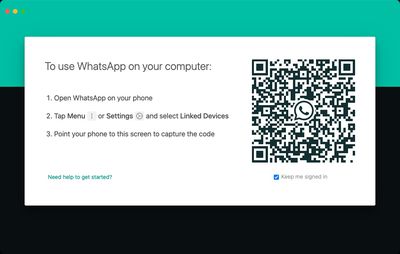
After following these steps your device will be linked, and you'll be able to access WhatsApp on your Mac to send and receive messages and view chat threads, without needing to rely on a phone connected to the internet.
Bear in mind that it's not currently possible to delete messages or conversation threads from a linked device. It's also worth noting that you can't message or call from web, desktop, or Portal to users who have an outdated version of WhatsApp on their phone, and you can only have one phone connected to your WhatsApp account at one time. Personal calls and messages remain end-to-end encrypted across devices.
If you don't use your phone for over 14 days, your linked devices will be disconnected. Lastly, given that the feature is still in beta, WhatsApp cautions that the performance and quality of its service may be affected, although happily, users can leave the beta at any time.




















