

In iOS 17.1 and later, iPhone users in the UK can now view banking information like account balance when using Apple Pay and viewing bank cards and credit cards in the Wallet app. Keep reading to learn how it works.
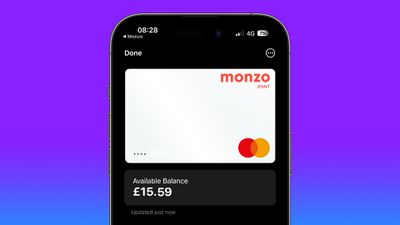
Apple's Wallet app on iPhone has been able to display Apple Pay transactions made using your bank and credit cards for a while now, but if you are a Wallet app user in the United Kingdom, a new integration introduced in iOS 17.1 means you can view your current account balance from your bank, along with other information like spending history, payments, deposits, and withdrawals. If you have a credit card, you can also view your remaining credit.
The new feature is intended to help you make more informed purchases, increase your confidence when making a transaction, and allows you to simply view frequent information so that you have more control when it comes to your finances.
To get the additional account information, your bank needs to support the Open Banking API that Apple has implemented. Supporting banks currently include Barclays, Barclaycard, First Direct, Halifax, HSBC, Lloyds, M&S Bank, Monzo Bank, NatWest Bank, and Royal Bank of Scotland, with more banks likely to come on board now that the feature is live.
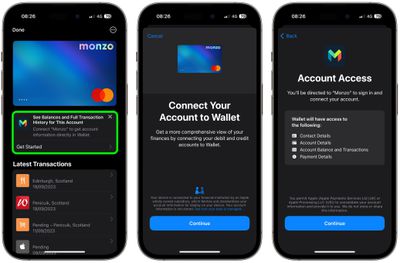
The following steps show you how integration is securely authorized through the Wallet app in iOS 17.1 and later. It's a simple enough process, and Apple will automatically redirect you to your bank app to authenticate the connection.
- Open the Wallet app on your iPhone.
- Tap a card from a supporting bank.
- Tap Get Started under "See Balances and Full Transaction History for This Account." (If you don't see the option, your bank doesn't yet support the feature.)
- Tap Continue to connect your account to Wallet.
- Check the account details that you are about to give Wallet permission to access, then tap Continue.
- In your bank app, enter your iPhone's passcode or use Face ID to grant Wallet permission to access the specified account details.
After following these steps, you'll be directed back to the Wallet app, where you will now see the available balance of your account underneath the bank card, along with your transaction history and other relevant information. If it's a credit card, you'll also see the remaining balance available, while a tap on the balance will also reveal your credit limit.
Apple Wallet also keeps annual transaction histories for linked accounts. You can access them for each account in Settings -> Wallet & Apple Pay: Tap the connected account under "Connections," tap the card under "Accounts," then tap Account Activity, where you can view transactions by year.

















Top Rated Comments
This is a good improvement.
Not sure, right now, whether it will be any more use than my bank's own app. But might just be more convenient.
What I'd actually like is an open receipt mechanism. Shops often offer a paper receipt, a receipt on their app on your phone, or require an email address.
A mechanism whereby you can accept a detailed receipt from the shop's till, without installing a shop-specific app, maybe offer a hidden email for them to use if they need to contact you (e.g. a recall), and me to be able to use it as proof of purchase, is very much wanted.
E.g. last year I bought confectionery bar from a supermarket but had to return as I didn't like it. But the process was crazily complex - because I wasn't using the supermarket's own app.
The UK banking sector is very different - consumer banking anyway - and so features like this are available relatively quickly. Apple Pay support is another one where it's now rare to find a bank that doesn't support it.