You Can Now Get Visual Intelligence on iPhone 15 Pro – Here's How - MacRumors
Skip to Content

You Can Now Get Visual Intelligence on iPhone 15 Pro – Here's How

by

On iPhone 16 models, Visual Intelligence lets you use the camera to learn more about places and objects around you. It can also summarize text, read text out loud, translate text, search Google for items, ask ChatGPT, and more. And thanks to the latest iOS 18.4 update from Apple, iPhone 15 Pro models can now get in on the action, too.

Apple Visual Intelligence
Until recently, ‌Visual Intelligence‌ was a feature limited to iPhone 16 models with a Camera Control button, which was necessary to activate the feature. However, Apple in February debuted the iPhone 16e, which lacks Camera Control and yet supports Visual Intelligence. This is because the device ships with a version of iOS that includes Visual Intelligence as an assignable option to the device's Action button.

Apple later confirmed that the same Visual Intelligence customization setting would be coming to iPhone 15 Pro models via a software update. That update is iOS 18.4, and it's available now. If you haven't updated yet, you can do so by opening Settings ➝ General ➝ Software Update.

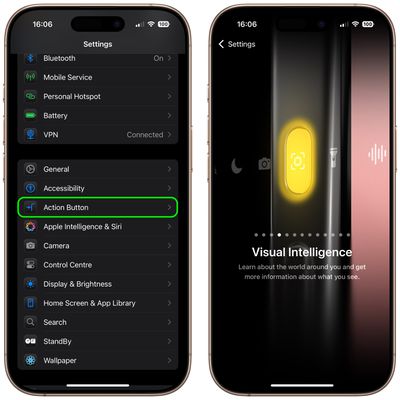
After your device is up-to-date, you can assign Visual Intelligence to the device's Action button in the following way.

  1. Open Settings on your iPhone 15 Pro.
  2. Tap Action Button.
  3. Swipe to Visual Intelligence.

settings

Pressing and holding the Action button will now activate Visual Intelligence. Note that you can also activate Visual Intelligence using the new button option in Control Center. Here's how.

  1. Swipe down from the top-right corner of your iPhone's display, then long press on the Control Center.
  2. Tap Add a Control at the bottom.
  3. Use the search bar at the top to search for Visual Intelligence, or swipe up to the "Apple Intelligence" section and choose the button.
  4. Tap the screen to exit the Control Center's edit mode.
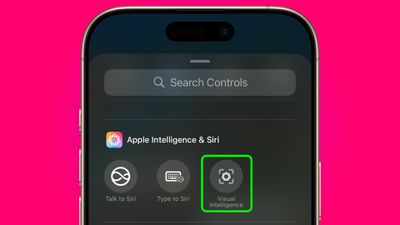
control center

Using Visual Intelligence

The Visual Intelligence interface features a view from the camera, a button to capture a photo, and dedicated "Ask" and "Search" buttons. Ask queries ChatGPT, and Search sends an image to Google Search.
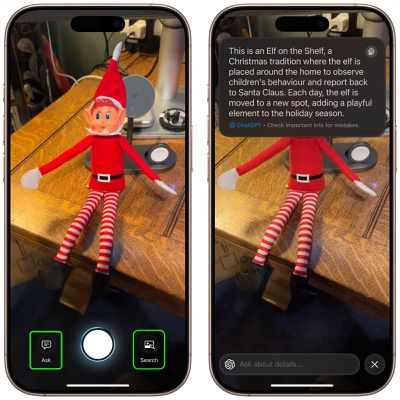
visual intelligence buttons
When using Visual Intelligence you can either snap a photo using the shutter button and then select an option, or you can select an option in live camera view. You cannot use photos that you took previously.

To learn about everything that you can do with Visual Intelligence, be sure to check out our dedicated guide.


Top Rated Comments

cicalinarrot Avatar
13 months ago
I'd title this "$1000 phones from a year ago still not outdated, bad luck for $900 phones buyers"
Score: 11 Votes (Like | Disagree)
13 months ago
Visual intelligence, what a joke. Unless I am missing something, all this feature does is upload an image to either ChatGPT or Google image search, depending on the button. What amazing things you are doing apple. These billions invested in ai are paying off!!
Score: 9 Votes (Like | Disagree)
youteonduty Avatar
13 months ago
technically you can get all these features on all the phones running upto date ios but apple decided not too as idea is to sell new hardware
Score: 6 Votes (Like | Disagree)
almostinsane Avatar
13 months ago

You’re missing something. It’s in-device processing.
How is it on device if it sends the image to google and the query to Chatgpt?
Score: 5 Votes (Like | Disagree)
lelisa13p Avatar
13 months ago

The beta period for Apple I will be longer than expected
I'm patient. I can wait. These days the thrill of a Beta for me isn't what it once was.
Score: 5 Votes (Like | Disagree)
13 months ago
Apple Intelligence gets some stick (largely for a set of useful or quaint OS features) but Visual Intelligence is brilliant.

Yes it relies on ChatGPT to do much of the heavy lifting but this doesn’t require an account and is no different to using Google as the search engine in Safari.

I’ve used it for all sorts of things from asking what an unknown food in the market might taste like to how to calculate Young’s Modulus of some tensile testing samples at work. On a recent trip to Spain I used it to visually translate nearly everything I came across.

Yes it’s Google Lens for the iPhone. But it’s only a purposeful button hold away at all times and the swishy gradient animations are look slick.
Score: 4 Votes (Like | Disagree)

Popular Stories

iOS 26

iOS 26.4 Adds Two New Features to CarPlay

Tuesday March 24, 2026 1:55 pm PDT by
iOS 26.4 was released today, and it includes a couple of new features for CarPlay: an Ambient Music widget and support for voice-based chatbot apps. To update your iPhone 11 or newer to iOS 26.4, open the Settings app and tap on General → Software Update. CarPlay will automatically offer the new features so long as the iPhone connected to your vehicle is running iOS 26.4 or later....
Apple Business hero

Apple Unveils 'Apple Business' All-in-One Platform

Tuesday March 24, 2026 8:53 am PDT by
Apple today announced Apple Business, a new all-in-one platform that unifies device management, productivity tools, and customer outreach features. The service is designed to be a consolidated replacement for several of Apple's existing business-focused offerings, including Apple Business Essentials, Apple Business Manager, and Apple Business Connect. It provides organizations with a single...
AirPods Pro Firmware Feature

Apple Releases New Firmware for AirPods Pro 3, AirPods Pro 2 and AirPods 4

Tuesday March 24, 2026 12:31 pm PDT by
Apple today released new firmware for the AirPods Pro 2, AirPods Pro 3, and the AirPods 4. The firmware has a version number of 8B39, up from 8B34 on the AirPods Pro 3, 8B28 on the AirPods Pro 2, and 8B21 on the AirPods 4. There is no word on what's included in the firmware, but Apple has a support document with limited notes. Most updates are limited to bug fixes and performance...