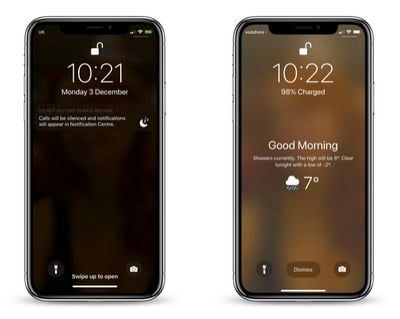
In iOS 12, Apple has included a somewhat hidden feature that lets you see the day's weather forecast on your iPhone's Lock Screen when you check it for the first time after waking up.
how to wake up to a weather forecast on your iphone lock screen
The feature is part of Apple's Do Not Disturb at Bedtime mode, which prevents notifications from being displayed on your iPhone's Lock Screen when you're supposed to be sleeping.

Many users don't realize you can get the weather forecast to show on the Lock Screen because of the odd way that Apple has implemented the feature. Regardless, here's how to get it working.

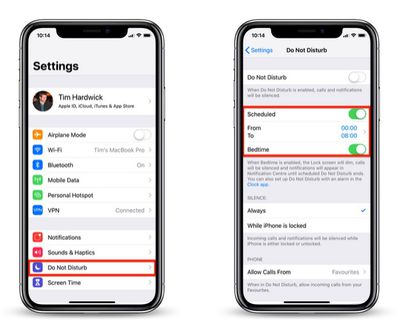
  1. Launch the Settings app on your iPhone.
    how to wake to a weather forecast on iphone lock screen 1

  2. Tap Do Not Disturb.
  3. Make sure the Scheduled and Bedtime buttons are toggled on so that they're both green.
  4. You can also set your sleep and wake schedule here by adjusting the From and To times.
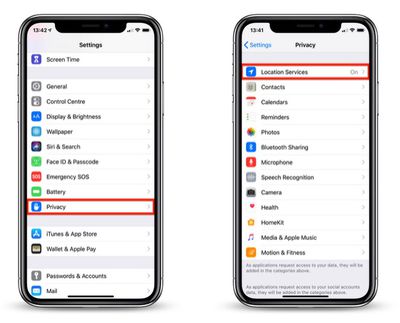
  5. Return to the main Settings screen and tap Privacy.
    how to wake to a weather forecast on iphone lock screen 2

  6. Tap Location Services.
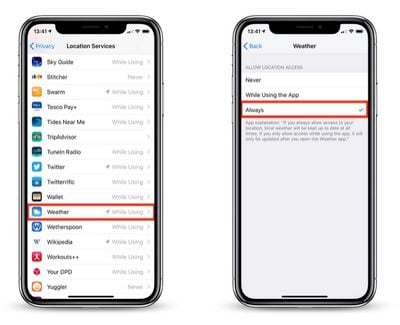
  7. Tap Weather in the list of apps.
    how to wake to a weather forecast on iphone lock screen 3

  8. Under Allow Location Access, tap Always.
  9. Exit the Settings app.

With that done, next time it's time to wake up and Bedtime Mode is scheduled to go off, your iPhone will display the usual "Good morning!" message along with the day's weather, including the current temperature, weather conditions, and forecast.

To make the forecast vanish from your Lock Screen, simply tap Dismiss. To switch the temperature scale between Celsius and Fahrenheit, launch the Weather app and scroll to the bottom of the weather locations list, where you'll find the option to do so.

It's worth noting that once you unlock your iPhone, the weather forecast will disappear for the rest of the day, and it won't return until the next day when you wake up and access the device after Bedtime mode has turned itself off.

As it stands, the Lock Screen weather feature offers no other flexibility, and it won't work unless you allow the Weather app to always access your location data. Hopefully Apple will eventually change this to make it a more useful Lock Screen "widget" in a future update to iOS.


Top Rated Comments

bpa1093 Avatar
94 months ago
My wife showed this to me the other day. She was excited that she knew something about the iPhone that I didn’t.
Score: 10 Votes (Like | Disagree)
iLoveDeveloping Avatar
94 months ago
That would be great if the weather app apple use isn’t from weather channel. What a terrible service. Something like meteo weather for Europe would be much better / or the equivalent in US. Weather channel is less than useless for ACURATE weather. It’s mosly 3-4 desgrees off, rain warnings are usually just basic or to cover all bases, what’s the point. Partner up with some real meteorological firms and do it right, ive never understood why apple can’t get the weather app right, i mean yahoo? Seriously? That was good right?!
Score: 9 Votes (Like | Disagree)
CrzyP Avatar
94 months ago
I’m personally not a fan of DND Bedtime. It silences everything to include other alarms and is not great for people who have changing bedtime schedules. It’s too bad this weather feature only work with bedtime mode.
Score: 5 Votes (Like | Disagree)
oneMadRssn Avatar
94 months ago
That would be great if the weather app apple use isn’t from weather channel. What a terrible service. Something like meteo weather for Europe would be much better / or the equivalent in US. Weather channel is less than useless for ACURATE weather. It’s mosly 3-4 desgrees off, rain warnings are usually just basic or to cover all bases, what’s the point. Partner up with some real meteorological firms and do it right, ive never understood why apple can’t get the weather app right, i mean yahoo? Seriously? That was good right?!
I think the problem is for-profit weather forecasting. It incentivizes click-bait weather reports. In my area, Weather Channel is always forecasting a huge storm coming up sometime this week, but as the day approaches it is downgraded or the forecast is changed and hey look a huge storm is coming next week now.

I wish there was a good app with a solid Apple-like UI that just scrubbed the forecast from NOAA/NWS.
[doublepost=1543851446][/doublepost]
It silences everything to include other alarms
This should be added to the article. It sure would stink for someone to miss their one-time early alarm while traveling or something because they followed MacRumor's instructions.

Score: 4 Votes (Like | Disagree)
ghostface147 Avatar
94 months ago
I like this feature, but wish it wasn't a one time thing. Once you see it, you won't see it again until the next day. Or leave it as a widget!
Score: 3 Votes (Like | Disagree)
PhillyGuy72 Avatar
94 months ago
Took a few tries a few months ago to finally get this to show up. Cool feature, but it's extremely brief.

Would love a simple setting where you can have this always on - all day or maybe a custom time setting
(Ex. between 7am-11:59am. Or whatever time frame you want)
Score: 2 Votes (Like | Disagree)

Popular Stories

wwdc sans text feature

Apple Rumored to Announce New Product on February 19

Thursday February 5, 2026 12:22 pm PST by
Apple plans to announce the iPhone 17e on Thursday, February 19, according to Macwelt, the German equivalent of Macworld. The report, citing industry sources, is available in English on Macworld. Apple announced the iPhone 16e on Wednesday, February 19 last year, so the iPhone 17e would be unveiled exactly one year later if this rumor is accurate. It is quite uncommon for Apple to unveil...
Apple Logo Zoomed

Tim Cook Teases Plans for Apple's Upcoming 50th Anniversary

Thursday February 5, 2026 12:54 pm PST by
Apple turns 50 this year, and its CEO Tim Cook has promised to celebrate the milestone. The big day falls on April 1, 2026. "I've been unusually reflective lately about Apple because we have been working on what do we do to mark this moment," Cook told employees today, according to Bloomberg's Mark Gurman. "When you really stop and pause and think about the last 50 years, it makes your heart ...
Finder Siri Feature

Why Apple's iOS 26.4 Siri Upgrade Will Be Bigger Than Originally Promised

Friday February 6, 2026 3:06 pm PST by
In the iOS 26.4 update that's coming this spring, Apple will introduce a new version of Siri that's going to overhaul how we interact with the personal assistant and what it's able to do. The iOS 26.4 version of Siri won't work like ChatGPT or Claude, but it will rely on large language models (LLMs) and has been updated from the ground up. Upgraded Architecture The next-generation...
maxresdefault

Apple Shows Off a Key Reason to Upgrade to the iPhone 17

Saturday February 7, 2026 9:26 am PST by
Apple today shared an ad that shows how the upgraded Center Stage front camera on the latest iPhones improves the process of taking a group selfie. "Watch how the new front facing camera on iPhone 17 Pro takes group selfies that automatically expand and rotate as more people come into frame," says Apple. While the ad is focused on the iPhone 17 Pro and iPhone 17 Pro Max, the regular iPhone...
iOS 26

iOS 26.3 and iOS 26.4 Will Add These New Features to Your iPhone

Tuesday February 3, 2026 7:47 am PST by
While the iOS 26.3 Release Candidate is now available ahead of a public release, the first iOS 26.4 beta is likely still at least a week away. Following beta testing, iOS 26.4 will likely be released to the general public in March or April. Below, we have recapped known or rumored iOS 26.3 and iOS 26.4 features so far. iOS 26.3 iPhone to Android Transfer Tool iOS 26.3 makes it easier...