
When watchOS 3 launched alongside iOS 10, it brought a handful of feature additions and speed improvements to the Apple Watch. One of the new social features is a way for users to share their Activity Rings with friends and family through "Activity Sharing."

Mainly focused in iOS 10's Activity app, the ability to share workout data nevertheless requires an Apple Watch updated to watchOS 3, and for you to be comfortable with certain people receiving live updates on your fitness activity. When you're ready to start sharing your Activity Rings, and you've updated to both iOS 10 and watchOS 3, follow these steps:

Activity Sharing on iPhone
activity-how-to-3

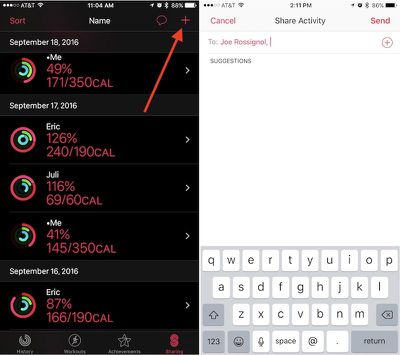
  1. Open "Activity" on your iPhone.
  2. Navigate to the "Sharing" tab on the bottom right.
  3. Tap the "+" icon in the top right corner to add a friend.
  4. The app will offer suggestions from your contacts of users who may own an Apple Watch, so you can tap one of those or type in someone specific in the text box.
  5. You can include multiple invitations at one time, and once you have everyone included in the "To" box, tap "Send."

From there, simply wait for your friend to accept the invitation. Afterwards, you'll begin to see one another's Calorie, Workout, and Standing rings in the same Sharing tab you sent the invite from. Once you amass a group of friends and family members, you can also sort the data in helpful partitions depending on what you'd like to see. Simply tap "Sort" in the top left corner of the Sharing tab and choose from Name, Move, Exercise, Steps, and Workouts as the primary focus.

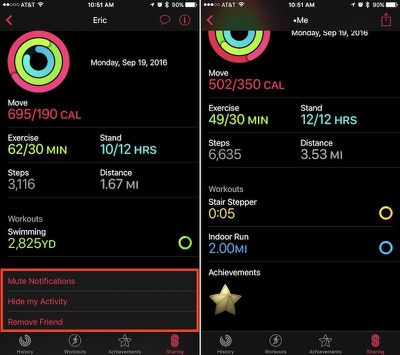
Tapping on anyone in the list will bring you into a deeper menu about that individual's Activity that day. The app will break down each ring, as well as showcase a step count, distance walked, and list any completed workouts or earned achievements. At the very bottom, there's a few options to mute a friend's notifications, hide your Activity from them, or delete them as a friend. Within your main friends list you will see your own Activity as well.
activity-how-to-2

An example of a friend's Sharing card (left), and your own (right)

Activity Sharing on Apple Watch

Although Activity Sharing is more in-depth within Activity on iOS, most of the interactivity of the new social feature takes place on the Apple Watch. Whenever friends begin closing their Activity Rings, completing workouts, and earning achievements, you'll get push notifications about each accomplishment. From these pop-ups, you can send friendly encouragements (or sly digs) about their hard work.
activity-how-to-5

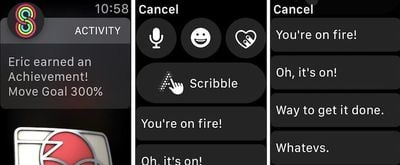
  1. When you receive an Activity notification from a friend on your Apple Watch, scroll down.
  2. Tap "Reply."
  3. You can choose from the traditional speech-to-text, emoji, Digital Touch, and Scribble options, or scroll more for some of Apple's stock Activity responses.
  4. Tap on any phrase to send it.

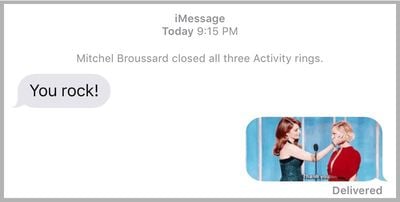
These responses are integrated directly into Messages in iOS 10, so if you sent "You're on fire!" for example, Messages would provide slight context above the message with "Mitchel completed a workout." Until they otherwise mute you for the day, or turn off your notifications completely within Activity on iPhone, each of your friends will receive a notification upon the completion of every workout and earning of every achievement.
activity-how-to-7
If you visit the Activity app on Apple Watch, you can scroll down to get more detailed readouts of each Activity Ring. Swiping right-to-left shows the new Sharing tab, similar to the one on iPhone. You can scroll to see each friend, tap on them for an individualized view, and send a message through a button at the bottom of their profile.

It should be noted that Apple's stock fitness-related phrases will only appear following a Sharing notification from a friend, and then only on Apple Watch. Any other Messages-related prompt outside of a notification from a friend will simply guide you over to Messages with all of the expected features introduced in the app in iOS 10.

There are plenty of other interesting and notable features to discover in watchOS 3, so be sure to check out the MacRumors roundups for both watchOS 3 and Apple Watch Series 2 to find out more information on each.


Related Roundup: Apple Watch 11
Buyer's Guide: Apple Watch (Neutral)

Top Rated Comments

44267547 Avatar
123 months ago
How to use the most useless feature ever
You must not have any friends to share your activity with. I feel sorry for you.
Score: 2 Votes (Like | Disagree)
Phogro Avatar
122 months ago
How to use the most useless feature ever
^ how to be a shortsighted fool.
Score: 2 Votes (Like | Disagree)
Raineer Avatar
123 months ago
I'm curious to hear if this works for anyone. I've been trying to connect my activity account with my wife's for like 4 days now. We can get to the "accept" prompt to accept the invite, but after that it's just infinite spinning "thinking" icon. Have rescinded the invite and resent several times, trying both directions.
Score: 2 Votes (Like | Disagree)
Watabou Avatar
122 months ago
How to use the most useless feature ever
I think it's pretty fun, myself. I get to see how my friends and family are doing with their activity, and if they beat me on a day, it really motivates me to do better. But we do have a competitive side so that also helps.

Just because you think it's useless, doesn't make it so.
Score: 2 Votes (Like | Disagree)
tliede20 Avatar
123 months ago
I'm curious to hear if this works for anyone. I've been trying to connect my activity account with my wife's for like 4 days now. We can get to the "accept" prompt to accept the invite, but after that it's just infinite spinning "thinking" icon. Have rescinded the invite and resent several times, trying both directions.
You're not going to like my answer.... but I had to RESTORE my iPhone to make that work, I've seen this 3 times now. That seems to be the ONLY solution. Apple Support had me try the following which didn't work...

- Unpair / Repair watch
- Restore Watch

Checked diagnostics on both and they were clear.

Restoring the phone and THEN repairing the watch worked.

Good Luck!
Score: 2 Votes (Like | Disagree)
chitoac Avatar
123 months ago
I'm curious to hear if this works for anyone. I've been trying to connect my activity account with my wife's for like 4 days now. We can get to the "accept" prompt to accept the invite, but after that it's just infinite spinning "thinking" icon. Have rescinded the invite and resent several times, trying both directions.
its working for me. only problem i got was that my gf didnt update her watch, but after both have ios 10 and watch os 3 its working. sometimes it takes a little long to load.
but im loving it! specially the days i beat my her LOL
Score: 1 Votes (Like | Disagree)

Popular Stories

Apple Logo Zoomed

Tim Cook Teases Plans for Apple's Upcoming 50th Anniversary

Thursday February 5, 2026 12:54 pm PST by
Apple turns 50 this year, and its CEO Tim Cook has promised to celebrate the milestone. The big day falls on April 1, 2026. "I've been unusually reflective lately about Apple because we have been working on what do we do to mark this moment," Cook told employees today, according to Bloomberg's Mark Gurman. "When you really stop and pause and think about the last 50 years, it makes your heart ...
wwdc sans text feature

Apple Rumored to Announce New Product on February 19

Thursday February 5, 2026 12:22 pm PST by
Apple plans to announce the iPhone 17e on Thursday, February 19, according to Macwelt, the German equivalent of Macworld. The report, citing industry sources, is available in English on Macworld. Apple announced the iPhone 16e on Wednesday, February 19 last year, so the iPhone 17e would be unveiled exactly one year later if this rumor is accurate. It is quite uncommon for Apple to unveil...
Finder Siri Feature

Why Apple's iOS 26.4 Siri Upgrade Will Be Bigger Than Originally Promised

Friday February 6, 2026 3:06 pm PST by
In the iOS 26.4 update that's coming this spring, Apple will introduce a new version of Siri that's going to overhaul how we interact with the personal assistant and what it's able to do. The iOS 26.4 version of Siri won't work like ChatGPT or Claude, but it will rely on large language models (LLMs) and has been updated from the ground up. Upgraded Architecture The next-generation...
iOS 26

iOS 26.3 and iOS 26.4 Will Add These New Features to Your iPhone

Tuesday February 3, 2026 7:47 am PST by
While the iOS 26.3 Release Candidate is now available ahead of a public release, the first iOS 26.4 beta is likely still at least a week away. Following beta testing, iOS 26.4 will likely be released to the general public in March or April. Below, we have recapped known or rumored iOS 26.3 and iOS 26.4 features so far. iOS 26.3 iPhone to Android Transfer Tool iOS 26.3 makes it easier...
iphone 17 pro dark blue 1

iPhone 18 Pro Max Rumored to Deliver Next-Level Battery Life

Friday February 6, 2026 5:14 am PST by
The iPhone 18 Pro Max will feature a bigger battery for continued best-in-class battery life, according to a known Weibo leaker. Citing supply chain information, the Weibo user known as "Digital Chat Station" said that the iPhone 18 Pro Max will have a battery capacity of 5,100 to 5,200 mAh. Combined with the efficiency improvements of the A20 Pro chip, made with TSMC's 2nm process, the...















