
WhatsApp: How to Set a Message Reminder - MacRumors
Skip to Content

WhatsApp: How to Set a Message Reminder

by

WhatsApp has rolled out a new feature on iPhone that lets you set reminder alerts for specific messages that you want to come back to later.

Whatsapp Feature
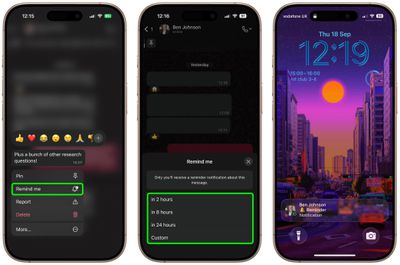
Available in version 25.25.74 of WhatsApp, the feature allows you to long press on any message in a conversation thread and select a new "Remind me" option in the popup menu. You can then choose between 2 hours, 8 hours, and 24 hours, or set a custom duration after which you will be alerted about it.

The new feature is useful for keeping track of important details that might otherwise get lost in busy chats. It's also a simple way to make sure you don't forget to reply to a message at a later time. Here's how to set your first message reminder in WhatsApp:

How to Set a Message Reminder in WhatsApp

  1. Open a WhatsApp conversation thread and long press on a message bubble that you want to be reminded about later.
  2. Tap More... in the popup menu.
  3. Select Remind Me.
  4. Select in 2 hours, in 8 hours, in 24 hours, or choose Custom to set a more specific reminder time and date.
whatsapp

A bell symbol appears in the corner of the message bubble to indicate a reminder has been set. When the reminder alert comes through as a notification, depending on your message preview settings you may see the message content, the conversation in which it's located, and a preview of any accompanying media.

The ability to schedule a reminder about a message should be a lot more convenient and foolproof than, say, starring a message or taking a screenshot of it and hoping you'll remember to come back to it.

How to Cancel a WhatsApp Message Reminder

If you want to cancel a reminder that you've set, simply long press a message showing the bell symbol, tap More... then choose Cancel Reminder.


Top Rated Comments

wanha Avatar
27 weeks ago
pay me no mind but how cool would it be able to set a regular reminder to forget all about our phones for another hour
Score: 2 Votes (Like | Disagree)
27 weeks ago
Good to know about this. Will be useful for users who use the app very much. I use it occasionally only and don't think I have a need for this.
Score: 1 Votes (Like | Disagree)
calzon65 Avatar
27 weeks ago
Since the iPhone has allowed multiple numbers (SIM/eSIM) on the same phone for several years, I wish WhatApp would support multiple numbers on the same phone.
Score: 1 Votes (Like | Disagree)

Popular Stories

iOS 26

iOS 26.4 Adds Two New Features to CarPlay

Tuesday March 24, 2026 1:55 pm PDT by
iOS 26.4 was released today, and it includes a couple of new features for CarPlay: an Ambient Music widget and support for voice-based chatbot apps. To update your iPhone 11 or newer to iOS 26.4, open the Settings app and tap on General → Software Update. CarPlay will automatically offer the new features so long as the iPhone connected to your vehicle is running iOS 26.4 or later....
Apple Business hero

Apple Unveils 'Apple Business' All-in-One Platform

Tuesday March 24, 2026 8:53 am PDT by
Apple today announced Apple Business, a new all-in-one platform that unifies device management, productivity tools, and customer outreach features. The service is designed to be a consolidated replacement for several of Apple's existing business-focused offerings, including Apple Business Essentials, Apple Business Manager, and Apple Business Connect. It provides organizations with a single...
AirPods Pro Firmware Feature

Apple Releases New Firmware for AirPods Pro 3, AirPods Pro 2 and AirPods 4

Tuesday March 24, 2026 12:31 pm PDT by
Apple today released new firmware for the AirPods Pro 2, AirPods Pro 3, and the AirPods 4. The firmware has a version number of 8B39, up from 8B34 on the AirPods Pro 3, 8B28 on the AirPods Pro 2, and 8B21 on the AirPods 4. There is no word on what's included in the firmware, but Apple has a support document with limited notes. Most updates are limited to bug fixes and performance...















