
iPhone Displays Green and Orange Dots: What Do They Mean? - MacRumors
Skip to Content

iPhone Displays Green and Orange Dots: What Do They Mean?

by

Digital privacy is a perennial hot topic these days, and Apple is regarded as being at the forefront of security when it comes to smartphone and tablet operating systems. For example, for an app to access your iPhone or iPad's camera, camera and microphone access must be enabled for the app in question in the Settings app.
recordingindicatorios14arrow

Social media apps will often ask you for access to your device's camera or microphone when you first launch them, which is fair enough if you want to record and share audio and video on these platforms.

However, Meta's Facebook and Instagram have both been found guilty in the past of accessing device cameras in the background when the apps are in use. Therefore, in response to legitimate concerns, Apple includes a security feature in iOS to indicate when an app does exactly this.

Green Dot

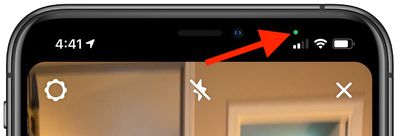
  • Green dot means an iOS app is currently using the camera.

Orange Dot

  • Orange dot means an iOS app is currently using the microphone.

When an app is using either the camera or the microphone on your iPhone or ‌iPad‌, a small dot will appear in the status bar just above the WiFi and cellular signal bars.
recordingindicatorios14controlcenter
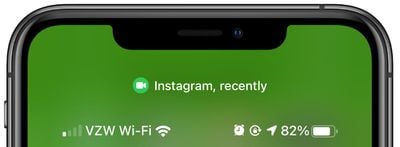
If you close the app using the camera or microphone and then open the Control Center, there will be a camera or microphone icon along with the name of the app that was recently using the feature. In this way, recording indicators prevent the camera or microphone from being accessed by an app in the background without your knowledge, so you can be sure that apps aren't sneakily recording conversations or videos.


Popular Stories

iOS 26

iOS 26.4 Adds Two New Features to CarPlay

Tuesday March 24, 2026 1:55 pm PDT by
iOS 26.4 was released today, and it includes a couple of new features for CarPlay: an Ambient Music widget and support for voice-based chatbot apps. To update your iPhone 11 or newer to iOS 26.4, open the Settings app and tap on General → Software Update. CarPlay will automatically offer the new features so long as the iPhone connected to your vehicle is running iOS 26.4 or later....
Apple Business hero

Apple Unveils 'Apple Business' All-in-One Platform

Tuesday March 24, 2026 8:53 am PDT by
Apple today announced Apple Business, a new all-in-one platform that unifies device management, productivity tools, and customer outreach features. The service is designed to be a consolidated replacement for several of Apple's existing business-focused offerings, including Apple Business Essentials, Apple Business Manager, and Apple Business Connect. It provides organizations with a single...
AirPods Pro Firmware Feature

Apple Releases New Firmware for AirPods Pro 3, AirPods Pro 2 and AirPods 4

Tuesday March 24, 2026 12:31 pm PDT by
Apple today released new firmware for the AirPods Pro 2, AirPods Pro 3, and the AirPods 4. The firmware has a version number of 8B39, up from 8B34 on the AirPods Pro 3, 8B28 on the AirPods Pro 2, and 8B21 on the AirPods 4. There is no word on what's included in the firmware, but Apple has a support document with limited notes. Most updates are limited to bug fixes and performance...














