
iOS 18: Find Your Passwords on iPhone - MacRumors
Skip to Content

iOS 18: Find Your Passwords on iPhone

by

With iOS 18, Apple introduced its first dedicated Passwords app, which corrals all of your saved logins and passwords within a simple interface and secures them behind your biometric authentication.
Generic iOS 18 Passwords Feature
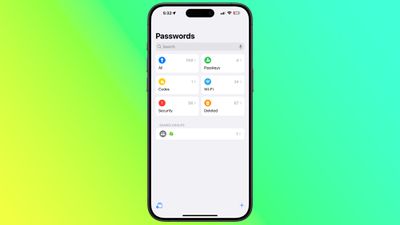
The Passwords app is automatically added to your device when you update to iOS 18, iPadOS 18, or macOS Sequoia, and it replaces the passwords section in the Settings app on iPhone/iPad and in System Settings on Mac. Its clean, straightforward design puts a search bar front and center, making it easy to find exactly what you need.
ios 18 passwords app

Passwords app in iOS 18

If you've been using ‌iCloud‌ Keychain, all your saved logins and passwords are seamlessly available after authenticating with Face ID or Touch ID. The app organizes your data into clear categories: passwords and logins (found under "All"), Passkeys, two-factor authentication codes, Wi-Fi passwords, security alerts, and even recently deleted logins.
macOS Sequoia Passwords app

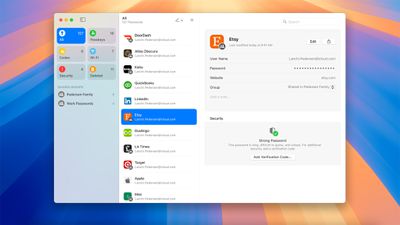
Passwords app in macOS Sequoia

Navigating the app is intuitive — select any category to explore its contents, and tap an individual entry to view details. Each login includes fields for the app or website name, username, password, verification codes, associated websites, and notes. A handy one-tap option lets you quickly update any password directly from the app.

In addition to storing your passwords and login credentials, the Passwords app can also generate verification codes for additional sign-in security. You can also share Wi-Fi passwords using QR codes when other sharing methods aren't available, or for when you want to share the network details with several people. Click the links for all the details.


Popular Stories

iOS 26

iOS 26.4 Adds Two New Features to CarPlay

Tuesday March 24, 2026 1:55 pm PDT by
iOS 26.4 was released today, and it includes a couple of new features for CarPlay: an Ambient Music widget and support for voice-based chatbot apps. To update your iPhone 11 or newer to iOS 26.4, open the Settings app and tap on General → Software Update. CarPlay will automatically offer the new features so long as the iPhone connected to your vehicle is running iOS 26.4 or later....
Apple Business hero

Apple Unveils 'Apple Business' All-in-One Platform

Tuesday March 24, 2026 8:53 am PDT by
Apple today announced Apple Business, a new all-in-one platform that unifies device management, productivity tools, and customer outreach features. The service is designed to be a consolidated replacement for several of Apple's existing business-focused offerings, including Apple Business Essentials, Apple Business Manager, and Apple Business Connect. It provides organizations with a single...
AirPods Pro Firmware Feature

Apple Releases New Firmware for AirPods Pro 3, AirPods Pro 2 and AirPods 4

Tuesday March 24, 2026 12:31 pm PDT by
Apple today released new firmware for the AirPods Pro 2, AirPods Pro 3, and the AirPods 4. The firmware has a version number of 8B39, up from 8B34 on the AirPods Pro 3, 8B28 on the AirPods Pro 2, and 8B21 on the AirPods 4. There is no word on what's included in the firmware, but Apple has a support document with limited notes. Most updates are limited to bug fixes and performance...















