

Earlier this year, I spent some time in a 2019 Nissan Altima, checking out how CarPlay interfaces with the native NissanConnect infotainment system, and I came away fairly impressed with the flexibility and ease-of-use of NissanConnect and the carmaker's decision to make CarPlay standard across all trims.
Looking to show off more of its technology and how some of it integrates with iPhones, Nissan recently asked me to take a look at the 2019 Leaf, specifically the Leaf Plus, a new-for-2019 extended-range version of the popular electric vehicle that's been on the market for nearly a decade.
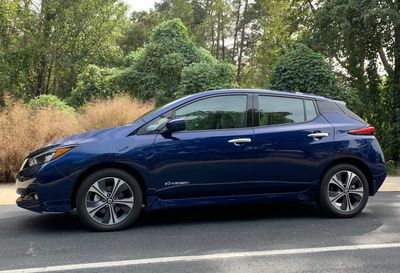
The base Leaf starts at $30,000 before tax credits that can knock $7,500 off the price, and it comes with a 40 kWh battery that delivers up to 150 miles of range. There are three trims of the regular Leaf, with only the entry-level S model lacking CarPlay support. In fact, that base model comes with a basic 5-inch non-touchscreen display for the infotainment system, so most technology-heavy users will want to step up to at least the second-level SV trim on the regular Leaf.
The Leaf Plus begins at $36,550 before tax credits and upgrades to a 62 kWh battery that offers up to 226 miles of range. The extended-range Plus lineup also comes in three trims, all of which include CarPlay and Android Auto support.
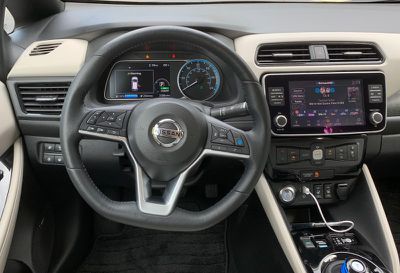
My test vehicle was the top-of-the-line Leaf SL Plus, which checks in at an MSRP of $42,550 before tax credits, with a couple of minor add-ons like floor mats and splash guards pushing my vehicle's sticker price to just under $44,000. For those looking to squeeze out every last mile of range, it's worth noting that only the lowest S trim of the Leaf Plus can reach the 226 miles of rated range, with the SV and SL trims dropping back a bit to 215 miles due to some of the additional technology in the car sapping some of the battery's energy.
All Leaf Plus models come with an 8-inch touchscreen very similar to that I experienced on the Altima, albeit with the hardware buttons located in clusters on either side of the display rather than in a strip below. The 8-inch display is plenty big for showing off NissanConnect and CarPlay making it easy to hit the desired icons on the screen, while the hardware knobs and buttons help you get a few common tasks done more by feel.
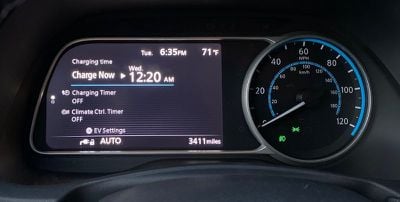
Behind the steering wheel, there's a combination analog speedometer and digital information display, with the display offering a number of different views to suit your preferences, including such features as digital speedometer, compass, and current audio information (including CarPlay track information).
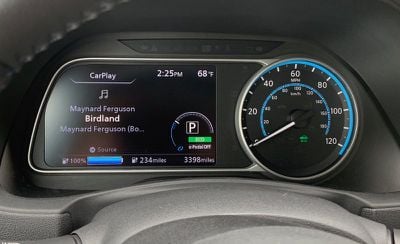
Importantly, all views also include a digital readout of your current battery level and estimated range, as well as a digital power meter to help you understand real-time power consumption and regeneration. One of the customizable views also lets you see the battery temperature, as charging times can vary significantly depending on the temperature of the battery.
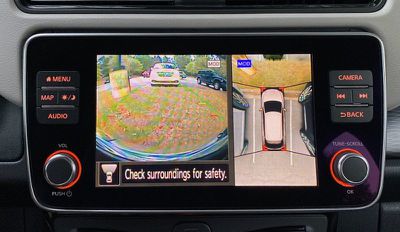
My top-level trim naturally came with all of the tech bells and whistles, including Nissan's Intelligent Around View Monitor for a bird's eye view of your vehicle, intelligent cruise control, and ProPILOT Assist, which not only helps maintain a safe following distance automatically but also keeps your car centered in the lane, even on curves.
NissanConnect
I covered NissanConnect and CarPlay in my review of the Altima earlier this year, and the experience on the Leaf is very similar. As on the Altima and most other vehicles, the Leaf's CarPlay implementation is a wired one, so you'll need to plug your phone into a USB port.
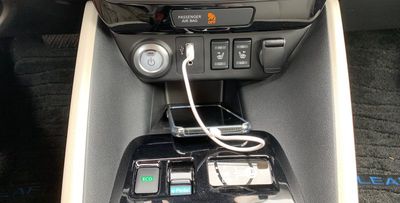
There is a single USB-A port near the base of the center stack, right next to the start button, and there's a convenient phone cubby located right below the port. Unfortunately, this is the only USB port included on the Leaf, with nothing in the center console compartment or for rear passengers.
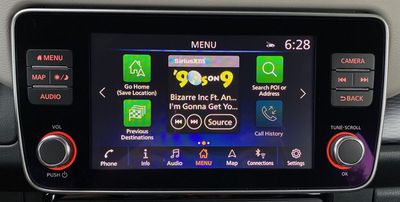
From there, it's a relatively traditional infotainment experience. The 8-inch touchscreen is bright, with enough color to help individual items on the screen stand out a bit. NissanConnect allows for multiple customizable home screens with shortcuts and informational widgets for functions like the clock, audio, and phone. Unlike the Altima that I tested earlier, my Leaf Plus tester came with built-in navigation that performed well as an alternative to mapping apps available through CarPlay.
CarPlay
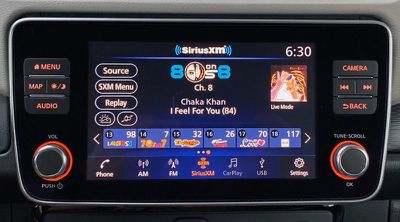
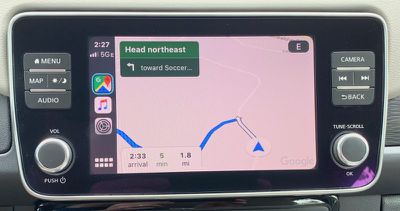
When you plug in your phone and activate CarPlay, NissanConnect makes it fairly easy to hop back and forth between the two systems as needed, with a dedicated CarPlay icon in the dock at the bottom of the NissanConnect's screens. When you're in CarPlay, you can use either the Nissan app icon on the CarPlay home screen or the convenient Home/Menu hardware button to jump back into Nissan Connect.
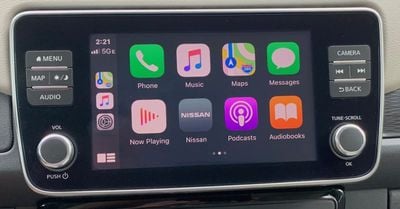
When active, CarPlay takes over the entire display of the infotainment system, and while I do prefer systems that offer at least minimal dual-system function with an app strip or even a small supplemental information screen on a widescreen setup, Nissan's system certainly isn't bad. The hardware buttons, steering wheel controls, and driver's information display all help ease interactions with the systems, whether it be moving between CarPlay and NissanConnect or adjusting/viewing details for one while the other is active on the main screen.
EV Features
As an EV, the Leaf has a lot of technology built-in for managing the battery and its charge level. The Leaf has a pair of charging ports located under a cover on the front center of the car. On the right is a standard port that lets you connect a Level 2 charger (220-240V) for normal charging that can give you a full charge in 11-12 hours or a Level 1 charger for trickle charging from a standard 110-120V outlet, although that would take on the order of two and a half days to fully charge the car's battery.
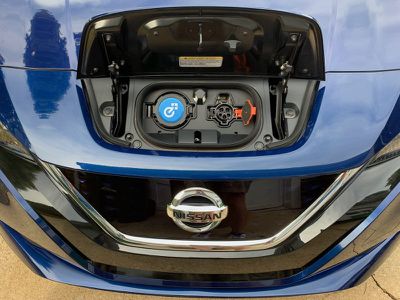
On the left is a CHAdeMO quick charge port that lets you use higher-powered chargers often found at public charging stations to recharge to 80 percent in as little as 45 minutes under ideal temperature conditions and when connected to a 100kW quick charger.
One welcome feature of most EVs is the ability to schedule charging, letting users take advantage of cheaper energy rates during certain times of the day if their electric utility charges variable rates, and the schedule can be managed either right in the vehicle after you park it, or from your phone.
App Control
With an EV, your phone can become a crucial tool since you can refuel your car from home or work without needing to stop by a gas station. Your phone gives you nearly instant access to information about your car's charge level without needing to go out to the vehicle, so you can judge when your car has been fully charged or manage charging right from your phone.
Nissan offers an iOS and Android app to manage much of this from your phone, not only for battery management but for other features like remote start, car finder, plug-in reminders, and climate control remote start/stop so you can be sure your car is comfortable when you hop in. There's even an Apple Watch app to let you perform most of those functions right from your wrist.
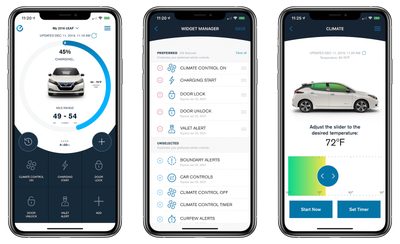
Unfortunately, the app has received many poor reviews from users, with numerous complaints about sluggish response times within the app, difficulty getting a connection to the car that sometimes results in commands failing to register, and other issues. Nissan regularly updates the app with bug fixes, but hopefully a more comprehensive overall is in the works to improve functionality.
NissanConnect EV also integrates with Alexa and Google Assistant to let you check on the car's status and activate functions with your voice.
A basic set of NissanConnect EV features including remote charge start, remote climate control, and more is complimentary for the first three years of ownership, but there are a couple of paid upgrade tiers that offer additional functionality on 2018 and 2019 Leaf models. A Select tier includes remote lock/unlock, maintenance alerts, and Alexa/Google Assistant support and is priced at $11.99/month after a three-year trial.
A Premium tier adds features like remote horn/lights, valet alert, curfew and speed alerts, automatic collision notification with emergency calling, roadside assistance calls, and stolen vehicle locator. After a free six-month trial, the Premium tier is priced at $8.00/month and requires the Select tier, so once the three-year Select trial ends you'd be paying a total of $19.99/month for the full suite of NissanConnect services.
Wrap-up
Overall, I remain a fan of the NissanConnect infotainment system and the useful combination of hardware and software controls that make it easy to interact with. It plays quite nicely with CarPlay on the large 8-inch screen, and touch response is good.
For an EV where technology is a major focus, though, the phone app integration seems like it really needs some improvement, including app performance and perhaps some additional features like managing the charging schedule rather than limiting remote charge controls to manually starting a charge cycle.
I'd also like to see a bit more connectivity in the car, such as more USB ports or even an option for wireless phone charging. I realize that every power-drawing feature has the potential to impact the range of an EV, and manufacturers are generally trying to eke out every last mile from their batteries, but more and more of these technology features are becoming expected equipment on cars that can hit $30,000 or more like the Leaf Plus.
The Leaf has proven to be a popular EV, and the fact that it is still supported by the full federal EV tax credit makes it a competitive vehicle. The Plus lineup costs a good bit more than the regular version, but pushing the range above 200 miles is a significant improvement to the EV experience and lets even longer distance commuters rely on it for a full day without needing to worry about running low on charge, and makes longer road trips more palatable with fewer charging stops required.

























![Apple Pulls Keynote, Pages and Numbers From App Store [Update: Back]](https://images.macrumors.com/t/Okb7kitB_gNr6qe5Pex9nQIysD8=/112x112/article-new/2026/01/Apple-Creator-Studio-iWork-suite.jpg)




















Top Rated Comments
I drive 300+ miles in a single sitting once or twice per year, and sometimes never for years at a time. So why do I need an 3-row SUV that has a 25-gallon gas tank?
It makes much more sense to buy an EV that fits my needs 99% of the time, and rent a Chevy Suburban for that 1% of the time that I actually need it. Much much easier.
Even cheap EVs are anything but slow, bub. Seriously, go test drive a leaf or a bolt, you'll be surprised!