

Back at CES in January, Alogic introduced its new lineup of 32-inch 4K displays, following up on 27-inch models launched last year. I've now had some time to put the high-end Clarity Max Touch model from the 32-inch family through my daily grind, and I've found it offers some nice features for those looking for a larger canvas to work on.
To recap, there are three models in each of the 27-inch and 32-inch Clarity display lineups, with varying features. The base model in each is a fairly standard 4K display running at up to 60 Hz that can connect over USB-C, HDMI, or DisplayPort, and it includes a few extra USB-A ports on the rear to serve as a mini-hub for accessories that don't demand too much in the way of power or data speeds.
The middle-tier model of each size adds a retractable 8-megapixel webcam at the top of the display, while the high-end models offer both the webcam and touchscreen support that works on Windows and Mac. For the 32-inch family, I've only tested the high-end Clarity Max Touch, but my observations should also apply to both the base Clarity Max and the mid-range Clarity Max Pro with the exception of those features that are exclusive to models at the higher end of the range.
Setup is quite easy, with a two-piece stand design that quickly goes together with a thumb screw and then clicks into the rear of the display. The stand is primarily made of silver aluminum, which offers sturdy support for the display with very little wobble. The stand offers both tilt and height adjustment, a welcome feature that costs extra on some displays such as the Apple Studio Display.
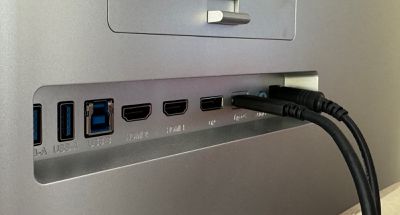 Rear ports
With USB-C, HDMI, and DisplayPort connectivity options, you have an array of choices depending on your setup and you can connect additional devices like an Apple TV or game console thanks to the multiple inputs.
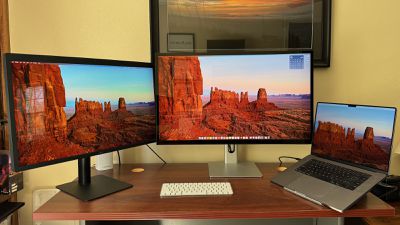
I hooked the Clarity Max Touch up to my 16-inch MacBook Pro with M1 Pro chip and generally used it in a triple-display setup with the Alogic display as my main monitor, a 27-inch LG 5K UltraFine display off to the left as a secondary display, and the MacBook Pro with its built-in display off to the right as a third screen. I tested with both HDMI and USB-C connections and settled on USB-C for the more seamless operation it offered.
My typical desk setup has included a pair of the 5K UltraFine displays, so I've been a bit spoiled by the high pixel density that allows for true Retina quality plus the tight integration with macOS such as support for volume and brightness adjustment right from my Magic Keyboard.
With a lower 4K resolution on a larger 32-inch screen, running the Clarity Max Touch at a Retina size of 1920x1080 isn't a feasible option, as content appears far too large on the screen, which means you're going to want to run it at a higher scaled resolution. I used the 3360x1890 option in macOS for a while but ultimately settled on the maximum 3840x2160 resolution. Content is a bit on the small side, but the benefits of having a huge 4K desktop make it worth it for me.
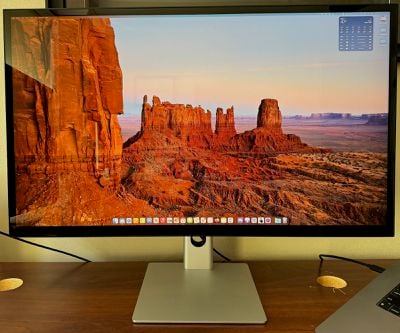
Content certainly is not as sharp as on a Retina display, but when I run it as a full 4K desktop, the content is small enough on the screen that it's not a major hindrance in my opinion. I'm not a high-level photo or video editor, so I'm not heavy into display calibration, but with testing only a few color profiles I was able to find one I was happy with. Depending on color profile, the display can pick up a bit of a pink tint as you move to more severe viewing angles, but as long as I was looking fairly straight-on as I normally would, I didn't notice any color issues.
It's worth noting that the Clarity Max lineup is one of the only display families I'm aware of to offer 32-inch glossy screens as opposed to the matte finishes more commonly found on this size of display. I've found the glossy screen on the Clarity Max Touch allows for good color reproduction, and while it can generate some glare depending on lighting angles, I already have a good desk arrangement that minimizes the issue so it hasn't affected my use of the display.
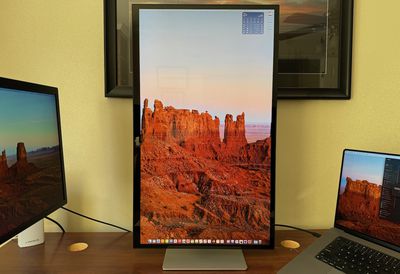
The display does run at a maximum of only 60 Hz, so if you're looking for higher refresh rates, you won't find them here. But for my day-to-day usage that centers around web browsing and other productivity tasks, it's perfectly fine. If you like portrait displays, the Clarity Max models easily rotate to vertical orientation and macOS makes it easy to adjust desktop rotation to match.
If you connect any of the Clarity Max displays to your laptop via USB-C, the display can provide up to 65 watts of passthrough power to keep your computer charged up. That's enough for most of Apple's laptops, although 16-inch MacBook Pro models and higher-end 14-inch models may be able to exceed that limit. But unless you're doing really heavy work, the display's power output should be sufficient for most users, even if it may not be able to recharge a depleted battery as quickly as a more powerful charger.
The 8-megapixel retractable webcam remains hidden within the body of the display while not in use, and it automatically rises whenever an app such as FaceTime, Skype, or Zoom is opened and the display's webcam is selected in the app's settings. The camera automatically retracts when the app is closed or a different camera is selected in the app's settings.
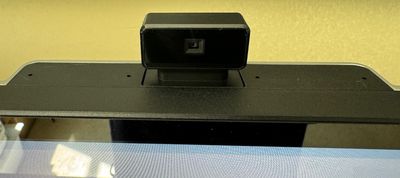 Camera activated
My test unit did ship with a bug that prevented the webcam from retracting once the app requiring it was closed, but a simple firmware update fixed the issue for me and Alogic says units shipping now should come with that firmware pre-installed.
I found the camera quality to be solid, and even a step up from most integrated cameras I've seen in other displays, although it won't be able to match the quality when using an iPhone via Continuity Camera or other higher-end standalone options. While the built-in camera does have some limitations for adjusting the field of view, there is a manual wheel on the rear of the camera housing that allows you to vertically adjust the angle of the camera within the housing to optimize it for your sitting position.
It's worth noting that a motorized retractable webcam is a feature that introduces another place for potential failure in the device, but for privacy-minded folks, it's a nice feature that guarantees the camera can't be remotely activated without your knowledge.
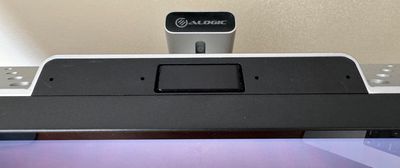 Camera retracted
Power, volume, and on-screen display settings are controlled by a set of buttons on the bottom right edge of the display. It makes for a clean design, although it takes some time to get used to their location and which button does what. The five buttons all feel quite similar to the touch, so you need to make sure you're hitting the right ones as you reach under the display.
Turning to the touchscreen functionality available only on the top-end Clarity Max Touch model, it's essentially identical to the functionality I described in my review of the 27-inch model. It requires installation of several drivers and apps to control the Mac functionality, and while the apps do not offer a native macOS feel, they do support an impressive array of customizability options for the touchscreen feature.
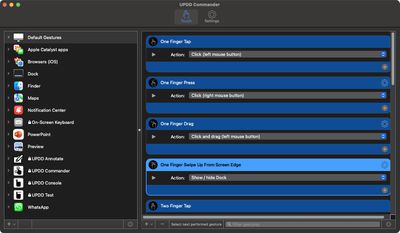 Touch gesture setup
The UPDD Commander app lets you customize various touch options for defaults as well as on a per-app basis, with features like one-finger tap, press, drag, and edge swipe, two-finger tap, drag, pinch, rotate, edge swipe, three-finger tap and swipes, and five-finger pinch expand gestures all supported. The array of gestures can make for an iPad-like experience on a large display in front of you, but my arm does quickly tire if I try to do more than short bursts of touch activity. Some users may also be reluctant to get fingerprints and other smudges on their glossy display, although that wasn't an issue for me with my occasional touchscreen usage and my lighting angles.
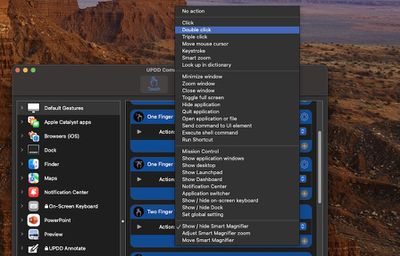 Touch gesture options
Beyond the basic gesture configuration, you can also tweak an array of other settings such as the time limit for a double tap interval, the minimum time for a press gesture versus a tap gesture, the radius around your touch point that the system will look for a clickable UI element, and more.
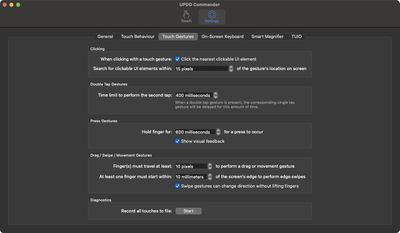 Additional touch settings
If you need precise control such as for drawing apps, you can use a non-capacitive active stylus (an Apple Pencil won't work), and for those looking for an ergonomic display stand to bring the Clarity Max Touch into a better orientation for drawing, Alogic offers a Clarity Fold Stand sold separately for $200.
The touchscreen functionality doesn't turn my Mac into a full touch experience, but I do sometimes find it convenient to just flick the screen to scroll long web pages, use a three-finger swipe to access Mission Control, or use the five-finger pinch expand gesture to get to my desktop. Pinch and rotation gestures are also helpful with some image manipulation tasks.
Wrap-up
The base Clarity Max model is priced at $999.99, while the Clarity Max Pro with retractable webcam is priced at $1,199.99 and the top-of-the-line Clarity Max Touch with webcam and touchscreen capabilities is priced at $1,399.99, but Alogic's sale currently knocks 20% off of those prices with coupon code ALG20.
Overall, I've found the 32-inch Clarity Max Touch to be a solid display if your setup and workflows are compatible with a larger 4K display. The high-end model is on the pricier side of things, but it does come with some extras with the motorized retractable webcam and the touchscreen capabilities and the current sale brings the pricing down quite a bit. And if you don't need one or both of those features, you can step down to one of the cheaper models.
With any of the three models, you get a large desktop canvas on a glossy display, quality construction, a clean design, good connectivity options, and the flexibility of tilt and height adjustments including the ability to swivel the display to a portrait orientation. I do miss the Retina sharpness of my 27-inch 5K LG UltraFine display and the tight macOS integration it offers, but the LG is one of only a few options to offer those features and not at a 32-inch size.
Note: Alogic provided GeekWebGuides with the Clarity Max Touch display for the purposes of this review. No other compensation was received. GeekWebGuides is an affiliate partner with Alogic. When you click a link and make a purchase, we may receive a small payment, which helps us keep the site running.

















































Top Rated Comments
I said I've been spoiled by Retina displays (like the Studio Display, though the LG UltraFines are my daily drivers), and this doesn't match those in that regard. But within the constraints of the pixel density, the quality is perfectly fine, and you can't get the Studio Display in a 32-inch size. The Pro Display XDR will obviously outperform at the same size, but you're going to have to pay a heck of a lot more for that.