

After we published our review of the ClamCase Pro keyboard for the iPad Air 2, some of our readers suggested that we take a look at other iPad keyboards available on the market. We decided to take MacRumors readers up on that suggestion, and over the next few weeks, we'll be looking at several keyboards designed for Apple's newest tablet, the iPad Air 2.
We're kicking things off with a review of the BrydgeAir keyboard, which is able to work with both the original iPad Air and the iPad Air 2. Much like the ClamCase Pro we previously looked at, the all-aluminum BrydgeAir is designed to turn the iPad into a miniature MacBook.
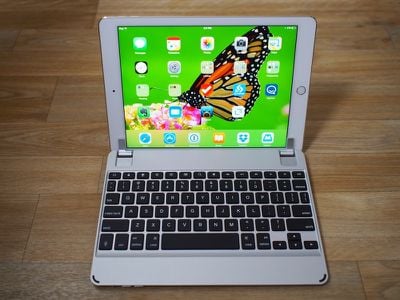
At $169, the BrydgeAir is one of the more expensive iPad keyboards on the market, but that price point comes with some perks not found in many cheaper options -- quality aluminum construction, a fluid 180 degree hinge, built-in dual stereo speakers, and backlit keys.
What's in the Box and Setup
The BrydgeAir comes in a sleek iPad-style cardboard box that contains the keyboard itself, a black USB to micro-USB cable used for charging and a set of extra pads that are designed to make it fit the iPad Air 2.
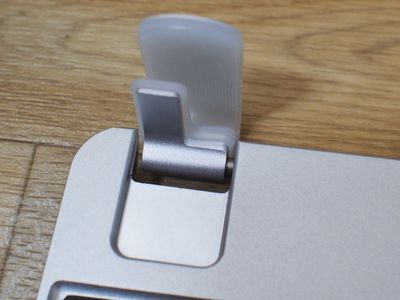
BrydgeAir has designed the keyboard to be compatible with both the iPad Air and the iPad Air 2, and the hinges that hold the iPad in place need extra lining to keep the iPad Air 2 securely in place because it's thinner than the first iPad Air.
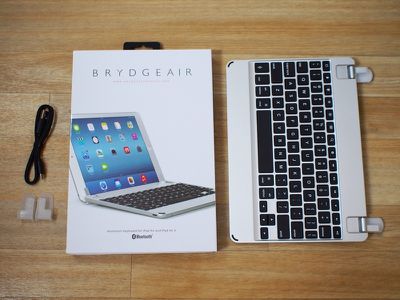
Setting it up for the iPad Air 2 involves carefully removing the existing silicone shims, as BrydgeAir calls them, and replacing them with new ones that are thicker. The instructions said to "make sure there was no remaining glue or residue on the bare hinge" after pulling off the old adhesive shims, but there was no way to get the remaining glue off of the hinges.
We were disappointed that this step was not done by BrydgeAir, as the need to remove the existing set of shims and add a new one seems to compromise the stickiness of the second set of shims. Lining up the new shims and placing them on is a frustrating process right out of the box.
The keyboard pairs to the iPad like any other keyboard. Flick on the power button on the bottom, open the Settings menu, tap the keyboard's pairing button next to the power button, and it's automatically detected and pairs with a tap. The built-in speakers need to be paired separately by holding the speaker pairing button, also located next to the power button.
Design
The BrydgeAir is made from a single piece of aluminum and can be ordered in silver, gold, or space gray to match the design of the iPad. It consists of a keyboard with two hinged silicone-lined tabs at the top to hold the iPad in place, rather than being a full clamshell case like the ClamCase Pro.
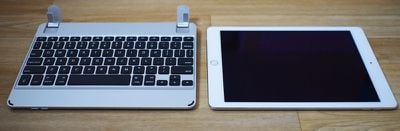
Each of the tabs lines up with the iPad's screen, and holds it securely in place while the keyboard is in use. As mentioned above, the tab lining needs to be swapped out before the keyboard can be used with the iPad Air 2, but once the thicker lining is in place, the iPad fits into the tabs securely.
The hinges rotate 180 degrees, which means the iPad can be placed into several different viewing positions from all the way closed (forwards) to bent flat (backwards). Because it folds closed, the keyboard serves as a cover for the iPad display when shut, but there's no protection for the back of the tablet. The BrydgeAir is landscape only, like many keyboards for the iPad Air 2.
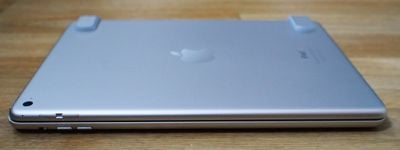
We traveled with the BrydgeAir in a bag next to an aluminum MacBook, and that caused the hinges to become scratched and discolored, but the aluminum of the keyboard itself was fine.
Since the iPad is only held in place with these silicone-lined tabs, it takes just a few seconds to stick the iPad in the BrydgeAir or remove it to use without the keyboard case. With some other keyboard cases, it can be a chore to remove the iPad when you only need the tablet function, but that's not a problem with the BrydgeAir.
Because the keyboard and the iPad match so well, the BrydgeAir makes the iPad look like a mini MacBook. It's a heavy keyboard that weighs over a pound (more than the iPad Air 2), but that weight is important because it makes sure that the BrydgeAir doesn't shift and move while it's being used.
The weight of the keyboard balances out the weight of the iPad, so it never feels like the iPad is in danger of tipping over when using the keyboard. It's also stable on a desk or in a lap, making it perfect for typing while watching television, on an airplane, or in other situations where you may not have a hard surface to work with. One quick note -- due to the way the iPad fits in the BrydgeAir, it's difficult to swipe upwards on the screen to access the Control Center.
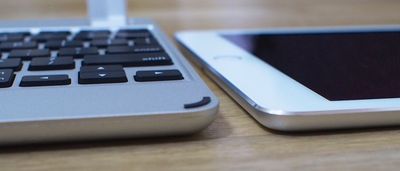
On the bottom of the BrydgeAir keyboard, there are four rubber feet to ensure stability on a desk, and two rubber bumpers on the front area to keep the iPad screen from touching the aluminum. The back edge near the hinge also includes two built-in speaker openings, while the other side includes buttons to turn the keyboard on and off, activate Bluetooth, and turn on the case's speakers.
The Keys
The BrydgeAir's keys feel similar to the keys on a MacBook and are very much comparable to the keys on the ClamCase Pro, but when comparing to a MacBook, it's important to note that the spacing isn't quite the same.
The BrydgeAir is more compact than a MacBook keyboard so the keys are slightly closer together. It's not too difficult to adjust to the smaller spacing, however, and our typing speeds on the BrydgeAir were similar to the typing speeds we were able to obtain on similar keyboards for the iPad. The BrydgeAir also doesn't have the same key travel as the keys on a MacBook Air or MacBook Pro so it's not as "clicky" as a MacBook keyboard, but the keys still feel nice and springy under the fingers.
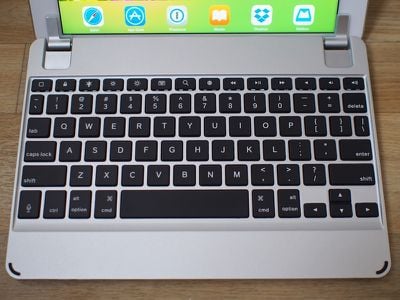
One of the best things about the BrydgeAir's keys is the backlighting. There's an LED panel underneath the keyboard that lights up the keys, making this one of the best iPad keyboards for use in the dark. The lights are controlled by a key on the keyboard, and there are three different brightness settings to suit multiple lighting situations. Many cheaper keyboards don't offer backlighting, and even some of the more expensive options, like the ClamCase Pro, don't have that feature.
Like many keyboards for the iPad, the BrydgeAir has a row of keys at the top of the keyboard that control functions specific to Apple's tablet. There are buttons for going straight to the home screen, locking the iPad, changing the screen brightness, opening up search, activating the on-screen keyboard, changing the keyboard language, controlling the volume, and controlling media.
Other Features
The BrydgeAir keyboard's unique feature is its built-in speakers, which can be used instead of the iPad's speakers. Pairing speakers and the keyboard at the same time via Bluetooth drains a decent amount of battery life and the value that the speakers add over the iPad's own built-in speakers is questionable.
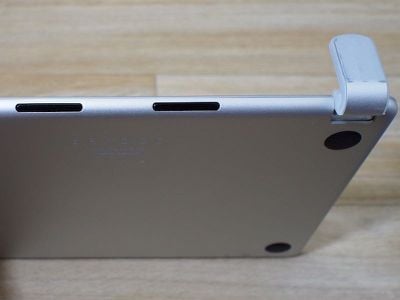
BrydgeAir's speakers are louder than the iPad's built-in speakers, but there didn't seem to be a noticeable difference in sound quality. The speakers are located at the back of the keyboard so sound is still directed away from the user, which doesn't seem like much of an improvement compared to using the iPad's own sound.
To preserve battery when not in use, the speakers can be turned off by holding down the speaker button on the bottom of the keyboard for four seconds. Turning them on again is done the same way.
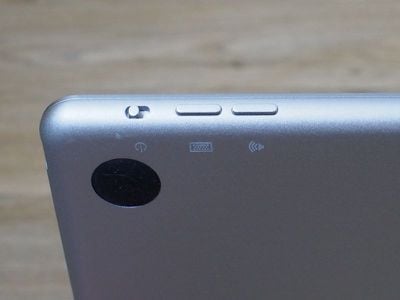
With the speakers and backlighting turned on, the BrydgeAir's battery lasted for approximately two weeks of regular use, but without the speakers and backlighting, it should be much longer. The BrydgeAir website says the battery lasts for three months. There's no way to tell what the battery level is at unless it's running low, which is a bit of a negative. When low, the backslash key will flash blue.
Who's it For?
If you're looking for an iPad keyboard that will let you type nearly as fast as you can type on a MacBook Air or Pro, the BrydgeAir is a good option. It has a solid build quality that outshines most of the other iPad keyboards on the market, but keep in mind -- this is a heavy keyboard.
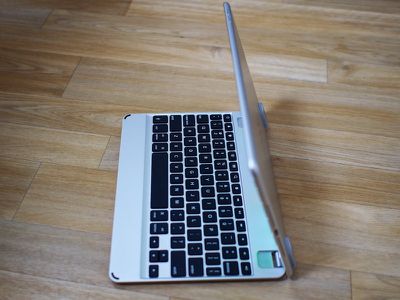
The BrydgeAir is going to add a pound of weight to your iPad, so it's not the best option for frequent travel. Unfortunately, the speakers seem like more of a gimmick than a truly useful feature, but the backlit keys and the overall design of the keyboard make up for it. For those who don't mind the weight, the BrydgeAir is a keyboard that looks and feels worth its premium price tag. If you're looking for a keyboard that's versatile, easy to use, simple to remove, and has MacBook-style qualities, you won't go wrong with the BrydgeAir.
Pros:
- Solid construction
- Balanced weight
- Hinge for multiple viewing angles
- Backlit keys
- MacBook-style key spacing and feel
Cons:
- It's heavier than the iPad and not great for travel
- Speakers more gimmicky than actually useful
- Setting it up for the iPad Air 2 is a hassle
- Expensive
How to Buy
The BrydgeAir for the iPad Air and iPad Air 2 can be purchased from the BrydgeAir website for $169. The site also sells iPad keyboards for older versions of the iPad, and it offers several accessories for the BrydgeAir, including a sleeve and a protective shell for the iPad.
Update: Beginning in mid-April, all BrydgeAir keyboards will ship ready for the iPad Air 2, rather than the iPad Air. The default shims included on the keyboard will be for the iPad Air 2. Optional iPad Air shims will also be included in the box.

















































Top Rated Comments
I use SimpleMind. I appreciate that there are versions for Android, Windows, OSX, and iOS... and use them all for the various devices that I use.
Nice. I use nvAlt for my plain-text notes... stored on DropBox. This gives me the option to be cross-platform with notes as well....
Windows=ResophNotes
Android=Draft
iOS=Notesy, WriteRoom, PlainText
OSX=nvAlt
This keyboard looks like a great option. I use the Logitech Ultrathin keyboard cover on my iPad, but if Apple isn't forthcoming with an iPad Pro, I would definitely consider an iPad Air 2 with this keyboard.
I have the BrydgeAir Keyboard and use it with my iPad Air 2. For the most part, I love it. Two things that I don't like:
1) the magnet in the keyboard doesn't sleep/wake the iPad Air 2, only the 1. They say that will be fixed in the next version...
2) the keyboard goes to sleep WAY too early.. I haven't time it, but it seems like 3 or 4 minutes. To wake it up, you press any key, but you have to wait about 3 seconds before it comes back to life. I like to read things on my iPad and I scroll with my finger so often times the keyboard goes to sleep, then I go to type something, and the first few letters are missed because the keyboard is still waking up. It drives me ABSOLUTELY CRAZY. The company has told me the next version will also address this issue by perhaps allowing the user to change the time-out value, but the current version will never have that ability.
Because of issue #2, I highly recommend that iPad Air 2 users WAIT for the next version of the BrydgeAir!!
-chris
I think it depends on what you're looking for. If you want full iPad protection, ClamCase Pro is better because it covers the back. If you want a case that's easier to remove, this one is superior. This one is also entirely aluminum, whereas ClamCase Pro is an aluminum keyboard with a plastic shell.
360 degree hinge on the ClamCase Pro is undeniably handy, but so are the backlit keys on the BrydgeAir.