
Dotti and Notti iPhone-Controlled Lights Review - MacRumors
Skip to Content

Review: Dotti and Notti Are Fun iPhone-Controlled Smart Lights That Deliver Notifications

by

Dotti and Notti are small iPhone-controlled smart lights created by design company Witti. More fun than practical, the two lights connect to an iPhone over Bluetooth, allowing their colors to be changed and letting them light up when a notification is received.

Notti, the more inexpensive of the two at $60, is an angular light that somewhat resembles a candle. Dotti, priced at $80, is a square pixel light with 8x8 grid of LEDs that can be arranged into different pixellated shapes and colors.
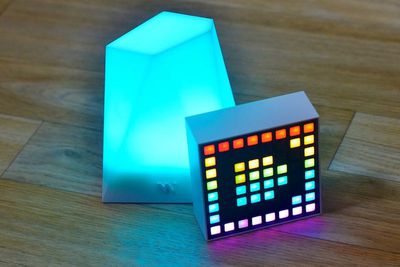
dottiandnottitogether
I went hands-on with the Notti and Dotti and after a couple of weeks, I can say that they're both well-designed, fun to play with, and make nice desk or table decorations.

Notti

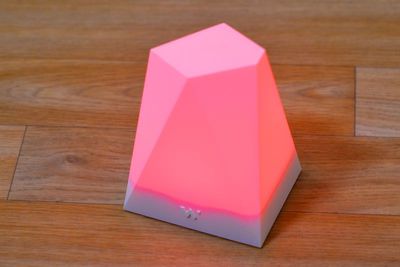
Notti is the more simple light of the two. Made of opaque white plastic, it's got a faceted, angular design that looks attractive, especially when lit. It's a nice mood light for a living room or bedroom, measuring in at 10cm x 7.5cm x 6cm. Notti has a built-in battery that will last for up to five hours when the light is turned on, and up to 720 hours in standby mode while waiting for a notification to come in.
nottiinpink
When the Notti is first turned on via a small button on the front of the light, it's bright green, but with the accompanying Notti app, it can be changed to any color. The Notti pairs with an iPhone automatically once the app has been installed. Lights don't photograph quite as saturated in as they are in real life, so when looking at photos of Notti and Dotti, keep that in mind. The colors are actually deeper and more vivid.
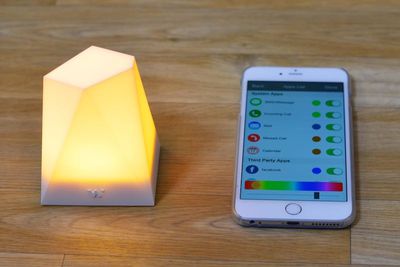
nottiwithiphone
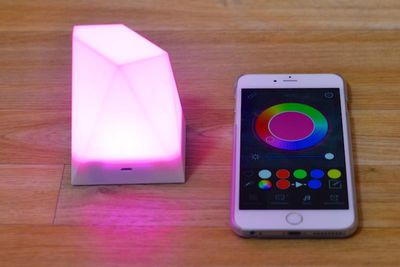
With the app, you can control both color and brightness with a color wheel, resulting in a lot of different combinations. LEDs in some colored lights can't do certain shades like blue and green, but the Notti does well with these these colors.

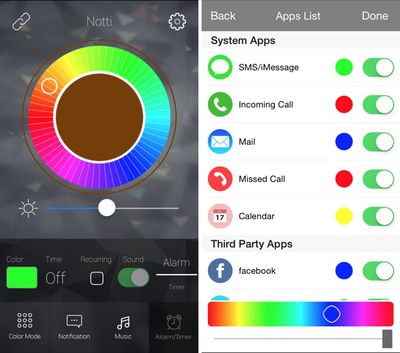
App features include a rainbow mode that cycles through colors continuously, an alarm mode, and a mode that lets the Notti flash along with the tempo of a song. The app's most important feature is a notification setting that works while the Notti is in standby, flashing in a specified color whenever a notification is received.

Several system apps work with Notti, including SMS/iMessages, phone calls, Mail, missed calls, and Calendar. It's also compatible with third-party apps including Facebook, Twitter, WhatsApp, Wechat, Facebook Messenger, QQ, Line, Weibo, Skype, Google+, Instagram, Viber, IFTTT, Hangouts, Kakaotalk, and Telegram.
nottiapp
Notti only works with the above listed apps, so there's no way to set it to deliver a notification for an app like Tweetbot, Mailbox, or Fantastical, which is a bit of a downside if you use a lot of unsupported apps. You can also only receive notifications for four third-party apps at one time.
nottinotifications
When a notification comes in for one the supported apps, the Notti flashes in your chosen color, and it's impossible to miss. With the Notti set up alongside all of my iOS devices and Mac, when I get an incoming call, there's a bright flashing green light, my iPhone rings, my iPad rings, my iPad mini rings, my Mac rings, and my Apple Watch rings. It's a circus of light and sound.

Notti's app isn't perfect. There are a few misspellings, the interface could be better, and choosing colors for notifications could be more clear, but on the whole, it works, as does the notification feature. I tested Notti with several of the apps it's compatible with, and notifications were successfully delivered with each one.

I don't think most people need the Notti for notifications because our iPhones, Macs, and Apple Watches do a pretty solid job of letting us know when we receive a message, but it's a fun feature and it's potentially useful if you do need visual notifications. Notti's also fun at parties, it's nice to use as a nightlight when you get up at night for a drink, and on a low setting, you could plug it in and leave it on in a child's room. It's also a nice little mood light that pairs well with existing lighting systems, like the Philips Hue.

Dotti

Dotti and Notti are two completely unique lights. While Notti's a faceted jewel-like light, Dotti is a square light (7.7cm x 5.2cm x 5.2cm) with 64 LEDs that can be used to make pixellated light art with the accompanying Dotti app. It reminds me of a Lite-Brite and it's fun to fiddle with when you're bored or stressed out and need to relax for a few minutes.
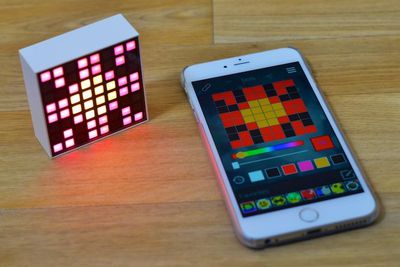
dottiflowerdesign
Dotti's design may seem familiar -- it's quite similar to the L8 SmartLight that was available via Kickstarter in 2012, but that product is not available and it's received poor reviews from backers. The Dotti looks similar, but it lacks some of the L8's sensors (it promised proximity, temperature, and luminosity sensors) and its performance issues.

Like the Notti, the Dotti has a built-in battery so it can be used without a cord, and it lasts the same length of time before needing a charge. The Dotti has no physical buttons, instead using a touch panel at the top of the light. It turns on with a hard press and swiping along the top of the panel can switch between modes, displaying favorite icons, animations, a clock, and more.
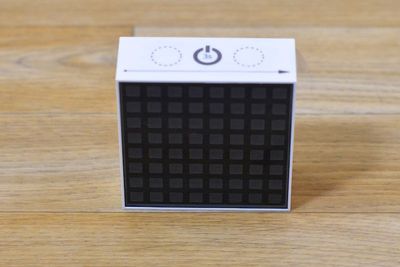
dottiblank
Though square at the front, the backside of the Dotti has a faceted design like the Notti. I'm not sure if this was done to accommodate battery or if it was a design decision, but the faceting makes the light's body more visually interesting.
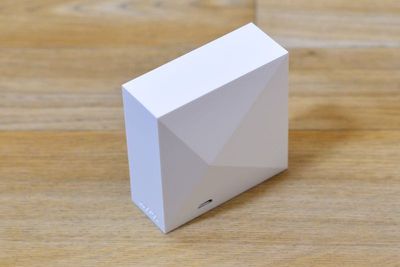
dottibackside
Dotti connects automatically to the Dotti app, which is used to control each of the LEDs. The app displays a grid and a color palette, and creating a design is done by tapping each square in the grid. You can choose from several different colors and color intensities while making a design, with black turning off an associated LED.

There are several preconfigured favorites built into the app to select, from including a happy face, a heart, a Batman symbol, a mushroom, and a Pac-Man. There's also an animated scene, which you can customize. You can save your own animated design and pixel art creations, but you have to overwrite the preconfigured content.
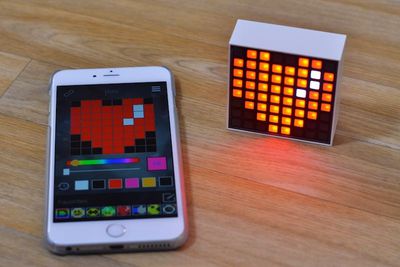
dottiheartdesign
You can only save eight designs and one animated scene in the Dotti app, which is kind of non-sensical. The app would be a lot more useful if it could store many more designs.

With music on, Dotti will show a visual synthesizer, and there's a clock mode that'll display the time. It's a little hard to read (that's 21:49 in the image below). There's even a built-in dice game, which you can activate by shaking the light. Each shake rolls the dice again.
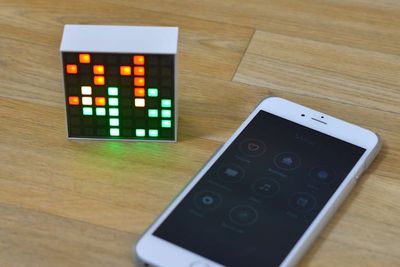
dotticlock
Like the Notti, one of Dotti's major features is the ability to display incoming notifications. It works with all of the same apps and features on the iPhone as the Notti, but it displays notifications as a pixellated app icon. Dotti's display notifications can't be customized -- they're preconfigured for each app. Each notification will flash until you touch the top of the light to dismiss it or until you clear the notification on your phone.
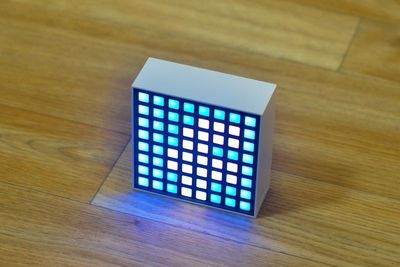
dottifacebooknotification
Dotti has a lot of functionality, but it's not all easy to access because the touch panel at the top of the light isn't intuitive. Luckily the Dotti's core features -- drawing and notifications -- work well without needing the touch panel, and many of the additional features can also be accessed within the app. The Dotti app could definitely use improvement. A $79 light should support a lot more saved animations and art.
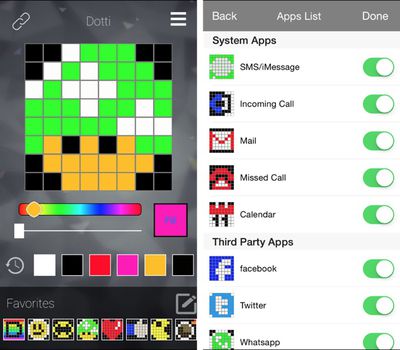
dottiapp

Bottom Line

Both the Dotti and the Notti make fun desk toys, but it's hard to see them as anything but toys. The Notti is somewhat more versatile because it can serve as a mood light or an alarm clock, but the Dotti may be something that most people will play with for a few weeks and then set aside.

Most of us have enough ways of receiving notifications, but if you use the supported apps a lot and like to keep your phone tucked away while at the office, the Notti and Dotti are both going to do an excellent job letting you know when you're getting an email or phone call. There are some people who will find the visual notifications to be highly useful -- for those hard of hearing, the Dotti and the Notti could be far more than just toys.
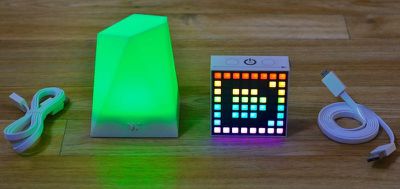
nottidottiwithcables
Both the Dotti and Notti apps could use improvement, and both lights would be a lot more valuable if the notifications were more customizable. Being able to use the Dotti and Notti with the apps that I actually use would have made them a lot more useful to me. That said, even with somewhat subpar apps, the lights still do a lot of things well.

Nobody needs the Dotti or the Notti, but they're one of those nifty little gadgets that's just nice to have.

How to Buy

Dotti and Notti can be purchased from the Witti website. Dotti is priced at $79.99 and Notti is priced at $59.99.

Note: MacRumors received no compensation for this review.

Update 6/23: According to Witti, the Dotti app will be updated in the future to be able to support more than eight saved images and more than a single animation. Users can also email [email protected] to request third-party app additions to the Notti and Dotti apps.

Top Rated Comments

jclo Avatar
148 months ago
Juli, if this is a sponsored endorsement it is common courtesy to inform your readers of that fact.

Having said that, it does seem like a cool little gadget. Wouldn't mind getting either of these for Christmas or something, but I wouldn't actively go out and buy one.
MR, comments like the one above from DavidTheExpert seems to always show up, every time you do a product review. Maybe it would be good to have a separate section just for reviews to make it clear.

On the second comment from DTE, I agree that it is cool little toy. Having Hue bulbs already, I will wait for the HomeKit integration.
For awhile I had been adding a line at the end of each review that specifically said we received no compensation, but I thought we might be beyond those types of comments after several months. Apparently not. I've added the disclaimer to this post and will do so going forward.


David, this is not a sponsored endorsement. Sounding like a broken record here, but we do not do paid or sponsored posts or reviews.

Edit: Also, in the future, please feel free to email us with your concerns about a post ([email protected] or [email protected]) or post in the Site and Forum Feedback section of the forums. This discussion belongs there.
Score: 5 Votes (Like | Disagree)
148 months ago
Dotti and Notti are small iPhone-controlled smart lights created by design company Witti. More fun than practical, the two lights connect to an iPhone over Bluetooth, allowing their colors to be changed and letting them light up when a notification is received.

Notti, the more inexpensive of the two at $60, is an angular light that somewhat resembles a candle. Dotti, priced at $80, is a square pixel light with 8x8 grid of LEDs that can be arranged into different pixellated shapes and colors.


I went hands-on with the Notti and Dotti and after a couple of weeks, I can say that they're both well-designed, fun to play with, and make nice desk or table decorations.

Notti

Notti is the more simple light of the two. Made of opaque white plastic, it's got a faceted, angular design that looks attractive, especially when lit. It's a nice mood light for a living room or bedroom, measuring in at 10cm x 7.5cm x 6cm. Notti has a built-in battery that will last for up to five hours when the light is turned on, and up to 720 hours in standby mode while waiting for a notification to come in.


When the Notti is first turned on via a small button on the front of the light, it's bright green, but with the accompanying Notti app, it can be changed to any color. The Notti pairs with an iPhone automatically once the app has been installed. Lights don't photograph quite as saturated in as they are in real life, so when looking at photos of Notti and Dotti, keep that in mind. The colors are actually deeper and more vivid.


With the app, you can control both color and brightness with a color wheel, resulting in a lot of different combinations. LEDs in some colored lights can't do certain shades like blue and green, but the Notti does well with these these colors.


Click here to read more... ('https://www.geekwebguides.com/review/dotti-notti-iphone-controlled-smart-lights/')

Article Link: Review: Dotti and Notti Are Fun iPhone-Controlled Smart Lights That Deliver Notifications ('https://www.geekwebguides.com/review/dotti-notti-iphone-controlled-smart-lights/')
Love your random reviews of sundry Apple-related gear. Keep up the good work, and ignore the knuckleheads who assume it's sponsored content.
Score: 3 Votes (Like | Disagree)
ArtOfWarfare Avatar
148 months ago
Juli, if this is a sponsored endorsement it is common courtesy to inform your readers of that fact.
They covered the pros and the cons - this doesn't read like an ad to me, but a third party review.
Score: 3 Votes (Like | Disagree)
148 months ago
Juli, if this is a sponsored endorsement it is common courtesy to inform your readers of that fact.

Having said that, it does seem like a cool little gadget. Wouldn't mind getting either of these for Christmas or something, but I wouldn't actively go out and buy one.
Score: 2 Votes (Like | Disagree)
148 months ago
I made something very like this with my kids using an Arduino, a bunch of Neopixels and an opaque Kilner jar. They use it as a nightlight that they can change the brightness/color on. These look nice, but if you're into making stuff, I can definitely recommend the home-brew route...
Score: 1 Votes (Like | Disagree)

Popular Stories

M5 MacBook Pro

RIP, MacBook Ultra

Monday October 19, 2026 9:37 am PDT by
Apple today sent out invites for an experience in Los Angeles on Wednesday, October 28, and the "Pro and tell" tagline on the invitation likely means that the rumored MacBook models with touch-enabled OLED displays will stick with MacBook Pro branding instead of the once-rumored "MacBook Ultra" name. The long-rumored "iPhone Ultra" ended up being named iPhone Duo, so speculation that Apple...
iPhone Duo Trio

Here's What Apple's Apps Look Like on the iPhone Duo

Tuesday October 20, 2026 11:12 am PDT by
With just three days to go until the iPhone Duo is released, Apple is getting ready for the launch. Behind the scenes, the App Store now has screenshots of Apple's built-in apps running on the Duo. We've seen some apps in marketing materials, but images of the ones we haven't seen give us an idea of what it will be like using the iPhone Duo day to day. Many apps are shown in landscape...
apple pro tell logo

Apple Announcing New Products Next Week: 'Pro and Tell'

Monday October 19, 2026 9:05 am PDT by
Apple's Greg Joswiak today hinted at new product announcements coming next week, sharing a social media post that says "Can't wait to pro and tell next week." Rumors suggest Apple is planning to debut the new MacBook Pro with an OLED touchscreen display, an M6 entry-level MacBook Pro, an M6 iMac, an iPad mini with an OLED display. Can't wait to pro and tell next week....
Latest Stories
Apple Pulls Keynote, Pages and Numbers From App Store
14 minutes ago
Apple Updates More Apps With iPhone Duo Support
44 minutes ago
Apple Will Label Apps 'Made for iPhone Duo' in App Store
4 hours ago
Amazon Takes $49 Off iPad With Prices Starting at $399.99
4 hours ago
F1 on Apple TV Now Available in Dolby Atmos
5 hours ago
Apple Reveals More Than 50 Apps That Will Be Updated for iPhone Duo
5 hours ago
Apple Blocks Certificates That Could Help Attackers Fake Websites
7 hours ago
Giant iPhone Duo Installations Spotted at Apple Fifth Avenue
7 hours ago
iPhone Duo 2 Prototypes Include Under-Display Face ID
7 hours ago
Tesla App Gains iPad and iPhone Duo Support
11 hours ago
Apple Reportedly Boosts iPhone Duo Orders by 44%
12 hours ago
Fortnite Returning to Australian App Store After Court Ruling
12 hours ago
Apple Ordered to Open iPhone to Rival App Stores in Australia
13 hours ago
Apple Suppliers Face Hurdles Cutting Circuit Board Emissions
13 hours ago
Things Updated for iPhone Duo With Adaptive Layout
13 hours ago
Simplicity and Siri AI Are HomeView's Killer Features, Apple Says
14 hours ago
iPhone Duo Reviewers Really Miss Face ID
19 hours ago
Does the iPhone Duo Run Hot? Here's What Reviews Found
20 hours ago
Apple Music's New Look is Now Live on Apple's Website
21 hours ago
Anthropic Launches Claude Duet, a Proactive AI Agent
21 hours ago
What 32,000 Folds Did to the iPhone Duo's Hinge
22 hours ago
iPhone Duo's Hidden FaceTime Camera Takes 'Trash' Photos
1 day ago
iPhone Duo Has 'Edge Light' Feature That Debuted on Macs Last Year
1 day ago
Apple Support App Updated for iPhone Duo's Larger Display
1 day ago
Amazon Sweetens the Deal on Entry-Level 16-Inch MacBook Pro With $570 Off
1 day ago
iPhone Duo Tips Over on MagSafe Stands When Unfolded
1 day ago
Apple Music's New Look Officially Announced
1 day ago
iPhone Duo Supports Apple Pencil Starting With iOS 27.2
1 day ago
iPhone Duo Accessories Roundup: Cases and Screen Protectors From OtterBox, ZAGG, and More
1 day ago
Apple Stores Will Have 'Limited' Availability of iPhone Duo for Walk-In Customers
1 day ago










































