

When the first iPhones launched with wireless charging capabilities, many of the first wireless charging accessories designed for the new devices were the plain, flat wireless charging pads.
Now that companies have had time to innovate and come up with more efficient charging solutions, we're seeing more and more upright wireless charging stands, like iOttie's new iON Wireless Charging Stand.
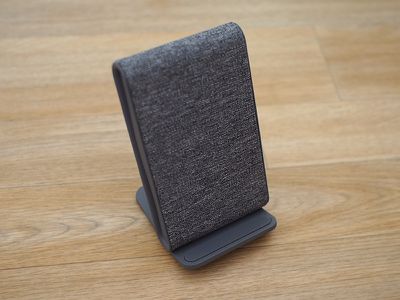
Upright wireless charging stands offer several benefits over the flat wireless charging options, and are by far my favorite charging solutions for the iPhone X and new iPhone XS models. With a wireless charging stand, it's impossible to place the iPhone at the wrong position for charging to start automatically, which is not the case with flat charging solutions.
When I'm using a flat pad, I have on multiple occasions put the iPhone a little bit left or right of the center of the built-in charging coil, which means it won't charge. Then I have to adjust multiple times and double check to make sure everything is lined up.
With the little shelf that's available on upright stands, there's basically no room for error when positioning the iPhone, so it's better for peace of mind, especially when charging an iPhone on a wireless charger at night. And, in addition to the no-hassle charging, upright stands offer the benefit of being able to look over and see the iPhone's screen at a glance.
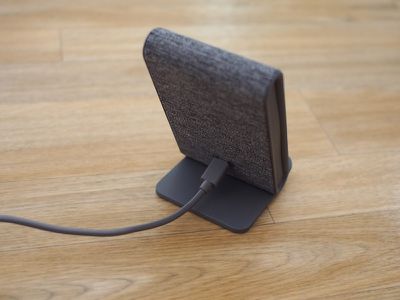
iOttie's iON Wireless Stand, like its flat charger, is one of the more unique wireless charging accessories I've run into. It's actually almost identical in design to the iON Fast Charging Pad Plus and the iON Fast Charging Pad Mini, but it's a stand instead of a pad.
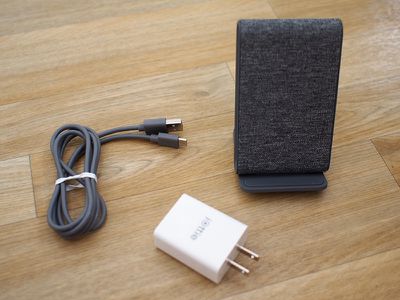
The iON Wireless Stand is covered in an attractive tweed-style fabric that's available in gray, beige, and red, with the gray pictured in my images. It's a little more professional looking than your average plastic charging stand, so I think it's a great option for an office. It does, of course, look just as attractive at home on a desk or a night stand.
Size wise, the stand has a fairly small base (right around two inches square) so it's not going to take up as much room as one of the flat charging options.
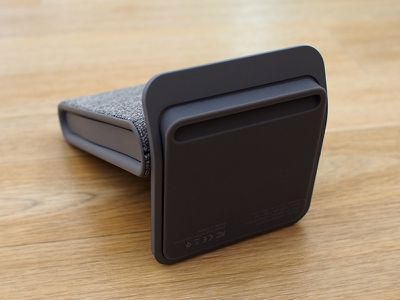
At the bottom of the iON Wireless Stand, there's a grippy rubber pad to make sure that it stays in place on a flat surface without slipping around, and a plastic shelf at the bottom of the charger holds the iPhone in place. The shelf is covered with the same rubber material to ensure your iPhone is secure.
My phone didn't slip or move while on the iON Wireless Stand, but these upright chargers are more prone to being knocked over or bumped which is something to be aware of. There are no side bars holding the iPhone in place on this stand, so if you give it a good knock, your iPhone runs the risk of falling off.
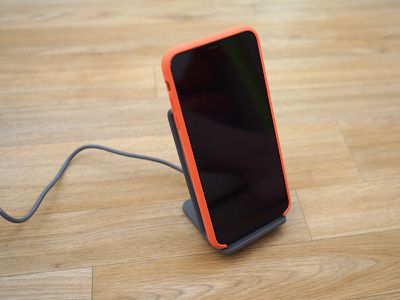
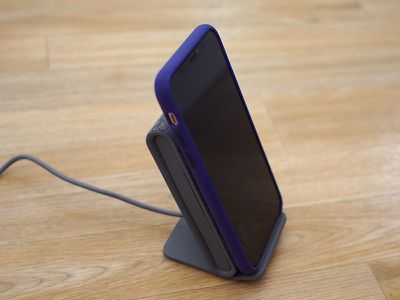
iOttie designed the iON Wireless Stand to be just a bit narrower in width than the iPhone X and XS, so when your phone is on the stand, the stand is hidden from view from the front.
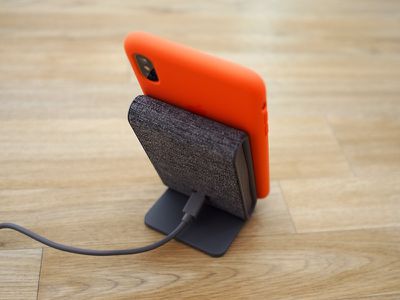
At the back of the stand, there's a USB-C port where the USB-C to USB-A cord plugs in to the charging brick that's included with the stand. On the right side, there's an LED that lights up while charging is taking place. The LED is a distraction, but it's not so bright that it can't be used at night in a dark room.
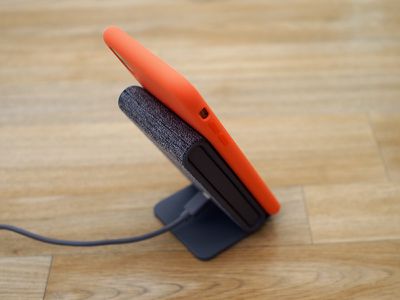
What I like about the iON Wireless Stand in addition to the fabric design is the 65-degree angle of the charging plate that the iPhone rests against. It's in an ideal position for looking over at the iPhone when a notification comes in or glancing at the time at night. It can double as a stand for watching portrait or landscape videos.
Speaking of landscape mode, you can charge an iPhone on the iON Wireless Stand in either portrait or landscape orientation because there are two coils inside of it, which means the corresponding coil in the iPhone lines up properly in either position.
Like iOttie's other wireless charging options, the iON Wireless Stand charges compatible iPhone models at 7.5W, the maximum wireless charging speed for Apple's current crop of devices. Android devices charge at a faster 10W pace.
7.5W charging is not all that much faster than 5W charging in most charging conditions, but it is going to give you a little more juice.
I drained my iPhone X to 1 percent battery life, put it in Airplane Mode, and put it on the iON Wireless Stand to charge for an hour, which is the same testing protocol that I use for all wireless charger reviews.
In a one hour period, the iPhone X charged up to 38 percent, which is in line with the charging speeds that I saw from iOttie's other 7.5W charging options and 7.5W charging pads from other companies.
Wireless charging is temperature dependent so the 38 percent metric was with the ambient room temperature at about 74 degrees. When it's colder in the winter, I've seen 7.5W wireless chargers charge to about 45 percent within an hour.
I tested the iON Wireless Stand with a standard Apple Silicone case, but iOttie says it'll work with cases up to 7mm thick.
Bottom Line
Now that Apple has embraced Qi wireless charging, there are hundreds of wireless charging accessories on the market at a range of price points. You can get cheap 5W wireless charger on Amazon for about $10 and there are a lot of 7.5W chargers out there now that aren't too much more expensive.
At $49.95, the iON Wireless Stand is pricier than those plain charging pads you can get on Amazon, but I think for some people, the convenience of an upright stand and the design of the iON may be worth the price.
When compared to other premium upright wireless charging stands from Logitech and Belkin, iOttie's solution is competitively priced at $20 less, making it an attractive choice for those looking for a quality charging stand.
How to Buy
iOttie's iON Wireless Stand can be purchased from the iOttie website for $49.95 or from Amazon for $44.95.
Note: iOttie provided MacRumors with an iON Wireless Stand for the purpose of this review. No other compensation was received. MacRumors is an affiliate partner with Amazon and may earn commissions on purchases made through links in this article.





















Top Rated Comments
https://www.amazon.com/gp/product/B079KSSY9G/ref=oh_aui_search_detailpage?ie=UTF8&psc=1
[doublepost=1538794138][/doublepost]....
[doublepost=1538794335][/doublepost]depends where you have this but I don't have to use two hands. I dont look and I just put it on top of my bed stand. If I see a notification I want to respond to I use one hand to pick it up and use it for a little bit and put it back down. Its much more convenient then having a cable.
[doublepost=1538931406][/doublepost]My iOttie iON Stand arrives today. Will report back after some time using it.
Edit: AND as usual, USPS shows item has been delivered but never actually attempted delivery. UGH.