

Earlier this week, Kensington launched its entry into the Thunderbolt 3 dock market with its SD5000T Thunderbolt 3 Docking Station, an enterprise-focused accessory that incorporates a couple of unique features in the form of a Kensington lock slot and the ability to mount the dock to the rear of VESA-compatible displays for "Zero Footprint Mounting" with a separate bracket accessory.
I've since had a chance to spend some time with the SD5000T, so I've been able to test it out to see how it stacks up against the competition.
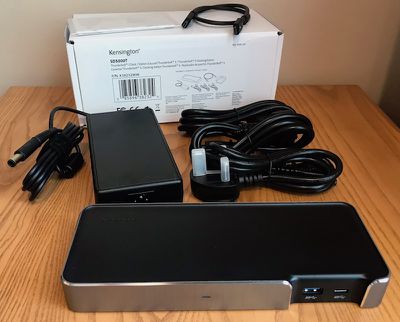
The dock arrived in a plain white box with a product label on it, which Kensington tells me is the B2B packaging. Retail units will obviously have fancier packaging.
Inside the box was the dock itself, a large power brick identical to ones used by many of the other Thunderbolt 3 docks, and a 0.5-meter Thunderbolt 3 cable. Kensington also includes three separate power cables with compatibility for the major US, UK, and mainland European standards.
The SD5000T is fairly attractive, constructed primarily of matte black plastic with a band of brushed aluminum with chamfered top edges around all four sides of the dock except for the two front USB ports. The gap in the aluminum band around the USB ports provides a bit of visual interest without being overly distracting.

Kensington's dock has a horizontal design very similar to most other Thunderbolt 3 docks on the market, measuring about 8.5 inches wide by about 3.35 inches deep by just about an inch high and weighing just over three quarters of a pound. A small Kensington word mark is molded into the plastic on the top left rear corner of the dock, but it's a subtle inclusion that doesn't distractingly stand out like the branding on some other docks.
Setup is a breeze, requiring the power brick be plugged in and connected to the dock and the Thunderbolt cable connected from one of the ports on the back of the dock to the computer. Any other cables for peripherals and displays are easily connected to the dock. When the dock is powered on, a subtle blue light shines on the front to indicate its status. The SD5000T supports a full 85 watts of charging over Thunderbolt 3, so it can power even a 15-inch MacBook Pro over the same cable used to pass data and video.
I own a number of displays, most of which are VESA-compatible, but none of them will work with Kensington's Zero Footprint Mounting solution, and that's the problem with this feature. All of my VESA displays require that you remove the foot from the display and attach a separate backplate that includes the VESA mounting holes.
If you use these displays sitting on a desk as I and many other people do, you can't also mount Kensington's dock on the back of the display. There are, however, some displays on the market that do include accessible VESA mounting holes even with the display's foot attached, so if you have one of those monitors this would be a great way to get the dock off of your desk.
As with the other Thunderbolt 3 docks I've looked at, I tested Kensington's dock with a 2016 MacBook Pro and a pair of LG UltraFine 5K displays over Thunderbolt 3, one connected via the dock and the other hooked up directly to the MacBook Pro. The display connected via the SD5000T worked just fine, utilizing its full 5K Retina resolution at 60 Hz. Alternatively, you can connect a pair of 4K displays to the dock, one over Thunderbolt 3/USB-C and one over DisplayPort. Other standards like HDMI and VGA can also be used with appropriate DisplayPort adapters.
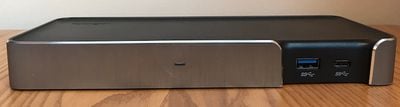
The SD5000T includes a trio of USB ports running at 5 Gbps, one Type-A and one Type-C on the front and one Type-A on the rear. It's a pretty typical number of USB ports for docks like this and a Type-C option is a nice inclusion, but I still wish Kensington and other manufacturers would match OWC's five USB ports for maximum flexibility.
Connecting a fast USB 3.1 Gen 2 external SSD to the MacBook Pro through the dock yields read and write speeds of around 350 and 320 MB/s respectively through both the Type-C and Type-A ports on the dock, on par with 5 Gbps USB ports on other Thunderbolt 3 docks I've tested.

That's a bit slower than 420/410 MB/s speed seen when the SSD is connected directly to a 5 Gbps MacBook and can't compare to the ~500 MB/s speeds seen when connecting it directly to the 10 Gbps MacBook Pro, but it's still plenty speedy for most uses.
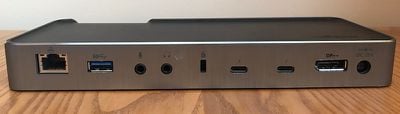
Other ports on the rear of the dock include Gigabit Ethernet and separate 3.5 mm audio in and out ports. Kensington's famous lock slot is also included, and while it's not really necessary in my home office, institutional customers will no doubt appreciate the added security.
At a list price of $350, Kensington's SD5000T comes in at the high end of Thunderbolt 3 docks, matching Belkin's dock and priced $50 higher than similar offerings from OWC, Elgato, and CalDigit. While general consumers may find it hard to justify the high-end pricing, institutional customers could be more willing to spend a bit more to get features like the Kensington lock slot and VESA mounting option (mounting plate sold separately for $9.99), as well as a three-year warranty that more closely aligns with typical replacement cycles than the shorter warranties offered on competing docks.
The Kensington SD5000T is available now from Kensington for $349.99, but B&H Photo is currently offering it at a discounted price of $299.95. B&H Photo does not yet have the dock in stock, however, and it is expecting orders to ship out around June 30.
Note: Kensington provided the SD5000T Docking Station to MacRumors free of charge for the purposes of this review. No other compensation was received. MacRumors is an affiliate partner with B&H and may earn commissions on purchases made through links in this article.




















Top Rated Comments
Docks have one job - provide lots of ports. This is a big, expensive, dock. So provide lots of ports. At the moment it's being beaten by cheap $5 USB 3 hubs. I don't particularly want to be strapping another hub onto a dock onto my laptop.