

Thunderbolt 5 is a technology that's only recently been adopted by Apple, and Thunderbolt 5 SSDs aren't yet common. Other World Computing, or OWC, has one of the first Thunderbolt 5 SSDs on the market.
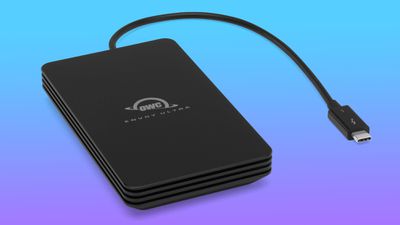
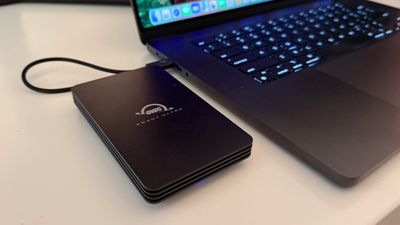
The bus-powered Envoy Ultra is priced starting at $330, and it comes in 2TB or 4TB capacities. The SSD has a premium feel, with a black aluminum enclosure and an internal design meant to dissipate heat. It's not the most compact SSD, measuring in at 5.1 inches long, 3 inches wide, and 0.8 inches thick. It weighs 0.75 pounds, so while it tucks away easily in a bag, you're not going to want to haul it around in a pocket.
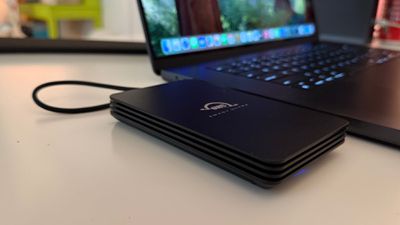
According to OWC, the SSD has an IP67 dust and water resistance rating, so it can hold up to temporary immersion in water (though make sure the cable end is dry before use). It's hefty and durable, but on a negative note, it has a built-in 9-inch Thunderbolt 5 cable that is not detachable. I am not a fan of built-in cables, but it does feel securely attached. How it'll hold up for years of use remains to be seen. If the Envoy Ultra's cable is damaged, the SSD can be sent in to OWC for repair. At this time, the cable is not sold separately for self repairs, but the enclosure does open to facilitate a cable swap.
The cable is fixed because of Thunderbolt 5 certification requirements and power draw, with a shorter cable able to mitigate power loss and deliver more power to the SSD for better performance.
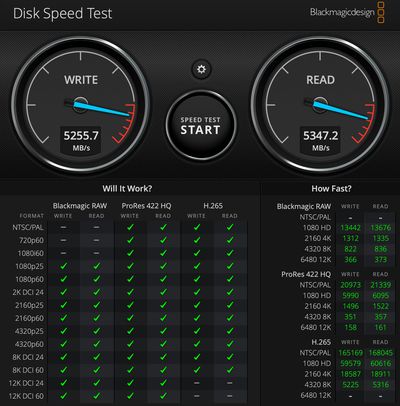
The SSD can reach speeds up to twice as fast as Thunderbolt 4/USB4 SSDs, maxing out at over 6,000MB/s. In testing with an M4 Pro MacBook Pro with Thunderbolt 5, I didn't quite hit that maximum. In benchmark tests with BlackMagic, it maxed out around 5,255MB/s write and 5,347MB/s read. Real world file tests were super quick, with 50GB transferring in about 15 seconds.
According to OWC, with sustained file transfers, write speeds will drop to around 1,350MB/s for the 2TB model and 1,700MB/s for the 4TB model, while read speeds stay consistent. I saw that dip in write speeds at around the 55GB mark.
Even when transferring large amounts of data, the Envoy Ultra did not get more than lukewarm, and since there's no fan inside, it offers silent operation.
To take advantage of the full speed of the Envoy Ultra, you need a computer that supports Thunderbolt 5. On the Mac side, that's Apple's latest Mac models with M4 Pro and M4 Max chips or the M3 Ultra found in the Mac Studio. Thunderbolt 3 and Thunderbolt 4 Macs are backwards compatible with the SSD and you can still use it with them, but you're probably only going to want to opt for a Thunderbolt 5 SSD if you have the equipment for one.
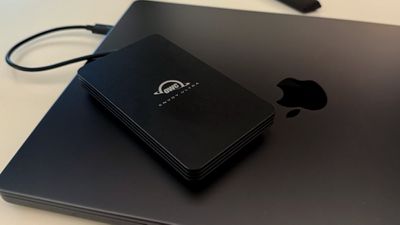
If you do have a Thunderbolt 5 Mac and want the fastest transfer speeds you can get for tasks like moving huge video files around, you're not going to go wrong with the Envoy Ultra. It's well built, and comes from a reputable company known for its drives.
You could get the Envoy Ultra for use with an older Mac for the purpose of future proofing, but the price difference may not be worth it. There are so few Thunderbolt 5 SSDs on the market right now, so prices are on the higher side. Of course, USB4/TB4 SSDs are also not super affordable, and the Envoy Ultra will give you maximum Thunderbolt 4 speeds, too.
With an M1 Max MacBook Pro, I got consistent read/write speeds right around 3,000MB/s, so I did hit the Thunderbolt 4 limit.
2TB USB4 SSDs that operate at half of the Envoy Ultra's speed are priced at $180 to $250, and if you don't even need USB4 speeds, 2TB SSDs can be under $100.
Bottom Line
If you have a Thunderbolt 5 Mac or are going to get one in the future and you need super fast transfer speeds, check out the Envoy Ultra. It's a solid product and the only downside for some may be the attached cable.
How to Buy
The Envoy Ultra can be purchased from the OWC website. The 2TB model is priced at $330, and the 4TB model is priced at $549.
Note: OWC provided MacRumors with a 2TB Envoy Ultra for the purpose of this review. No other compensation was received.





















Top Rated Comments
For everything I don't need to have constant access to, I put on my QNap NAS with a 10 GbE connection. it's SSD cache pretty much make it 24 TB of pretty fast space.
And for those who don't know, you can pop it open and put a longer Thunderbolt 5 cable in place of the one that came with the drive. But I'm not sure I'll ever need to do it. The drive and Mini are so small they sit under one side of my Studio Display. No need to hide them.
Also consider that when you change machines, you don't get to take that upgrade with you, and may have not have a device to re-use the original internal drive that you are replacing. I've seen no enclosures for Apple SSDs made for Studios, as such.
This OWC device seems to be all about portability. For one that you want to keep connected full time as a substitute to internal storage that will see substantial continuous use, you want your thunderbolt 5 SSD to have a built-in-fan! A fanless SSD operating at TB5 speeds will absolutely throttle itself due to heat.