

Back at CES 2022, Schlage introduced the Encode Plus deadbolt, the first smart lock in North America to support Apple's home key feature that lets you unlock your door via NFC just by using an iPhone or Apple Watch. The Encode Plus has been in very short supply since its launch, but I finally got a hold of one and have spent the past few months testing it out.
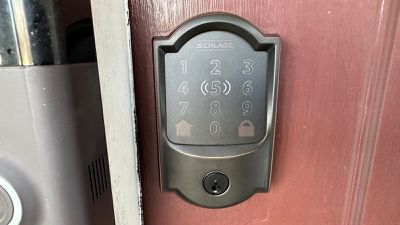
I have some previous experience with Schlage's HomeKit-enabled smart locks thanks to the Schlage Sense, and my Encode Plus review unit is very similar to the Schlage Sense down to the Camelot trim in Aged Bronze to match my other door hardware. A Satin Nickel color option is also available for the Camelot trim and there's a more modern Century trim available in both of those colors plus an additional Matte Black option.
Installation and Setup
If you've ever installed a deadbolt before, you'll find the hardware installation process for the Encode Plus very straightforward. Even if you haven't, it's not a particularly tricky process. Removing your existing deadbolt typically requires just taking out a few screws on the inside portion of the lock and pulling the two sides apart to remove the main body.
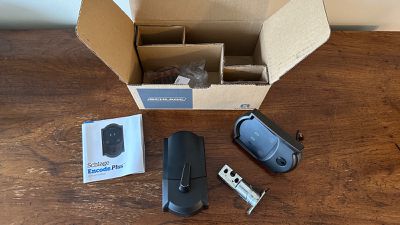
Once that's done, it's simple to take out a couple of screws from the edge of the door and remove the bolt, and then a couple of screws to remove the strike plate where the bolt slides into the door jamb if you wish to replace that as well.
It's essentially the same process in reverse to install the Encode Plus, with a little bit of added complication from the need to feed the wires for the keypad through to the interior unit. The Encode Plus uses a metal plate on the interior of the door to initially hold the two sides of the lock together, and then the bulkier interior unit screws onto that plate.
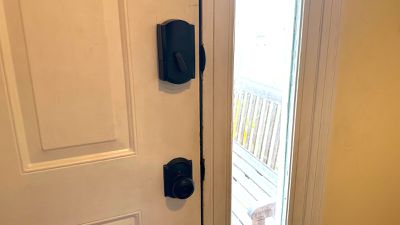
From there, it's just a matter of installing the four AA batteries into the holder, sliding the holder into the interior unit, and sliding the cover on to hide all of the internals.
Configuring the lock for operation is also very simple, and it can be initiated either from the Schlage app or from the Home app. Either way will prompt you to scan the HomeKit code to add it to your Home app and then ask if you'd like to set up home key access. It's a quick setup process and I had no problems with it. You can also set up extra access codes to allow pet sitters, house sitters, or other visitors to get in without giving away your master code.
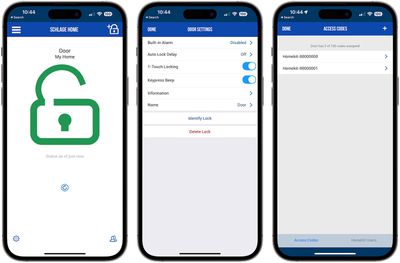 Lock details in Schlage app
With Apple's Home app setup, other members of your family can also access the Encode Plus status, automations, and home keys, but due to frustrating HomeKit issues dating back years, I haven't been able to test out this functionality. For some reason, I have been unable to share my HomeKit home with my wife for several years as she never receives my invitations.
In the process of trying once again to set it up for this review, it ended up with me losing ownership of my own HomeKit home and forcing me to set up every HomeKit device in my house from scratch. It's been months and a few of them still remain in limbo even after supposed full resets, claiming they are linked to another home that I of course can't remove them from because no one has ownership of said home.
Operation
Compared to the previous Sense, the Encode Plus operates nearly identically for the most part, with both locks offering keypad and traditional key access from the outside with most of the electronics and the batteries housed on the interior side of the door. It's a much bulkier setup than the new Level Lock+, but it's not an uncommon arrangement and Schlage has managed to shrink the interior unit a bit with the Encode Plus over the Sense.
As HomeKit locks, both the Sense and the Encode Plus show up in the Home app across Apple's platforms, making it easy to view their status along with the rest of your smart home devices. You can also include them in automations and scenes in the Home app, making them work hand-in-hand with those other devices if you wish.
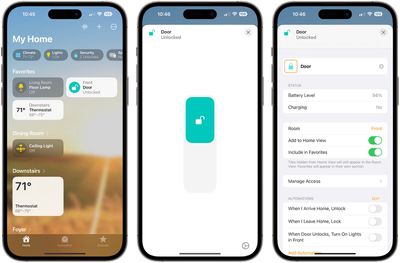
What separates the Encode Plus from the Sense is of course home key support, which means you don't need to type in a code on the keypad or use a physical key to unlock your door. All you have to do is bring your iPhone or Apple Watch close to the deadbolt and it will unlock, granting access to your home.
You can configure home keys to require authorization before they will unlock the door, or with Express Mode they can automatically trigger it to unlock without authentication or requiring you to bring up the key on your device. Express Mode also means you will be able unlock your door for a while even if your iPhone runs out of battery, taking advantage of the last little bit of reserve power in the phone's battery to give you a few hours of cushion.
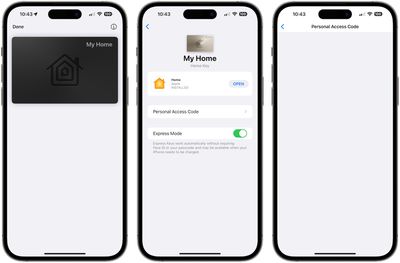 Home key in Wallet app on iPhone - access code details automatically blanked out in screenshots but can be seen in the app
The home key for your lock lives in the Wallet app on your iPhone and Apple Watch, appearing like a high-quality metal card that fits in with the rest of your cards but which has the extra little touches you expect from Apple like glare on the card that shifts around as you tilt your phone. There's not a lot of functionality on the home key card in the Wallet app, but it lets you see the manual keypad access code linked to it, offers a toggle for Express Mode, and provides a way to quickly jump to the Home app to configure other settings.
I quickly found I needed to hold my iPhone or Apple Watch quite close to the Encode Plus before it will register to unlock. That's not terribly surprising for NFC as a very short-range wireless communication technology and it's good for preventing unintentional activation of the lock, but it also made the home key functionality less convenient for me than I had hoped for.
Rather than pulling my phone out of my pocket, I prefer to use my Apple Watch whenever possible for tasks like this or paying with Apple Pay, but in this case I found it a bit unwieldy to use my Apple Watch.
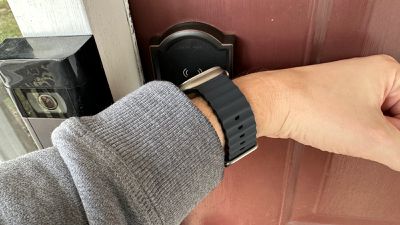
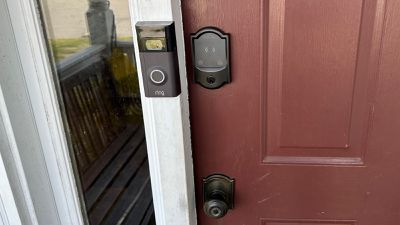
With a protruding door frame just to the left of the lock, I have to somewhat awkwardly bend my wrist around to get my watch close enough, and that's after having pushed my coat or sweatshirt sleeve up a bit to expose my watch. And then it takes a moment before it registers and unlocks the door. It actually feels more convenient to just use the keypad to type in my access code if I want to unlock the door, but your mileage may vary.
But that's where another minor issue crops up. As on the Sense, the numbers on the Encode Plus keypad are extremely faint under typical lighting conditions, making it hard to see where they are. They illuminate as soon as you press a button on the keypad, but it's an extra key press and a moment of uncertainty each time you enter your code.
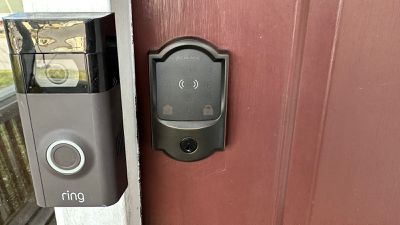 Unilluminated keypad
There is a set of wireless signal icons bracketing the "5" to show you where to hold your device for NFC unlocking, and they also help orient you on the keypad at a glance, but it would have been nice to have the full set of keypad numbers similarly visible without requiring illumination.
Using a bit of contrasting color for the keypad numbers would make them easily visible upon approach in daylight with illumination still available to help when it's darker out. It's not a big deal and the extra key press to turn on illumination only takes a moment, but better contrast for the numbers is an easy improvement I wish they had made in the seven years since the Sense launched.
On the interior of the door, the reduction in size of the unit compared to the Sense is a welcome change, although it never really bothered me on the Sense. With a keyed lock cylinder, the electronics, and four AA batteries needed to power the Encode Plus, it's still on the bulky side, so if you're looking for a clean aesthetic, be aware.
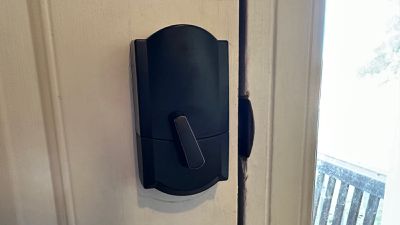
Aside from the reduction in size for the interior unit, there is one other change of note on this side of the door. While the Sense had a graspable round knob to manually lock the deadbolt from the inside, the Encode Plus uses a rotating lever. The operation is essentially the same (turn toward the door jamb to lock, turn away to unlock), but the lever design makes it easier to see at a glance from across the room whether or not the door is locked.
I also find the mechanical operation of the Encode Plus significantly quieter than on the Sense, which is nice for not disturbing other home occupants during late night entries or startling my cat.
Wrap-up
Overall, I've found the Encode Plus a nice addition to Apple's HomeKit ecosystem. It's easy to install, offers a fairly clean look, and gives you several different options for unlocking your door.
I've got a few nits to pick with it, mostly around the close proximity required for the NFC to trigger it and the visibility issues on the keypad, but overall it's a worthwhile addition if you're considering a HomeKit lock. It's one of your only options with home key support, and Apple's implementation of that feature is just about as slick as you'd expect and hopefully it will continue to improve with features like easy key sharing via iMessage and other apps.
My HomeKit frustrations do weigh on me a bit, though I acknowledge they aren't Schlage's fault and in this most recent case aren't specifically related to the Encode Plus at all. But in general I've mostly learned to live with HomeKit being a finicky and unreliable system. I'm certainly hoping things will improve with the new home architecture that appears set to finally roll out for real in iOS 16.4, but especially given the hiccups that resulted in Apple pulling the upgrade from the iOS 16.2 update, I'm not holding my breath.
Even with HomeKit's overall issues, I enjoy having dozens of smart switches, lights, locks, and more from around my home right at my fingertips wherever I am, and the Encode Plus fits right into that.
The Schlage Encode Plus is priced at around $320 at vendors like The Home Depot and Lowe's, but availability can be spotty.
Note: Schlage/Allegion provided the Encode Plus to GeekWebGuides for the purposes of this review. No other compensation was received. GeekWebGuides may be an affiliate partner with some vendors mentioned in this article and may earn commissions on purchases made through links in this article.
























![Apple Pulls Keynote, Pages and Numbers From App Store [Update: Back]](https://images.macrumors.com/t/Okb7kitB_gNr6qe5Pex9nQIysD8=/112x112/article-new/2026/01/Apple-Creator-Studio-iWork-suite.jpg)



















Top Rated Comments
Lock, unlocks.
So convenient.
Haiku probably has more lines.
Battery powered devices like this that are often expected to go close to a year on AA batteries often have a capacitance sensor in there to determine if anything is being put in front of it before it will power up a power-hungry radio. So, what you may have been experiencing isn't necessarily the short range of the radio and antenna itself, but rather the need for it want to "see" that you are there in proximity before beginning an RF interaction.