
SnapPower Charger Review - MacRumors
Skip to Content

Review: The Easy-Install SnapPower Charger Adds a USB Port to Your Outlet

by

The SnapPower Charger, designed to make it easy to add USB ports to a wall outlet with no complicated wiring, originated on Kickstarter in 2015. It's basically an outlet replacement that features two standard sockets and an additional USB port, and it's meant to be simple enough to install in just a couple of minutes.
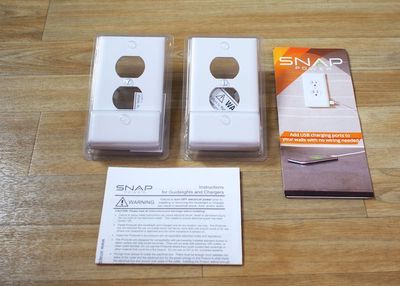
snappowercharger
SnapPower is available in three colors (white, light almond, and ivory) to match different home decor. Design wise, it looks identical to a standard outlet cover, but it features a hump at the bottom that houses a USB port for charging iOS devices. There are two versions of the SnapPower, designed to fit square or round outlets, which make up most of the types of modern outlet plates in the United States.

The SnapPower works by connecting the two metal tabs at the sides of the outlet cover to the screws of the outlet, allowing for a small amount of power to be drawn into the USB port of the device.
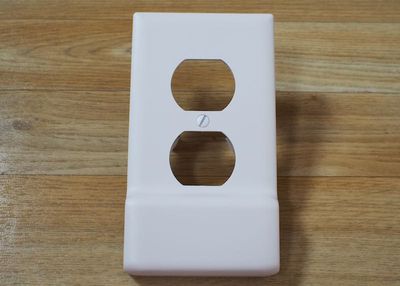
snappowerchargerfront
My apartment, which is fairly modern, is equipped with square-style outlets and the square SnapPower fit well. Some older houses and apartments might have outlets that are not compatible with the SnapPower, so that's something to be aware of when considering a purchase.
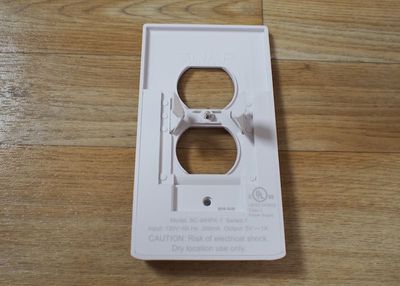
snappowerchargerback
I have zero electrical experience and I was able to install the SnapPower without running into problems. I turned off the power to my office through the circuit breaker, unscrewed my existing outlet cover, pulled it off the wall, snapped the SnapPower into place over the bare sockets, and then put the screws back in and turned the power back on. It took all of five minutes to do and was very straightforward.
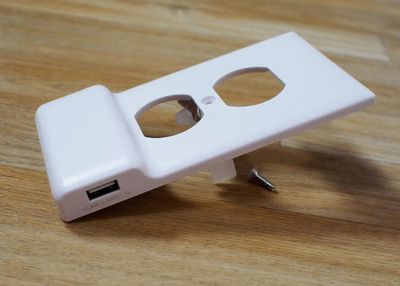
snappowerchargerside
One caveat -- I had an outlet that had been installed by an electrician upside down. The SnapPower still worked, but I had to install it upside down as well to get the contacts to line up properly to power the USB port.
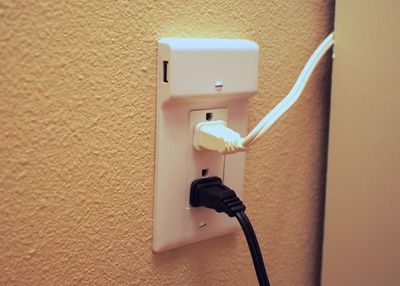
snappowerupsidedown
The SnapPower is bit thicker overall than a standard outlet cover and much thicker at the bottom to accommodate a USB port, so it makes outlets stand out visually more than a normal outlet would, but it wasn't enough of an aesthetic difference to be super noticeable.

Any USB device can be charged with the SnapPower, but it's limited to one amp, which is best suited to iPhone charging. Charging speeds are comparable to charging with an Apple iPhone charger, so it's not great for charging iPads.
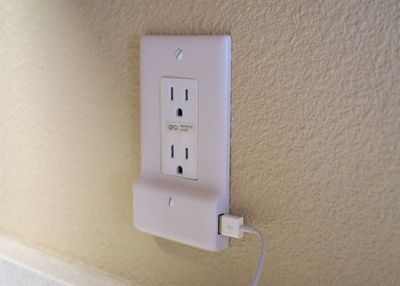

I was able to charge an iPhone 6s Plus in about the same amount of time that it takes to charge with a standard iPhone charger and Lightning cable, but my 9.7-inch iPad Pro took much longer, and I didn't even attempt to charge my 12.9-inch iPad Pro with such a low-power charger.

When I charge my iPhone, I don't typically use Apple's included charger because it's too slow, so I thought the SnapPower, while convenient, just wasn't worth it for me. It's not something that I'd use on a regular basis because I generally want faster charging for my iPhone and my other iOS devices.

If you're charging an iPhone overnight (or an Apple Watch) the speed of the charging doesn't matter quite as much, which makes the SnapPower more useful. I could see installing this next to a bedside table for a simple way to charge a device overnight without taking up a full socket.

Bottom Line

At a price ranging from $16 to $20 based on the number of SnapPower Chargers purchased, the device seems expensive for what you get - a single USB port. Comparatively, a little Anker PowerPort that can plug into a socket and offer 4 USB ports with faster charging speeds costs $25 from Amazon, which seems like a better deal to me. I'd rather spend my money on a multi-port charger that can go anywhere.
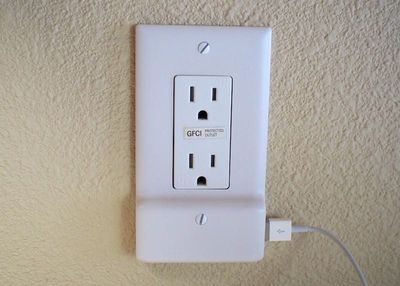
snappowerinstalled2
That said, if you're looking for a sleek solution that doesn't add visible bulk to your sockets and is easier to install than a solution that requires wiring expertise, the SnapPower is a good option. It was quick and easy for me to put in place and since I didn't need to do any wiring, I could install it in my apartment on my own.

If I had a house, I might seek out something more permanent and robust, able to charge devices at a faster rate. The SnapPower is limited to 1 amp, which is a major drawback if you have a lot of larger devices like iPads that require more power to charge at a reasonable rate.

Pros:

  • Easy installation
  • Clean, simple look
  • Leaves both sockets open

Cons:

  • Only adds 1 USB port
  • 1 amp

How to Buy

The SnapPower Charger can be purchased from the SnapPower website. It costs $20 for a single charger, $38 for two, $85 for five, and $160 for 10.


Top Rated Comments

133 months ago
If you're going to take off the cover plate you might as well just remove the socket and put in a new one with USB ports capable of charging at full speed.. They are about the same price and will require 2 more screws and 5 minutes. Don't see any point in this

Score: 7 Votes (Like | Disagree)
zorinlynx Avatar
133 months ago
The design of this product doesn't seem safe to me. I wonder if it's compliant with NEC. There's a UL logo on it but I'm still skeptical.
Score: 3 Votes (Like | Disagree)
rdlink Avatar
133 months ago
I just installed that same model a couple weeks ago. Works great.

I can understand someone who is a bit worried about messing with electrical wires going with one like in the article though.
Yep. I agree. Even though it's as easy as throwing the breaker some people still kind of freak about it. Fortunately, I'm not one of those people. ;-)

I replaced every switch and outlet in my house when I took possession of it. Changed everything from standard to Decora, replaced almost all of my light switches with Lutron Caseta HomeKit compatibles, and replaced every wallplate except for the five I put the Guidelights on with Lutron Claro hidden screw wallplates.
Score: 2 Votes (Like | Disagree)
133 months ago
One caveat -- I had an outlet that had been installed by an electrician upside down. The SnapPower still worked, but I had to install it upside down as well to get the contacts to line up properly to power the USB port. ]
Believe it or don't, the "proper" way per NECA standards is for NEMA 5-15R outlets to be installed with the grounding pin at the top or neutral prong if installed sideways. That's why an ELECTRICIAN installed it that way.

(I obtained the master electrician certification in two states so I could legally do the wiring in the new construction on my houses.)
Score: 1 Votes (Like | Disagree)
rdlink Avatar
133 months ago
If you're going to take off the cover plate you might as well just remove the socket and put in a new one with USB ports capable of charging at full speed.. They are about the same price and will require 2 more screws and 5 minutes. Don't see any point in this
I recently moved into my new house, and I did exactly that. I bought 5 outlets with two USB ports in them, and installed them in strategic locations through the house.

However, these guys, SnapPower make another great product that I have installed in several locations throughout my place, which gives me LED night lights:

https://www.snappower.com/select-guidelight/
Score: 1 Votes (Like | Disagree)

Popular Stories

M5 MacBook Pro

RIP, MacBook Ultra

Monday October 19, 2026 9:37 am PDT by
Apple today sent out invites for an experience in Los Angeles on Wednesday, October 28, and the "Pro and tell" tagline on the invitation likely means that the rumored MacBook models with touch-enabled OLED displays will stick with MacBook Pro branding instead of the once-rumored "MacBook Ultra" name. The long-rumored "iPhone Ultra" ended up being named iPhone Duo, so speculation that Apple...
iPhone Duo Trio

Here's What Apple's Apps Look Like on the iPhone Duo

Tuesday October 20, 2026 11:12 am PDT by
With just three days to go until the iPhone Duo is released, Apple is getting ready for the launch. Behind the scenes, the App Store now has screenshots of Apple's built-in apps running on the Duo. We've seen some apps in marketing materials, but images of the ones we haven't seen give us an idea of what it will be like using the iPhone Duo day to day. Many apps are shown in landscape...
apple pro tell logo

Apple Announcing New Products Next Week: 'Pro and Tell'

Monday October 19, 2026 9:05 am PDT by
Apple's Greg Joswiak today hinted at new product announcements coming next week, sharing a social media post that says "Can't wait to pro and tell next week." Rumors suggest Apple is planning to debut the new MacBook Pro with an OLED touchscreen display, an M6 entry-level MacBook Pro, an M6 iMac, an iPad mini with an OLED display. Can't wait to pro and tell next week....
Latest Stories
Giant iPhone Duo Displays Coming to Four Apple Stores
25 minutes ago
Apple Pulls Keynote, Pages and Numbers From App Store
1 hour ago
Apple Updates More Apps With iPhone Duo Support
2 hours ago
Apple Will Label Apps 'Made for iPhone Duo' in App Store
5 hours ago
Amazon Takes $49 Off iPad With Prices Starting at $399.99
5 hours ago
F1 on Apple TV Now Available in Dolby Atmos
6 hours ago
Apple Reveals More Than 50 Apps That Will Be Updated for iPhone Duo
6 hours ago
Apple Blocks Certificates That Could Help Attackers Fake Websites
8 hours ago
Giant iPhone Duo Installations Spotted at Apple Fifth Avenue
8 hours ago
iPhone Duo 2 Prototypes Include Under-Display Face ID
9 hours ago
Tesla App Gains iPad and iPhone Duo Support
12 hours ago
Apple Reportedly Boosts iPhone Duo Orders by 44%
13 hours ago
Fortnite Returning to Australian App Store After Court Ruling
13 hours ago
Apple Ordered to Open iPhone to Rival App Stores in Australia
14 hours ago
Apple Suppliers Face Hurdles Cutting Circuit Board Emissions
14 hours ago
Things Updated for iPhone Duo With Adaptive Layout
14 hours ago
Simplicity and Siri AI Are HomeView's Killer Features, Apple Says
15 hours ago
iPhone Duo Reviewers Really Miss Face ID
20 hours ago
Does the iPhone Duo Run Hot? Here's What Reviews Found
21 hours ago
Apple Music's New Look is Now Live on Apple's Website
22 hours ago
Anthropic Launches Claude Duet, a Proactive AI Agent
22 hours ago
What 32,000 Folds Did to the iPhone Duo's Hinge
23 hours ago
iPhone Duo's Hidden FaceTime Camera Takes 'Trash' Photos
1 day ago
iPhone Duo Has 'Edge Light' Feature That Debuted on Macs Last Year
1 day ago
Apple Support App Updated for iPhone Duo's Larger Display
1 day ago
Amazon Sweetens the Deal on Entry-Level 16-Inch MacBook Pro With $570 Off
1 day ago
iPhone Duo Tips Over on MagSafe Stands When Unfolded
1 day ago
Apple Music's New Look Officially Announced
1 day ago
iPhone Duo Supports Apple Pencil Starting With iOS 27.2
1 day ago
iPhone Duo Accessories Roundup: Cases and Screen Protectors From OtterBox, ZAGG, and More
1 day ago










































