

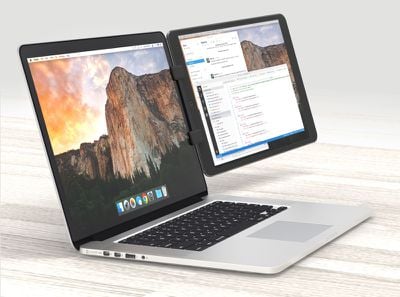
Ten One Design's new Mountie+ is an update to its existing Mountie, a device that's designed to allow you to attach an iPad or iPhone to your laptop for use as a second display. The Mountie+, which I've been using for the last few weeks, was created for Apple's larger 10.5 and 12.9-inch iPad models.
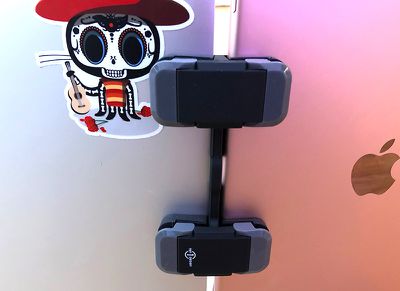
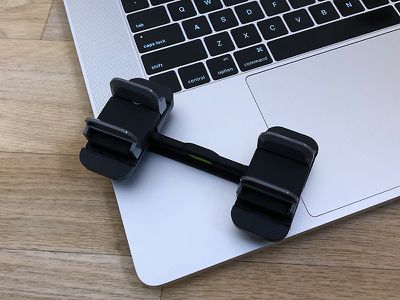
With the Mountie+, I can attach an iPad to the left side, right side, or top of my MacBook Pro using a simple double clamp mechanism. Made from plastic, one side of the clamp buckles onto my MacBook Pro, while the other side is meant to hold the iPad. I had to take my iPad Pro's Smart Cover off to use Mountie+, but it will work with slim cases attached.
The clamp works using soft pieces of grippy rubber to grasp both the display of the MacBook Pro and the iPad Pro, and there are different sized rubber inserts to fit different devices. The grip is super tight and fitted to both devices, so the iPad Pro is going absolutely nowhere while in the Mountie+. There is absolutely no slippage, and even when I pull on my iPad with a good amount of force, it does not budge.
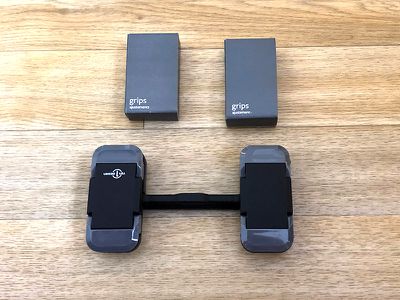
The first Mountie+ I had actually gripped my MacBook Pro too tight and caused visible distortion to the display even with the correct inserts. I was concerned about long term damage, so Ten One Design sent a replacement. The second Mountie+ had no issues with fit and did not cause prolonged screen distortion when I clamped it shut.
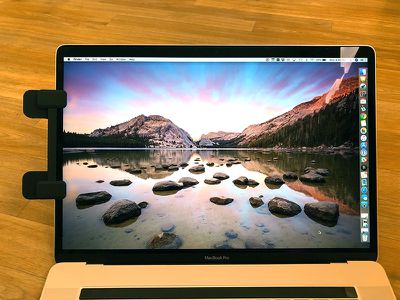
For the record, if you have one that fits a little tight like I did, Ten One Design will swap it out for you. To be honest, I'm still mildly concerned about the pressure the mount exerts on my MacBook Pro, but the original Mountie has been around for quite awhile and it's not an issue that's been raised, so it appears to be safe.
For my setup, the Mountie+ worked right out of the box, but some people may need to make component swaps. In that situation, I think it's a little unclear how the Mountie+ works and which components are needed -- I felt like Ten One Design needed to include clearer instructions. It's not immediately clear which side of the clamp goes where, nor how you're supposed to position it.
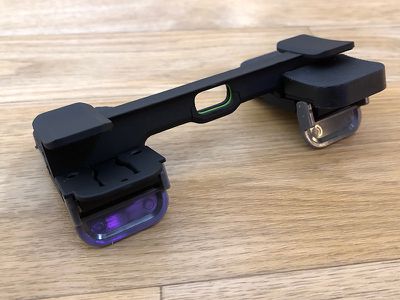
Here's how it works: Open up the buckles on the Mountie+, put the thinner side on the MacBook Pro with the smaller tabs facing the display side, and then put the thicker side on the iPad Pro. Line everything up and then close the buckle to clamp it all down tight.
Fit wise, the Mountie+ cuts into the display of my MacBook Pro and blocks a small bit of the display, and the same goes for my iPad. It's distracting at first, but I positioned it in an area where there's nothing that I need to see (my dock), so it's less bothersome.
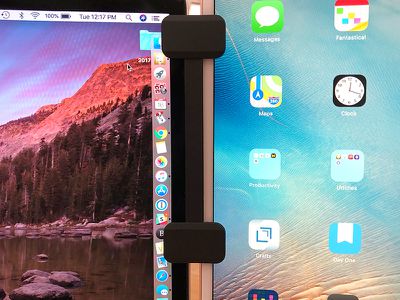
It's absolutely something to be aware of, though, if you have a 2016 or 2017 MacBook Pro with the slimmer bezels. On older models, there's no obstruction because the bezels of the device are thicker. I can charge an iPad while it's attached to my MacBook Pro because the Mountie+ leaves the Lightning port accessible.
I primarily tested the Mountie+ with my 10.5-inch iPad Pro, which I positioned in portrait mode to the right of my display where I could access it easily with my right hand for touch gestures. I used the iPad for things like Twitter, watching videos, and keeping an eye on the news while I worked during the day, and it was super handy to have an extra display right there within eye view.
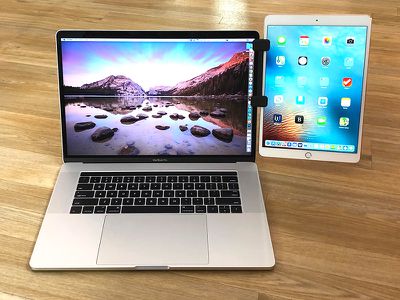
If you pair this with screen mirroring software like Duet Display, it can serve as a full secondary display for your Mac. Though I had mine in portrait mode on the right side, the Mountie+ can be used anywhere on the MacBook and with your iPad in portrait or landscape orientation.
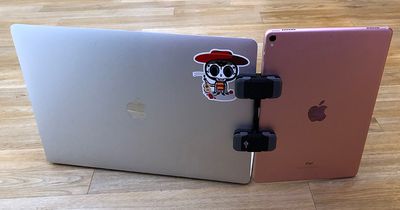
I did use the Mountie+ with my 12.9-inch iPad Pro, but it felt too heavy and unstable. Even with the 10.5-inch iPad Pro attached to my MacBook Pro, I was worried about its top heaviness and the extra weight pressure on the hinge of my machine. Ten One Design recommends making sure heavier tablets paired with lighter laptops are positioned with the bottom of the tablet resting on a desk, which does help take the pressure off of the MacBook.
Mounting the 10.5-inch iPad Pro on the left and right sides of my MacBook Pro worked well, but on the top, it was too much weight and I couldn't reliably keep it stable. You could use the Mountie+ at the top of the display with a smaller iPad like the iPad mini, or an iPhone, but it doesn't work well with a top-mounted iPad Pro.
While I liked having my iPad Pro positioned right next to my MacBook Pro, I did find myself wishing there was a way to tilt it towards myself just a bit for a better viewing angle, but that's not really something that's possible. It mounts straight to the side and since the clamps are straight, there's no adjustment possible.
Bottom Line
The Mountie+ is an interesting solution for adding a secondary display to your MacBook Pro using equipment you've already got on hand. It works with all of Apple's laptops and all recent iPad models (iPad Pro, iPad Air, iPad mini, etc), and because it has several rubber pad options for different fits, it also works with non-Apple devices.
I don't recommend the Mountie+ for the 12.9-inch iPad Pro unless you're going to be using it on a flat surface, but it works well with the 10.5-inch models on down. I do wish there was an option to tilt the iPad to get a better viewing angle, but that's a minor complaint.
I think the Mountie+ will be of particular interest to those who already use the iPad as a secondary screen with software like Duet Display, but it's also handy if you want to do things like keep an eye on your Twitter feed or watch YouTube videos while using your Mac for other purposes.
Because I've only had an opportunity to use the Mountie+ for a few weeks, I don't personally know if it's going to have any longterm effect on the hinge or the display of a MacBook, but Mountie's website suggests it should not be a problem because the weight of the device is evenly distributed along the length of the Mountie+ to avoid subjecting the hinges to undue stress. Still, I'd recommend using with caution, i.e., don't leave your iPad attached to your MacBook Pro all the time.
At $35, it's not overly expensive and it's a neat little accessory to have on hand whenever you need a second display in a pinch.
How to Buy
Mountie+ can be purchased from the Ten One Design website or Amazon.com for $34.95.
Note: Ten One Design provided MacRumors with a Mountie+ for the purpose of this review. No other compensation was received.





















Top Rated Comments
Knowing the lamination issues in the point of attachment and propensity of LCD displays to pressure damage I’d have to say no to this.
Except it would have been $9.99
Guess today’s equivalent would be “As Shown on TV” section of a *-Mart type store.
Shameful.