
OS X 10.7.3 Beta Reveals Active Work on 'Retina' Display Support for Mac - MacRumors
Skip to Content

OS X 10.7.3 Beta Reveals Active Work on 'Retina' Display Support for Mac

Several times earlier this year, we covered Apple's work on "HiDPI" modes in OS X Lion for supporting ultra high-resolution displays offering greater pixel density with a similar increase in image quality to that seen with the iPhone's transition to a "Retina" display.

With new claims that Apple is set to release a new 15" MacBook Pro offering a resolution of 2880x1800 early next year, Apple's work on its HiDPI software support has also been gaining renewed attention. By doubling the resolution in each dimension over the existing 1440x900 MacBook Pro, Apple would achieve four times the number of pixels and provide developers with an easy way to scale existing artwork.

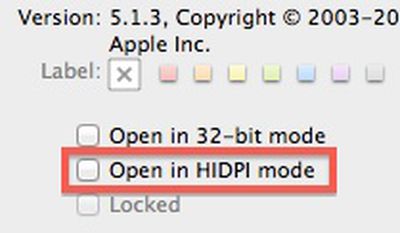
Evidence of Apple's continued work on HiDPI has shown up in developer builds of OS X 10.7.3, with the "Get Info" window for applications seeing the addition of an "Open in HIDPI mode" checkbox. But while that checkbox would presumably automatically use higher-resolution fonts and graphics that would display at the same absolute size as existing elements, it has not been functional in developer builds where it is present.
hidpi 10 7 3
With yesterday's release of Build 11D36 to developers, Apple has now removed that checkbox from the "Get Info" window entirely. While its removal may suggest a step backward in Apple's implementation of HiDPI support, it is routine for Apple to activate and deactivate portions of features as it works on them. Consequently, the mere change in the checkbox's visibility in the new build indicates that Apple is indeed likely actively working on the feature.


Popular Stories

M5 MacBook Pro

RIP, MacBook Ultra

Monday October 19, 2026 9:37 am PDT by
Apple today sent out invites for an experience in Los Angeles on Wednesday, October 28, and the "Pro and tell" tagline on the invitation likely means that the rumored MacBook models with touch-enabled OLED displays will stick with MacBook Pro branding instead of the once-rumored "MacBook Ultra" name. The long-rumored "iPhone Ultra" ended up being named iPhone Duo, so speculation that Apple...


iPhone Duo Trio

Here's What Apple's Apps Look Like on the iPhone Duo

Tuesday October 20, 2026 11:12 am PDT by
With just three days to go until the iPhone Duo is released, Apple is getting ready for the launch. Behind the scenes, the App Store now has screenshots of Apple's built-in apps running on the Duo. We've seen some apps in marketing materials, but images of the ones we haven't seen give us an idea of what it will be like using the iPhone Duo day to day. Many apps are shown in landscape...
apple pro tell logo

Apple Announcing New Products Next Week: 'Pro and Tell'

Monday October 19, 2026 9:05 am PDT by
Apple's Greg Joswiak today hinted at new product announcements coming next week, sharing a social media post that says "Can't wait to pro and tell next week." Rumors suggest Apple is planning to debut the new MacBook Pro with an OLED touchscreen display, an M6 entry-level MacBook Pro, an M6 iMac, an iPad mini with an OLED display. Can't wait to pro and tell next week....

Top Rated Comments

WildCowboy Avatar
194 months ago
I wish people would stop saying "provide developers with an easy way to scale existing artwork" when it's about computers, that's just nonsense.

That might be true for devices with known, fixed resolutions that are upgraded (ex: iPhone's 320x480 upgraded to the iPhone 4's 640x960), but it's completely pointless for computers which have various resolutions to begin with.

Nobody out there makes software that targets exactly 1440x900. Computer users use anything between 640x480 up to 2560x2048 (http://en.wikipedia.org/wiki/Computer_display_standard). Even the aspect ratio isn't fixed.
The statement refers primarily to onscreen elements. Buttons, icons, and other user interface elements need to be scaled up so that they appear at the same relative size as on current-resolution displays.

While applications target a range of resolutions, displays generally have roughly the same pixel density, so user interface elements remain roughly the same size regardless of the resolution. So it's about the pixel density, not the absolute resolution.

The move to "Retina" display on computers dramatically increases the pixel density, and that's what needs to be accounted for so that user interface elements don't become unusably small.

By going with a doubling of pixels in each dimension, it becomes easy for the system to display a pixel-doubled version of a small element at the appropriate real-life size if the developers have not provided those elements at sufficient resolution within the application.
Score: 14 Votes (Like | Disagree)
Small White Car Avatar
194 months ago
This is what the kids today refer to as awesome-sause.

Oh, they don't? It's just me?

Ok...well...this is awkward.
Score: 8 Votes (Like | Disagree)
194 months ago
By doubling the resolution in each dimension over the existing 1440x900 MacBook Pro, Apple would achieve four times the number of pixels and provide developers with an easy way to scale existing artwork.
I wish people would stop saying "provide developers with an easy way to scale existing artwork" when it's about computers, that's just nonsense.

That might be true for devices with known, fixed resolutions that are upgraded (ex: iPhone's 320x480 upgraded to the iPhone 4's 640x960), but it's completely pointless for computers which have various resolutions to begin with.

Nobody out there makes software that targets exactly 1440x900. Computer users use anything between 640x480 up to 2560x2048 (http://en.wikipedia.org/wiki/Computer_display_standard). Even the aspect ratio isn't fixed.
Score: 8 Votes (Like | Disagree)
194 months ago
I wish people would stop saying "provide developers with an easy way to scale existing artwork" when it's about computers, that's just nonsense.

That might be true for devices with known, fixed resolutions that are upgraded (ex: iPhone's 320x480 upgraded to the iPhone 4's 640x960), but it's completely pointless for computers which have various resolutions to begin with.

Nobody out there makes software that targets exactly 1440x900. Computer users use anything between 640x480 up to 2560x2048 (http://en.wikipedia.org/wiki/Computer_display_standard). Even the aspect ratio isn't fixed.
It's still a lot more convenient to scale interface elements in multiples (ie 2X) then to scale them some awkward resolution. It's lot easier to scale a 2X2 image to 4X4, instead of scaling some weird increment.

Additionally, the resolution doubling makes it a practical move for the development environment for Retina iPhone and iPad displays. For instance a Retina iPad graphic on a Retina MBP, will look the same as a non-Retina iPad graphic on a non-retina MBP. By consistently doubling the resolution of all products the only perceived difference for developers will be the clarity of the graphics.
Score: 6 Votes (Like | Disagree)
194 months ago
2012 is shaping up to be the year of the retina.
Score: 6 Votes (Like | Disagree)
nagromme Avatar
194 months ago
I wish people would stop saying "provide developers with an easy way to scale existing artwork" when it's about computers, that's just nonsense.

That might be true for devices with known, fixed resolutions that are upgraded (ex: iPhone's 320x480 upgraded to the iPhone 4's 640x960), but it's completely pointless for computers which have various resolutions to begin with.
Not relevant: you’re thinking about the “working area”—or whatever you want to call it: the size of windows and buttons as seen and experience by the user. That varies and always has.

This feature is nothing to do with the size of the display itself, but rather the pixel density. That matters just as much when the display size is unknown as when it is known. Your own quote makes the point: “scale existing artwork.” Not scale entire apps and UIs—we’ve met that challenge long ago. But scale the artwork, specifically.

The statement refers primarily to onscreen elements. Buttons, icons, and other user interface elements need to be scaled up so that they appear at the same relative size as on current-resolution displays.
Exactly! The challenges of a desktop app are NOT the same as for an iOS app.

Desktop apps already have to adapt to different “working area” sizes. Doubling the res doesn’t add that much to that challenge: the app doubles automatically and the “working area” remains the same. The app often need not even be aware that each pixel now means two. The OS will handle most of that.

It’s the assets within the app that are a challenge to scale, and using an even double IS a big help.
Score: 5 Votes (Like | Disagree)
Latest Stories
Tesla App Gains iPad and iPhone Duo Support
3 hours ago
Apple Reportedly Boosts iPhone Duo Orders by 44%
3 hours ago
Fortnite Returning to Australian App Store After Court Ruling
4 hours ago
Apple Ordered to Open iPhone to Rival App Stores in Australia
4 hours ago
Apple Suppliers Face Hurdles Cutting Circuit Board Emissions
4 hours ago
Things Updated for iPhone Duo With Adaptive Layout
5 hours ago
Simplicity and Siri AI Are HomeView's Killer Features, Apple Says
5 hours ago
iPhone Duo Reviewers Really Miss Face ID
10 hours ago
Does the iPhone Duo Run Hot? Here's What Reviews Found
11 hours ago
Apple Music's New Look is Now Live on Apple's Website
12 hours ago
Anthropic Launches Claude Duet, a Proactive AI Agent
13 hours ago
What 32,000 Folds Did to the iPhone Duo's Hinge
13 hours ago
iPhone Duo's Hidden FaceTime Camera Takes 'Trash' Photos
15 hours ago
iPhone Duo Has 'Edge Light' Feature That Debuted on Macs Last Year
16 hours ago
Apple Support App Updated for iPhone Duo's Larger Display
16 hours ago
Amazon Sweetens the Deal on Entry-Level 16-Inch MacBook Pro With $570 Off
16 hours ago
iPhone Duo Tips Over on MagSafe Stands When Unfolded
16 hours ago
Apple Music's New Look Officially Announced
17 hours ago
iPhone Duo Supports Apple Pencil Starting With iOS 27.2
18 hours ago
iPhone Duo Accessories Roundup: Cases and Screen Protectors From OtterBox, ZAGG, and More
19 hours ago
Apple Stores Will Have 'Limited' Availability of iPhone Duo for Walk-In Customers
19 hours ago
iPhone Duo Reviews Explain Why Device is Both 'Fun' and 'Frustrating'
20 hours ago
Apple Says 'Reachability' Feature Coming to iPhone Duo Later This Year
21 hours ago
Loop Capital Cuts Apple Rating Over iPhone Sales Outlook
1 day ago
Apple Stores in Bordeaux and Lille Looted During French Protests
1 day ago
Bluesound Adds Native Apple Music Support
1 day ago
Apple CEO John Ternus Explains What Makes Good Product Design
1 day ago
UK Proposes New Ways to Help Apple Pay Rivals
1 day ago
WhatsApp Developing In-App Browser for All Chat Links on iPhone
1 day ago
Apple's App Store Chief Explains Its Push for Premium Games
1 day ago








































