
Upcoming iOS 7 APIs: Gaming Improvements, Multitasking Support, AirDrop, and More - MacRumors
Skip to Content

Upcoming iOS 7 APIs: Gaming Improvements, Multitasking Support, AirDrop, and More

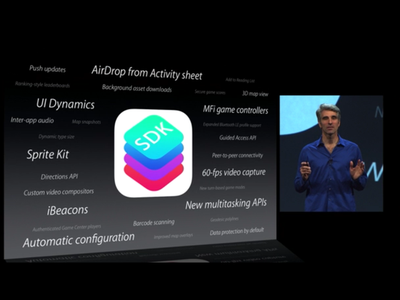
During Monday's WWDC keynote, Apple's senior vice president of Software Engineering, Craig Federighi, mentioned that iOS 7 would add 1,500 new APIs to Apple's SDK, including iBeacons, MFi game controllers, and new multitasking options.
ios7apis
These APIs reveal promising new features that developers will be able to incorporate into future app and hardware releases, offering new gaming technology, new location tracking options, and more. Here's a closer look at a few of the most notable APIs:

iBeacons - According to MacWorld, iBeacons are designed to use the Bluetooth Low Energy profile for microlocation, allowing iOS devices to use Bluetooth 4.0 devices to access location data.

AirDrop from Activity Sheet - Apps will be able to incorporate AirDrop support, giving users the ability to share photos, documents and more with friends from within an app.

Apple Maps - iOS 7 will let developers include additional mapping features in apps, including 3D viewing experiences, direction related route information and map-based images.

MFi Game Controllers - iOS 7 includes support for MFi "Made for iPhone" Apple Certified hardware game controllers, which will allow manufacturers to create dedicated iOS gaming controllers, turning the iPhone and the iPad into gaming machines on par with handheld gaming systems. Apps will be able to be designed around the Game Controller framework, allowing for seamless connectivity. Our sister site TouchArcade has shared an image from Apple's developer library detailing a reference design of both a standalone controller and an iPhone enclosure.

mifcontrollers
Sprite Kit - The Sprite Kit framework is designed to allow developers to create high-performing 2D games, controlling sprite attributes like position, size, rotation, gravity, and mass. It includes built-in support for physics to make animations look realistic and it also includes particle systems for additional game effects.

Game Center - iOS 7 adds new turn-based gaming modes (including simultaneous turns, chats, and trades) along with new methods for player authentication and secure game score transmission. This feature is likely designed to cut down on hacked Game Center scores from jailbroken devices.

Multitasking and Background Downloads - Apple's new multitasking APIs are designed to allow apps to update and download content in the background at intelligently scheduled times. For example, a Twitter app might incorporate this functionality, downloading new content in the background while the phone is not otherwise in use, staying up to date without unnecessarily draining battery. Push notifications can also initiate content downloads.

Inter-App Audio - With Inter-App Audio, apps are able to share audio streams with other apps, an API that will make it even easier to use Apple's iDevices to create music.

60-fps Video Capture - iOS 7 will allow apps to capture video at up to 60 frames per second.

Peer-to-Peer Connectivity - This data transmission API is designed to allow users to discover nearby devices and initiate direct communication without Internet connectivity.

Apple has a slew of other APIs available for developers, which should bring a lot of changes to apps when iOS 7 is released. For additional information on iOS 7, we detailed many of the upcoming features and we also explored some of the hidden tidbits.


Related Forum: iOS 7

Popular Stories

iOS 26

iOS 26.4 Adds Two New Features to CarPlay

Tuesday March 24, 2026 1:55 pm PDT by
iOS 26.4 was released today, and it includes a couple of new features for CarPlay: an Ambient Music widget and support for voice-based chatbot apps. To update your iPhone 11 or newer to iOS 26.4, open the Settings app and tap on General → Software Update. CarPlay will automatically offer the new features so long as the iPhone connected to your vehicle is running iOS 26.4 or later....
Apple Business hero

Apple Unveils 'Apple Business' All-in-One Platform

Tuesday March 24, 2026 8:53 am PDT by
Apple today announced Apple Business, a new all-in-one platform that unifies device management, productivity tools, and customer outreach features. The service is designed to be a consolidated replacement for several of Apple's existing business-focused offerings, including Apple Business Essentials, Apple Business Manager, and Apple Business Connect. It provides organizations with a single...
AirPods Pro Firmware Feature

Apple Releases New Firmware for AirPods Pro 3, AirPods Pro 2 and AirPods 4

Tuesday March 24, 2026 12:31 pm PDT by
Apple today released new firmware for the AirPods Pro 2, AirPods Pro 3, and the AirPods 4. The firmware has a version number of 8B39, up from 8B34 on the AirPods Pro 3, 8B28 on the AirPods Pro 2, and 8B21 on the AirPods 4. There is no word on what's included in the firmware, but Apple has a support document with limited notes. Most updates are limited to bug fixes and performance...

Top Rated Comments

dukebound85 Avatar
167 months ago
controller support? that is cool!
Score: 14 Votes (Like | Disagree)
chumawumba Avatar
167 months ago
iBeacons is cool, but when can I get iBacon?
Score: 11 Votes (Like | Disagree)
167 months ago
No doubt Sony, Microsoft and Nintendo execs are all simultaneously ******** their pants at the news of Apple OK'd hardware game controller designs.
Score: 9 Votes (Like | Disagree)
pgiguere1 Avatar
167 months ago
On the topic of improving their multi-tasking, I would really like to see the option of a button to "kill all" running apps in the background as opposed to closing each one individually.
You never had to close each app individually in the first place.

Most of the apps (unless they're playing audio or using your GPS) will just become inactive in the background so they don't use any RAM/CPU, their state was simply saved to storage so you it can resume when you switch to it again. "Killing" them had no effect except to clear their state cache.

Apple has never really made the way iOS multitasking works clear so I can't blame users who think iOS manages multitasking like a desktop, but it doesn't. It's made to manage stuff by itself. Only killing active apps has an effect, and apps are rarely active in the background unless you have a clear sign they are.
Score: 7 Votes (Like | Disagree)
167 months ago
On the topic of improving their multi-tasking, I would really like to see the option of a button to "kill all" running apps in the background as opposed to closing each one individually.
Score: 7 Votes (Like | Disagree)
Vol7ron Avatar
167 months ago
Seems to me that some of these additions to iOS could end up in the Apple TV...Especially the game controller functions...
Score: 7 Votes (Like | Disagree)















