
Hands-On with the 'Automatic' Connected Driving Assistant System - MacRumors
Skip to Content

Hands-On with the 'Automatic' Connected Driving Assistant System

by

Announced earlier this year, the Automatic Smart Driving Assistant is a Bluetooth 4.0 device that plugs in to your car's OBD-II port. Typically found somewhere under the steering wheel of every vehicle made after 1996 in the USA, the OBD-II port provides all sorts of useful diagnostic information which traditionally is only used by mechanics and for emissions testing.

Over the years, a number of devices have been released for home mechanics to connect to this port -- both to a Mac via USB and to iOS devices via the dock port. However, for the mechanical layman none of them have been that useful, with functionality specifically for figuring out why your "Check Engine" light is on or otherwise tuning/tweaking your engine.
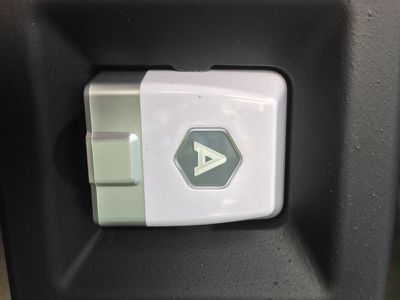
automatic_eli_package
Automatic changes all that. The Smart Driving Assistant is about the size of two matchbooks, and lives its life constantly connected to your car's OBD-II port. Unboxing the device is uneventful, as all that's really in the box is the Smart Driving Assistant, a small Automatic "A" bumper sticker, and a piece of paper that essentially tells you to download the Automatic app on your iPhone. Setup is simple, and involves creating a simple login to the Automatic service and then pairing your iPhone using the unique security code printed on the bottom of the Smart Driving Assistant.
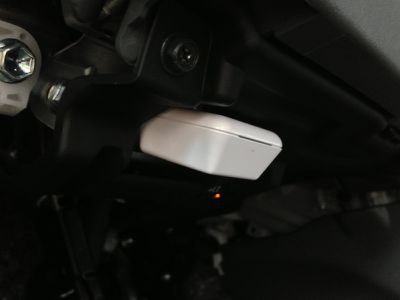
automatic_eli_obd
From there, it asks you to start your vehicle, and you're on your way. Amusingly enough, to get the setup to actually finish the engine of your car has to start. I drive a 2011 Prius, and the internal combustion engine only fires up when it's actually needed. So, there was a bit of confusion between what the app was asking me to do (simply start my car) and what I needed to do, which amounted to just driving around the block so the gas engine started.

The Automatic app runs in the background and automatically connects to the Smart Driving Assistant whenever you get in your car. Regardless of whether or not you even have the app open, once you start driving, it begins tracking everything you're doing. Data points captured include how long you were driving (both in time and distance), your miles per gallon, how many times you both braked or accelerated too hard, and how many minutes you were driving over 70 miles per hour. Your route is also saved and plotted on a map, and by tracking local gas prices the app computes how much each trip cost you.

All of this data is tallied together for your weekly totals and averages which is displayed at the top of your driving timeline. Additionally, using the information the app collects, it computes a "Drive Score" to grade you on how efficiently it thinks you're driving. In its current implementation this scoring system seems crazy, as right now I'm rocking a 35 out of 100 in my Prius, regardless of the fact that I'm exceeding the EPA estimated MPG of my car. The Automatic blog mentions tweaking this formula, as right now it is not computed on a specific car-by-car basis and instead is just grading you on hard brakes, acceleration, and how often you're driving over 70 MPH.
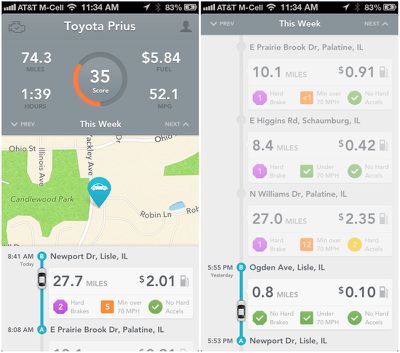
automatic_eli_tracking
Arguably the most useful feature of the Automatic Smart Driving Assistant's current implementation is seamlessly saving the location of where you parked your car. When you turn off your car, the app tags your current GPS location, and a simple tap loads up a full-screen map showing where you are in relation to your car. In my experience, accuracy of this feature has been fantastic, and way more useful than my typical routine of wandering through the parking lot pressing the lock button on my key fob over and over when I can't find my car.

Without a doubt, the geek-factor of the Automatic Smart Driving Assistant is off the charts. Being able to load up an app and see exactly where your car is, exactly how much each trip cost you in gas, and everything else feels futuristic -- particularly with how seamless this all is with the automatic Bluetooth connection and background data collection. It's also by far the most user-friendly OBD-II device I've seen, in that it parses the data the port can deliver in a very easy to understand format even for the least mechanically-minded drivers out there. The system also remains in beta testing, although it is unclear whether any additional features will be added before the official launch.

However, just how useful the Smart Driving Assistant actually is in reducing fuel consumption is debatable. It aims to save gas by reducing the amount of hard braking you do, how much of a lead foot you have, and how much you speed. But, do you really need a $70 gizmo to tell you that? Just simply making an effort to drive more slowly and conservatively, and both gradually accelerating and braking will have the same effect -- all without spending $70.


Top Rated Comments

smittyofdhs Avatar
172 months ago
How to say this politely....

What a piece of...no, that won't work.

Do I give a ...ah...darn if the piece of...er...junk thinks I accelerated too hard? And by whose standards...some dork sitting behind a computer who thinks driving is about going nice and slow (probably in the left lane) in their automatic shift, never-go-over-the-speed-limit, boring piece of...junk...car?

All that other ...ah...stuff (aside from the find your car thing), is useless and silly ca-ca, fit for folks for whom driving is a data gathering chore.

Of course, I'm just speaking for myself, and perhaps a few other people who enjoy driving and have gone to the bother of actually learning how to drive well. :D

Before going off just what was mentioned in this article, you should check out some of the other cool features, like it will call 911 when you are in accident and it gives the dispatcher your GPS info. It will also tell you why the "Check Engine" light is on, giving you the actual error codes and the remedy for the issue. I understand not everyone cares about pollution and the world we live in, but if people changed their driving habits just a bit, things would be better.
Score: 11 Votes (Like | Disagree)
Shrink Avatar
172 months ago
How to say this politely....

What a piece of...no, that won't work.

Do I give a ...ah...darn if the piece of...er...junk thinks I accelerated too hard? And by whose standards...some dork sitting behind a computer who thinks driving is about going nice and slow (probably in the left lane) in their automatic shift, never-go-over-the-speed-limit, boring piece of...junk...car?

All that other ...ah...stuff (aside from the find your car thing), is useless and silly ca-ca, fit for folks for whom driving is a data gathering chore.

Of course, I'm just speaking for myself, and perhaps a few other people who enjoy driving and have gone to the bother of actually learning how to drive well. :D
Score: 9 Votes (Like | Disagree)
nagromme Avatar
172 months ago
How to say this politely....

What a piece of...no, that won't work.

Do I give a ...ah...darn if the piece of...er...junk thinks I accelerated too hard? And by whose standards...some dork sitting behind a computer who thinks driving is about going nice and slow (probably in the left lane) in their automatic shift, never-go-over-the-speed-limit, boring piece of...junk...car?
...
That particular feature, obviously, is for people who already think for themselves that they are driving inefficiently. This is a tool to help. Among a great many other features.

You might as well ask, Do I care if some so-called "scale" thinks I weigh too much?? That scale is useful because you already care about your weight, not because you care about the scale-manufacturer's opinions.


So all this data goes up to Automatic servers and thus the NSA? Can you link the BT ODB dongle to the phone without the app uploading that data?
Good question (as horrifying as it is to hear myself say that). If there's any online component, it should be optional I would hope! The thing should be able to run on BT alone with no Internet involved.
Score: 8 Votes (Like | Disagree)
HiRez Avatar
172 months ago
I don't think that little box is big enough to fit my "Hard Accels" count.
Score: 8 Votes (Like | Disagree)
172 months ago
How to say this politely....

What a piece of...no, that won't work.

Do I give a ...ah...darn if the piece of...er...junk thinks I accelerated too hard? And by whose standards...some dork sitting behind a computer who thinks driving is about going nice and slow (probably in the left lane) in their automatic shift, never-go-over-the-speed-limit, boring piece of...junk...car?

All that other ...ah...stuff (aside from the find your car thing), is useless and silly ca-ca, fit for folks for whom driving is a data gathering chore.

Of course, I'm just speaking for myself, and perhaps a few other people who enjoy driving and have gone to the bother of actually learning how to drive well. :D

Uh, what?
Score: 7 Votes (Like | Disagree)
172 months ago
Is that the port that is hackable when the NSA/CIA want to terminate you? :rolleyes:
Score: 3 Votes (Like | Disagree)

Popular Stories

M5 MacBook Pro

RIP, MacBook Ultra

Monday October 19, 2026 9:37 am PDT by
Apple today sent out invites for an experience in Los Angeles on Wednesday, October 28, and the "Pro and tell" tagline on the invitation likely means that the rumored MacBook models with touch-enabled OLED displays will stick with MacBook Pro branding instead of the once-rumored "MacBook Ultra" name. The long-rumored "iPhone Ultra" ended up being named iPhone Duo, so speculation that Apple...
iPhone Duo Trio

Here's What Apple's Apps Look Like on the iPhone Duo

Tuesday October 20, 2026 11:12 am PDT by
With just three days to go until the iPhone Duo is released, Apple is getting ready for the launch. Behind the scenes, the App Store now has screenshots of Apple's built-in apps running on the Duo. We've seen some apps in marketing materials, but images of the ones we haven't seen give us an idea of what it will be like using the iPhone Duo day to day. Many apps are shown in landscape...
apple pro tell logo

Apple Announcing New Products Next Week: 'Pro and Tell'

Monday October 19, 2026 9:05 am PDT by
Apple's Greg Joswiak today hinted at new product announcements coming next week, sharing a social media post that says "Can't wait to pro and tell next week." Rumors suggest Apple is planning to debut the new MacBook Pro with an OLED touchscreen display, an M6 entry-level MacBook Pro, an M6 iMac, an iPad mini with an OLED display. Can't wait to pro and tell next week....
Latest Stories
Tesla App Gains iPad and iPhone Duo Support
2 hours ago
Apple Reportedly Boosts iPhone Duo Orders by 44%
2 hours ago
Fortnite Returning to Australian App Store After Court Ruling
3 hours ago
Apple Ordered to Open iPhone to Rival App Stores in Australia
3 hours ago
Apple Suppliers Face Hurdles Cutting Circuit Board Emissions
4 hours ago
Things Updated for iPhone Duo With Adaptive Layout
4 hours ago
Simplicity and Siri AI Are HomeView's Killer Features, Apple Says
4 hours ago
iPhone Duo Reviewers Really Miss Face ID
9 hours ago
Does the iPhone Duo Run Hot? Here's What Reviews Found
11 hours ago
Apple Music's New Look is Now Live on Apple's Website
11 hours ago
Anthropic Launches Claude Duet, a Proactive AI Agent
12 hours ago
What 32,000 Folds Did to the iPhone Duo's Hinge
13 hours ago
iPhone Duo's Hidden FaceTime Camera Takes 'Trash' Photos
14 hours ago
iPhone Duo Has 'Edge Light' Feature That Debuted on Macs Last Year
15 hours ago
Apple Support App Updated for iPhone Duo's Larger Display
15 hours ago
Amazon Sweetens the Deal on Entry-Level 16-Inch MacBook Pro With $570 Off
15 hours ago
iPhone Duo Tips Over on MagSafe Stands When Unfolded
15 hours ago
Apple Music's New Look Officially Announced
17 hours ago
iPhone Duo Supports Apple Pencil Starting With iOS 27.2
17 hours ago
iPhone Duo Accessories Roundup: Cases and Screen Protectors From OtterBox, ZAGG, and More
18 hours ago
Apple Stores Will Have 'Limited' Availability of iPhone Duo for Walk-In Customers
19 hours ago
iPhone Duo Reviews Explain Why Device is Both 'Fun' and 'Frustrating'
19 hours ago
Apple Says 'Reachability' Feature Coming to iPhone Duo Later This Year
20 hours ago
Loop Capital Cuts Apple Rating Over iPhone Sales Outlook
1 day ago
Apple Stores in Bordeaux and Lille Looted During French Protests
1 day ago
Bluesound Adds Native Apple Music Support
1 day ago
Apple CEO John Ternus Explains What Makes Good Product Design
1 day ago
UK Proposes New Ways to Help Apple Pay Rivals
1 day ago
WhatsApp Developing In-App Browser for All Chat Links on iPhone
1 day ago
Apple's App Store Chief Explains Its Push for Premium Games
1 day ago









































