
Apple Highlights New Apple TV 6.0 'Touch Setup' Feature in Support Document - MacRumors
Skip to Content

Apple Highlights New Apple TV 6.0 'Touch Setup' Feature in Support Document

Apple today released a support document detailing a newly implemented Apple TV setup feature that was introduced last week with its Apple TV 6.0 software update.

Users that have a third-generation Apple TV running the 6.0 software can use an iPhone, iPad, or iPod touch running iOS 7 to automatically transfer network settings, Apple ID information, and language preferences to the Apple TV, allowing for faster setup. The information exchange is done via Bluetooth by touching the iOS device to the Apple TV, taking advantage of the Bluetooth LE built into all Apple devices after the iPhone 4.
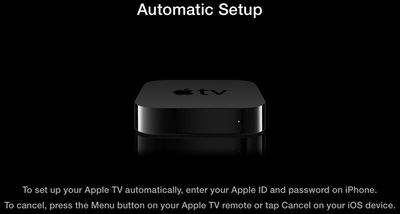
autosetup
Apple's support article includes a detailed list of instructions on the process:

1. Connect your Apple TV to your television and power and wait until your Apple TV displays the setup screen.

2. Unlock your iOS 7 device and ensure that Bluetooth is enabled. Also ensure that you are connected to the Wi-Fi network you want to use with Apple TV.

3. Touch your iOS device to your Apple TV and wait for the prompts to appear on your iOS device and Apple TV.

4. Enter your Apple ID and password on your iOS device.

5. Choose if you want Apple TV to remember your Apple ID password, and if you want Apple TV to send data to Apple.

6. Your Apple TV will start the configuration process, including connecting to your Wi-Fi network, activating Apple TV, and setting up your iTunes Store account.

Prior to the implementation of the tap setup feature, entering Apple TV information was a tedious process that required connecting a Bluetooth keyboard or using the Apple TV remote to pick and choose letters.

As noted by Apple, the transfer requires an iPhone 4s or later, a third-generation iPad or later, an iPad mini, or a fifth-generation iPod touch. The feature does not work with the iPhone 4 or the iPad 2.


Related Roundup: Apple TV
Buyer's Guide: Apple TV (Buy Now)

Popular Stories

Apple TV Sans Remote Feature

New Apple TV 4K Leaked

Friday September 25, 2026 8:16 am PDT by
MacRumors contributor Aaron Perris has uncovered an image file from Apple for an unreleased Apple TV 4K, suggesting that a new model will finally be released soon. The image is specifically for an "Apple TV 4K (4th generation)" model. Apple TV 4K (4th generation) image (on a gradient) The image reveals that the Apple TV will have the same external design as the current model, with all of its...

Apple TV 4K HomeView HomePod Mini tweaked

New Apple TV 4K, HomeView, and HomePod Mini: 16 Details Just Leaked

Sunday October 11, 2026 12:56 pm PDT by
Just two days before Apple's "Welcome home" experience in New York, Bloomberg's Mark Gurman has leaked several details about the new products set to be unveiled, including an all-new smart home hub, a HomePod mini 2, and a new Apple TV 4K. Here is an all-in-one summary of the details shared by Gurman:Apple's home hub with a touch-enabled display will be named HomeView, seemingly confirming a ...
HomePod minis Apple TV and iPad mini Leak Feature

iPad Mini With A20 Pro, New HomePod Mini Colors, and New Apple TV 4K All Just Leaked

Friday September 25, 2026 8:18 am PDT by
The next iPad mini, HomePod mini, and Apple TV 4K models have all leaked, just a few weeks before the devices are expected to be announced. Specifically, MacRumors contributor Aaron Perris discovered a few of Apple's official images of the devices, confirming their existence and some new features that are planned. The most notable iPad mini details revealed in today's leak include an A20 Pro ...

Top Rated Comments

DaGreat01 Avatar
171 months ago
Such a good feature. Typing in information with direction arrows and a select button sucks.
Score: 17 Votes (Like | Disagree)
MacGeek1987 Avatar
171 months ago
Not sure why tapping the devices is necessary, but I'd gladly do so instead of using that ridiculous "remote" to select one character at a time.
Score: 10 Votes (Like | Disagree)
jclo Avatar
171 months ago
Given that it's Bluetooth, why do the devices need to touch at all?

This isn't far off from the 'bumping' they mocked (though I realise there's a huge difference between this and AirDrop).

They don't need to touch. But touching ensures that the iOS device is close enough to the Apple TV, which is why I assume Apple specifies a touch in the documentation.
Score: 10 Votes (Like | Disagree)
Carlanga Avatar
171 months ago
lol, tedious...
takes about 4 minutes w the remote.
Either way is a welcome addition'
Score: 5 Votes (Like | Disagree)
Anonymous Freak Avatar
171 months ago
Now I want to wipe my :apple:TV 3 just to see this in action!

Edit: Okay, that was pretty slick.

Reset my :apple:TV, and it gave this prompt. Got my iPhone 4S about an inch from the :apple:TV, and a dialog appeared on the iPhone asking for my iTunes password. A couple "yes or no" type questions on the iPhone, and the :apple:TV was ready to go.
Score: 4 Votes (Like | Disagree)
171 months ago
Given that it's Bluetooth, why do the devices need to touch at all?

This isn't far off from the 'bumping' they mocked (though I realise there's a huge difference between this and AirDrop).

Edit: It may be that they're doing something clever with the iOS device's accelerometer readings to initiate the process whilst ensuring that they're within Bluetooth range...?
Score: 4 Votes (Like | Disagree)
Latest Stories
Tesla App Gains iPad and iPhone Duo Support
2 hours ago
Apple Reportedly Boosts iPhone Duo Orders by 44%
2 hours ago
Fortnite Returning to Australian App Store After Court Ruling
3 hours ago
Apple Ordered to Open iPhone to Rival App Stores in Australia
3 hours ago
Apple Suppliers Face Hurdles Cutting Circuit Board Emissions
3 hours ago
Things Updated for iPhone Duo With Adaptive Layout
4 hours ago
Simplicity and Siri AI Are HomeView's Killer Features, Apple Says
4 hours ago
iPhone Duo Reviewers Really Miss Face ID
9 hours ago
Does the iPhone Duo Run Hot? Here's What Reviews Found
11 hours ago
Apple Music's New Look is Now Live on Apple's Website
11 hours ago
Anthropic Launches Claude Duet, a Proactive AI Agent
12 hours ago
What 32,000 Folds Did to the iPhone Duo's Hinge
13 hours ago
iPhone Duo's Hidden FaceTime Camera Takes 'Trash' Photos
14 hours ago
iPhone Duo Has 'Edge Light' Feature That Debuted on Macs Last Year
15 hours ago
Apple Support App Updated for iPhone Duo's Larger Display
15 hours ago
Amazon Sweetens the Deal on Entry-Level 16-Inch MacBook Pro With $570 Off
15 hours ago
iPhone Duo Tips Over on MagSafe Stands When Unfolded
15 hours ago
Apple Music's New Look Officially Announced
17 hours ago
iPhone Duo Supports Apple Pencil Starting With iOS 27.2
17 hours ago
iPhone Duo Accessories Roundup: Cases and Screen Protectors From OtterBox, ZAGG, and More
18 hours ago
Apple Stores Will Have 'Limited' Availability of iPhone Duo for Walk-In Customers
19 hours ago
iPhone Duo Reviews Explain Why Device is Both 'Fun' and 'Frustrating'
19 hours ago
Apple Says 'Reachability' Feature Coming to iPhone Duo Later This Year
20 hours ago
Loop Capital Cuts Apple Rating Over iPhone Sales Outlook
1 day ago
Apple Stores in Bordeaux and Lille Looted During French Protests
1 day ago
Bluesound Adds Native Apple Music Support
1 day ago
Apple CEO John Ternus Explains What Makes Good Product Design
1 day ago
UK Proposes New Ways to Help Apple Pay Rivals
1 day ago
WhatsApp Developing In-App Browser for All Chat Links on iPhone
1 day ago
Apple's App Store Chief Explains Its Push for Premium Games
1 day ago









































