
Mac Pro/OS X 4K Display Compatibility 'Like the Wild West', Some 4K Monitors Unsupported

In its lengthy review of the new Mac Pro, AnandTech discovered that the Mac Pro's current support for 4K monitors leaves something to be desired. The reviewer connected the Sharp 32" 4K display that Apple currently offers on the Apple Online Store, expecting that OS X work the same way on that panel as Apple's current Retina MacBook Pro models do.

On those machines, Apple renders the screen at full resolution but then renders text, menu and UI elements at 4x their normal resolution so they are the appropriate physical size for the user. It also offers multiple options to scale UI elements up or down as the user prefers. Instead, using the Sharp panel with the Mac Pro makes text and other on-screen elements -- aside from photos and video -- very small and difficult to read.
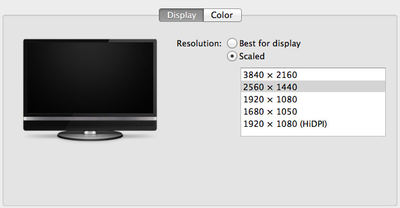
4K Monitor

I was fully expecting all of this to be available on the Mac Pro when connected to a 32” 4K display. By default, there’s only a single supported scaled resolution: 2560 x 1440. Unfortunately it doesn’t look like Apple is running the same supersampling routines when you pick this resolution, instead you get a 2560 x 1440 desktop scaled up to 3840 x 2160 (rather than a 5120 x 2880 screen scaled down). The result is a bit of a blurry mess.

You can use tools like SwitchResX (or Quartz Debug or the necessary Terminal command) to enable a 1080p HiDPI mode, but then you end up with insanely low point density of around 68 PPI. Unfortunately it doesn’t appear to be possible to define your own HiDPI modes in OS X, you have to rely on those that Apple officially supports. I tried creating a 5120 x 2880 (2560 x 1440 HiDPI) mode but I couldn't get it working under Mavericks. I'm not sure if I was limited by the OS or if Sharp's EDID-specified max resolution of 3840 x 2160 prevented OS X from accepting what I was trying to do.

AnandTech also tried the new Dell UltraSharp 24 Ultra HD display but found that the display is not properly supported by the Mac Pro.

The reviewer calls OS X's 4K display support "a bit like the wild west at this point", though he anticipates Apple will fix things with both software updates and its own displays in the future -- but urges early adopters to be aware of what they're getting into.

I am disappointed that Apple didn’t enable any HiDPI modes on the 32” Sharp display. While I found 3840 x 2160 a great resolution for video work, for everything else it made on-screen menus and text a bit too small. I would love to see a 2560 x 1440 HiDPI option (rendering offscreen at 5120 x 2880 and but scaling down to 3840 x 2160 for display) but it looks like I may have to wait for Apple’s own display before I get something like that.

It's been two years since Apple has updated its standalone display lineup, and the company is expected to come out with new models sooner rather than later. However, there are no concrete rumors suggesting when such an update might happen.


Related Roundup: Mac Pro
Buyer's Guide: Mac Pro (Caution)
Related Forum: Mac Pro

Popular Stories

maxresdefault

Apple Shows Off a Key Reason to Upgrade to the iPhone 17

Saturday February 7, 2026 9:26 am PST by
Apple today shared an ad that shows how the upgraded Center Stage front camera on the latest iPhones improves the process of taking a group selfie. "Watch how the new front facing camera on iPhone 17 Pro takes group selfies that automatically expand and rotate as more people come into frame," says Apple. While the ad is focused on the iPhone 17 Pro and iPhone 17 Pro Max, the regular iPhone...
Finder Siri Feature

Why Apple's iOS 26.4 Siri Upgrade Will Be Bigger Than Originally Promised

Friday February 6, 2026 3:06 pm PST by
In the iOS 26.4 update that's coming this spring, Apple will introduce a new version of Siri that's going to overhaul how we interact with the personal assistant and what it's able to do. The iOS 26.4 version of Siri won't work like ChatGPT or Claude, but it will rely on large language models (LLMs) and has been updated from the ground up. Upgraded Architecture The next-generation...
wwdc sans text feature

Apple Rumored to Announce New Product on February 19

Thursday February 5, 2026 12:22 pm PST by
Apple plans to announce the iPhone 17e on Thursday, February 19, according to Macwelt, the German equivalent of Macworld. The report, citing industry sources, is available in English on Macworld. Apple announced the iPhone 16e on Wednesday, February 19 last year, so the iPhone 17e would be unveiled exactly one year later if this rumor is accurate. It is quite uncommon for Apple to unveil...
apple wallet drivers license feature iPhone 15 pro

Apple Says These 7 U.S. States Plan to Offer iPhone Driver's Licenses

Monday February 9, 2026 6:24 am PST by
In select U.S. states, residents can add their driver's license or state ID to the Apple Wallet app on the iPhone and Apple Watch, and then use it to display proof of identity or age at select airports and businesses, and in select apps. The feature is currently available in 13 U.S. states and Puerto Rico, and it is expected to launch in at least seven more in the future. To set up the...
14 inch MacBook Pro Keyboard

New MacBook Pros Could Now Arrive in March

Sunday February 8, 2026 6:02 am PST by
New MacBook Pro models with the M5 Pro and M5 Max chips could arrive as soon as Monday, March 2, according to Bloomberg's Mark Gurman. In today's "Power On" newsletter, Gurman said that the release of new MacBook Pro models is tied to the release of macOS Tahoe 26.3. The launch is said to be slated for as early as the week of March 2. He added that the M4 Pro and M4 Max models on sale today...

Top Rated Comments

JM-Prod Avatar
158 months ago
This is really bad... how much effort would it have taken Apple to get this right for their most high-paying customers. Shame.
Score: 27 Votes (Like | Disagree)
Renzatic Avatar
158 months ago
I don't think this is an issue at all. Of course Apple can't guarantee every monitor will support OS X Retina technologies but I'm sure the best displays will make a conscious effort to do so. With this in mind, it doesn't surprise me the Dell cannot do OS X Retina.
No, this is more of a failing of OSX than Dell. If the monitor's built to display 3840x2160, then it's capable of displaying 3840x2160. Period. There should be no reason why it can't display that same resolution in Windows, but not in OSX due to it's...er..."Retina Technologies".

The only problem here is that Apple probably hasn't included the device IDs for all these new monitors yet, so OSX itself likely treats it as a generic display.
Score: 22 Votes (Like | Disagree)
WardC Avatar
158 months ago
What the article missed...this is a 4K display....you plug it in to your Mac Pro, and it displays everything at 4K resolution...it works.

It is not a Retina display, nor does it do Retina scaling, NOR was it even meant to.

It displays a 4K resolution picture, and workspace.

The display at this resolution may have tiny text and UI elements, but it was not meant to operate at any other resolution (as of now). You must learn to deal with this. I think that is what they are complaining about here...people have gotten extremely spoiled by Retina scaling, and this display is flat out HIRES, so the UI elements are small.

It does everything its advertised to do.

I think the article missed this.
Score: 10 Votes (Like | Disagree)
LordVic Avatar
158 months ago
this is more an issue with OSx and it's handling of displays than the Mac Pro.

I have similar issues on my myriad of displays at home. from 1600x1200 monitor, 1620x1050, 1080p, 720p, 1024x768, 1280x1024 and the like, OSx seems to have problems using many of these displays natively without weird impressions in each.

heck. it doesn't even seem to want to handle 720p identically accross displays even though they're both on HDMI! my 720p projector comes through as crystal clear. my 720p 27" TV is fuzzy and skewed.

swap over to Windows 7 via boot camp and all these displays work perfectly.

seems that Apple doesn't have good support for displays that aren't either theirs or directly sold by them. Something I hoped would be fixed in Mavericks that doesn't seem to be.
Score: 10 Votes (Like | Disagree)
yg17 Avatar
158 months ago
Almost everything I plug into DP or DVI (or VGA) looks exactly like it should. Maybe HDMI is a ****** protocol or devices having only HDMI input aren't too smart.

Two things wrong with this post:

1. HDMI and DVI use the exact same signaling for video. HDMI adds audio. HDMI is basically DVI with audio.
2. I have a Dell monitor plugged into my rMBP's mDP/TB port and it looks like crap because OSX thinks it's a TV and not a monitor. This is a well documented issue that's existed since 10.8 at least and I had to use a hack to the display definition files to get it to look right. The display works fine on Windows without any OS hacks.
Score: 8 Votes (Like | Disagree)
cable Avatar
158 months ago
What's terrible is that Apple presents this monitor as if it's fully functional. What's worse, is I signed up for the Dell financing and bought their 32inch screen and apparently it doesn't work either?

Not happy. Really crossing my fingers that a software update will rectify this before everything arrives in the mail.
Score: 8 Votes (Like | Disagree)















