
Apple Expanding Two-Step Verification to iCloud.com - MacRumors
Skip to Content

Apple Expanding Two-Step Verification to iCloud.com

Apple appears to be testing its two-factor authentication system on some iCloud.com accounts, asking for a verification code before allowing users with two-factor verification enabled to access various iCloud.com apps.

First noticed by AppleInsider, the two-factor verification system for iCloud.com requires users to enter a verification code sent via SMS or to a trusted iOS device before the iCloud.com versions of Mail, Contacts, Calendar, Reminders, Pages, Numbers, and Keynote can be used.
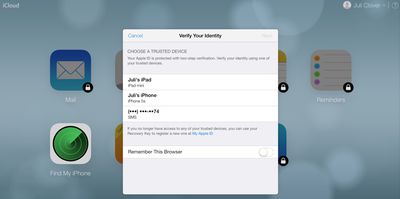
icloudtwofactorauthentication
Previously, accessing these apps only required an Apple ID password, but now "Find My iPhone" is the only app that remains accessible without a two-factor verification code. Computers used to access iCloud.com have a "Remember This Browser" option, requiring a verification code to be entered only once.

Originally implemented back in March of 2013, two-factor verification is an opt-in system designed to increase Apple ID account security by requiring identity verification before allowing users to make account changes or purchase content on new devices. It replaces standard security questions with a security code delivered to a trusted device.

At this time, it is unknown if Apple is simply testing the feature with some users or working on a wider rollout for all iCloud.com users with two-factor verification enabled.

Update 3:30 PM PT: Apple appears to have disabled two-factor verification for some iCloud.com accounts that previously had access to the feature, suggesting it may have seen an accidental early launch.


Popular Stories

iOS 26

iOS 26.4 Adds Two New Features to CarPlay

Tuesday March 24, 2026 1:55 pm PDT by
iOS 26.4 was released today, and it includes a couple of new features for CarPlay: an Ambient Music widget and support for voice-based chatbot apps. To update your iPhone 11 or newer to iOS 26.4, open the Settings app and tap on General → Software Update. CarPlay will automatically offer the new features so long as the iPhone connected to your vehicle is running iOS 26.4 or later....
Apple Business hero

Apple Unveils 'Apple Business' All-in-One Platform

Tuesday March 24, 2026 8:53 am PDT by
Apple today announced Apple Business, a new all-in-one platform that unifies device management, productivity tools, and customer outreach features. The service is designed to be a consolidated replacement for several of Apple's existing business-focused offerings, including Apple Business Essentials, Apple Business Manager, and Apple Business Connect. It provides organizations with a single...
AirPods Pro Firmware Feature

Apple Releases New Firmware for AirPods Pro 3, AirPods Pro 2 and AirPods 4

Tuesday March 24, 2026 12:31 pm PDT by
Apple today released new firmware for the AirPods Pro 2, AirPods Pro 3, and the AirPods 4. The firmware has a version number of 8B39, up from 8B34 on the AirPods Pro 3, 8B28 on the AirPods Pro 2, and 8B21 on the AirPods 4. There is no word on what's included in the firmware, but Apple has a support document with limited notes. Most updates are limited to bug fixes and performance...

Top Rated Comments

CrazyForApple Avatar
153 months ago
the more secure, the better
Score: 5 Votes (Like | Disagree)
153 months ago
You do understand that clicking "remember this computer" is exactly the same as not using it at all, right?

And you're criticizing others for not using it when that's your plan too?
This is my home computer, how is that the same not using it at all? It's just remembering that one computer, not all computers. There is also an option to log off all computers through iCloud.com. So I can go on another computer and log off if needed.
With iCloud.com, it's also the browsers too that it's saving. So you log on safari with it, it won't save it from Chrome.

If my house gets broken into, I doubt they are breaking in to go on my computer and read my email :rolleyes:
Score: 2 Votes (Like | Disagree)
153 months ago
Moronic

Stupid stupid stupid. If I have my IOS device with me why would I log into icloud? So were creating a system that only works when you don't need it?
Score: 2 Votes (Like | Disagree)
rdlink Avatar
153 months ago
"Computers used to access iCloud.com have a "Remember This Browser" option, requiring a verification code to be entered only once."

Surely this means you can login at home, tick the box and you won't be asked for a code again so you can continue using iCloud at school?

I think the OP's point is that their school uses a series of computers on carts, and they won't necessarily have access to the same computer every time. Also, many schools like this clear browser history automatically on logout.
Score: 2 Votes (Like | Disagree)
appleguy123 Avatar
153 months ago
I hope it's optional. I often use icloud to email things to myself to print at my college. Not interested in have to do this every time I need to print something.
Score: 2 Votes (Like | Disagree)
153 months ago
All well and good but...

How on earth am i going to use this is school. Our school uses a cart of windows laptops and we have separate computer rooms. And obviously since I'm in school i can't use my phone... What am i going to do? Will there be an option to turn this off? I physically can't use word or powerpoint in school any more, it's too much of a headache, i really need access to iCloud. Oh god.
Score: 2 Votes (Like | Disagree)















