Losing Two-Factor Recovery Key Could Permanently Lock Apple ID - MacRumors
Skip to Content

Losing Two-Factor Recovery Key Could Permanently Lock Apple ID

In March 2013, Apple introduced two-factor authentication to provide additional security for Apple IDs. It expanded the feature to several new countries earlier this year and introduced it to the company's iCloud.com website this September. This was after CEO Tim Cook promised to broaden use of its two-factor authentication system in the wake of a hacking incident that saw several celebrities' iCloud accounts hacked.
recoverykey
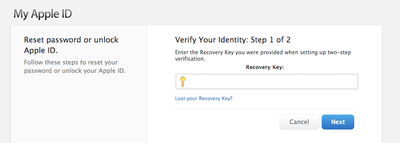
The system requires a user to have a second "trusted" device that is used to verify a user's identity in addition to an extra security code called the "Recovery Key". However, in a new account from The Next Web's Owen Williams, that Recovery Key also has the potential to completely lock a person out of their account if they're being hacked.

Williams found that someone had tried to hack his iCloud account. Apple's two-factor system kicked in and locked the account, denying entry to the would-be hacker while also denying entry to Williams. When he went to iForgot, Apple's account recovery service, he assumed two of his password, Recovery Key or trusted device would unlock his account, as he was led to believe by an Apple Support document.

When I headed to the account recovery service, dubbed iForgot, I discovered that there was no way back in without my recovery key. That’s when it hit me; I had no idea where my recovery key was or if I’d ever even put the piece of paper in a safe place. I’ve moved since I set up two-factor on iCloud.

Williams contends he took a screenshot of the Recovery Key and printed that out as well as taking a photo on his iPhone to keep as a backup, but could not locate either and was on the verge of losing his "digital life". He called Apple customer support and was told  that he had forfeited his Apple ID by losing his Recovery Key and that there was no way Apple could help him. He called back a second time.

When she got back on the line, the story was just as bleak. “We take your security very seriously at Apple” she told me “but at this time we cannot grant you access back into your Apple account. We recommend you create a new Apple ID.”

After a couple more days of talking to Apple customer support and even friends who worked at Apple, he continued to receive same responses: he was locked out of his account due to someone trying to hack into it and couldn't unlock it without a Recovery Key even though Apple's support document says it's possible with a trusted device. Eventually, Williams located his Recovery Key in what he calls the "depths" of his Time Machine backup, allowing him to finally unlock his account.

Williams concludes with a warning that anyone with two-factor authentication should take far greater care in protecting and remembering where they store their Recovery Keys, as losing it could permanently lock a user out of their Apple ID with Apple unable to do anything to help. The entire account, which is a fascinating and worthwhile read, can be read at The Next Web.


Popular Stories

iOS 26

iOS 26.4 Adds Two New Features to CarPlay

Tuesday March 24, 2026 1:55 pm PDT by
iOS 26.4 was released today, and it includes a couple of new features for CarPlay: an Ambient Music widget and support for voice-based chatbot apps. To update your iPhone 11 or newer to iOS 26.4, open the Settings app and tap on General → Software Update. CarPlay will automatically offer the new features so long as the iPhone connected to your vehicle is running iOS 26.4 or later....
Apple Business hero

Apple Unveils 'Apple Business' All-in-One Platform

Tuesday March 24, 2026 8:53 am PDT by
Apple today announced Apple Business, a new all-in-one platform that unifies device management, productivity tools, and customer outreach features. The service is designed to be a consolidated replacement for several of Apple's existing business-focused offerings, including Apple Business Essentials, Apple Business Manager, and Apple Business Connect. It provides organizations with a single...
AirPods Pro Firmware Feature

Apple Releases New Firmware for AirPods Pro 3, AirPods Pro 2 and AirPods 4

Tuesday March 24, 2026 12:31 pm PDT by
Apple today released new firmware for the AirPods Pro 2, AirPods Pro 3, and the AirPods 4. The firmware has a version number of 8B39, up from 8B34 on the AirPods Pro 3, 8B28 on the AirPods Pro 2, and 8B21 on the AirPods 4. There is no word on what's included in the firmware, but Apple has a support document with limited notes. Most updates are limited to bug fixes and performance...

Top Rated Comments

kitsap2 Avatar
147 months ago
Breaking News!

System works as designed!
Score: 101 Votes (Like | Disagree)
147 months ago
I am also confused how this is news. Apple explicitly states that losing the key will make the recovery impossible. And anyway, do you want secure accounts or not? If yes, then you are personally responsible for your stuff. Putting this silly article on MacRumours is entirely pointless.
Score: 29 Votes (Like | Disagree)
lolkthxbai Avatar
147 months ago
Extra! Extra! Read all about it! Man discovers responsibility!
Score: 28 Votes (Like | Disagree)
147 months ago
Two-Factor Authentication is just that:
A user will need 2 out of the 3;
1. Password
2. Device
3. Recovery Key

The name of service describes it.
Except that it apparently doesn't work that way if Apple decides to lock your account due to hack attempts. In that case you have to have the recovery key, even if you have the 2 other factors. I think it is a bit draconian to permanently lock the account like that, given the value attached to it (you could lose not only your iTunes purchases, email, cloud documents etc., but also effectively brick your devices if you use Find my iPhone and need to restore a device for some reason).

They could perhaps release the lock after 48 hours, or unlock the account if you supply password, trusted device, and some additional verification (like showing a photo ID at an Apple store or sending a verification code to an alternate email address).
Score: 26 Votes (Like | Disagree)
147 months ago
Almost all the posts in here are incorrect about the purpose of the Recovery Key.

The Recovery Key is required if you forget your Apple ID password or lose access to a trusted device.

According to this article, the person in question knew his password and had a trusted device. He shouldn't have needed the Recovery Key.

The only thing Apple says about an account being compromised is that you need to reset your Apple ID password. And it says nothing about needing a Recovery Key to do that.
Score: 26 Votes (Like | Disagree)
147 months ago
So now they are saying Apple is too strict?
Score: 26 Votes (Like | Disagree)