
How Photos for OS X Handles Content and Metadata Migration from iPhoto and Aperture - MacRumors
Skip to Content

How Photos for OS X Handles Content and Metadata Migration from iPhoto and Aperture

by

Last week, Apple released OS X Yosemite 10.10.3 with support for the new Photos for OS X app, the company's replacement for both iPhoto and Aperture; Apple also removed both apps from the Mac App Store shortly after Photos was released. Today, Apple released a support document detailing exactly what users can expect when they migrate their content from Aperture and iPhoto to Photos.
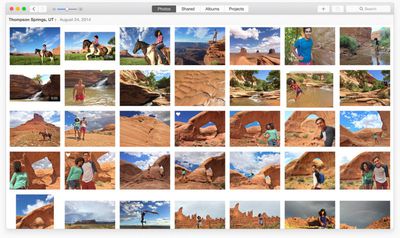
Photos for OS X
When iPhoto content (photos and video) and metadata are migrated over to Photos, they do so without changes. Images migrate over with the adjustments that were applied within iPhoto. Users will not be able to alter the images, but they will be able to revert to the original photo before adjustments were applied. Slideshows and Albums are both preserved in Photos with a few exceptions. Slideshows that use themes not available in Photos have the default theme attached to them, while Smart Albums where none of its Smart Album criteria are supported by Photos are not migrated over.

Keywords are preserved in Photos, and most metadata is migrated over, but there are some exceptions. Some IPTC metadata like Copyright are still attached to works, but they won't be visible within Photos. They can still be viewed in programs that recognize and display the select IPTC data, like iPhoto and Aperture. Finally, Events are transferred to an album called iPhoto Events in the Album View section of Photos for OS X.

Aperture's migration of content and metadata works similar to iPhoto, but with a few significant differences. Aperture projects and subfolders migrate to folders called Aperture Projects and iPhoto Events, both of which are available to view in the Album View section of Photos. Photo books also migrate to the Album section of the app. Captions are preserved in Photos, but star ratings, flagged images and color labels are turned into keywords. For example, a one-star rating shows up as "1 star" keyword, flagged images have "flagged" keywords attached and the green color label turns into a "green" keyword. Finally, custom metadata fields to not transfer to Photos.

The entire support document is helpful for those worrying about transferring their content over to Photos and can be viewed on Apple's website.


Top Rated Comments

150 months ago
Any Mac app reconfigured to work with IOS is watered down in order to do so.
Score: 13 Votes (Like | Disagree)
macbeta Avatar
150 months ago
Sticking with iPhoto and Lightroom.

I don't like it, Some deeply flawed ideas. One of the most useful features of iPhoto was dragging a picture out to a folder or to an application like photoshop. Dragging out a raw file creates a JPG and deposits it in the folder and you cannot drag into photoshop or send the raw to an external editor. Useless.
Score: 5 Votes (Like | Disagree)
AppleDeviceUser Avatar
150 months ago
So I migrated over thinking it would handle my library (40,000 photos) better than iPhoto did, editing options are less than before and it still crashes and freezes all the time. What the hell Apple?!

Plus they removed aperture off the app store, why? It's not like "photos" replaced all those editing features. Again... What the hell Apple?!

Score: 4 Votes (Like | Disagree)
150 months ago
merging albums, sorting by date gone. why?!?

I just don't understand why in the Photos app they removed the ability to merge or split albums. Also Aperture and iPhoto sorted Projects and Events by date with the most recent first. That made sense. Now Photos doesn't allow for that. If you want by date you need to scroll down to get to the most reason. Not really intuitive at best and definitely annoying.
Score: 4 Votes (Like | Disagree)
150 months ago
Personally, I prefer photos to iPhoto, but I understand people's complaints, especially those trying to cope using it as an Apeture replacement.

iCloud Photo Library does actually seem intuitive but it's annoying that it's blocked by a paywall for me.

Either give me more storage for free - my photo library is relatively small (people on here talk about collections with 40,000 photos in, I only have 7GB of photos) or allow me to store - for example - my 3 most recent events in iCloud, and keep the rest on my Mac.

----------

I want a response to this to! Can I delete the iPhoto one?

After moving all my photos into the Photos app, I deleted the iPhoto library, and have had no problems with the Photos app.
Score: 3 Votes (Like | Disagree)
150 months ago
I don't like it, Some deeply flawed ideas. One of the most useful features of iPhoto was dragging a picture out to a folder or to an application like photoshop. Dragging out a raw file creates a JPG and deposits it in the folder and you cannot drag into photoshop or send the raw to an external editor. Useless.


I had issues with this as well, until they rethink this option you should just go File->Export->Unmodified Original.

----------

>360.000 and 2TB. Not going into cloud. iCloud photo library looks much better than what it replaces, but please Apple, give us better tools to handle what goes to the cloud and what stays on our local storage systems (I've three local copies). And make sure that Photos works with large libraries - number of photos is not going to shrink over years and it's not unheard of to have hundreds of thousands, over decade or two!


Disagree. There is nothing normal with 360,000 photos in a library. Apple targets the mainstream here. If you need to manage such volums you are not a priority.

I think the mainstream (90%) of users will have less than 10,000 photos. I have 27 years of photos and 36,000 photos which I find to be a lot. 230GB which put me in the 500GB bracket. But I don´t consider myself mainstream.

----------

I'm calling BS on this. Even if true, we'd be talking months or years and Apple hasn't committed to any of this. Not even to add what should be the most basic functionality.


Short answer: you can't. Photos is a least-common-denominator approach; because Photos for iOS lacks a way to tag location to existing photos, Photos for OSX apparently can't have that functionality either. Similar to when Apple neutered the iWork for OSX suite to make it feature compatible with the iOS apps. Embarrassing, really, for a company of Apple's size.

You´re no fun. It´s version 1. Give Apple a break. It´s a fantastic first release. Obviously they will keep hacking up features. Until you find them, find alternative ways of doing things. Need to GEOTag something? Just export out of Photos, and into iPhoto, tag and re-import into Photos.
Score: 2 Votes (Like | Disagree)

Popular Stories

M5 MacBook Pro

RIP, MacBook Ultra

Monday October 19, 2026 9:37 am PDT by
Apple today sent out invites for an experience in Los Angeles on Wednesday, October 28, and the "Pro and tell" tagline on the invitation likely means that the rumored MacBook models with touch-enabled OLED displays will stick with MacBook Pro branding instead of the once-rumored "MacBook Ultra" name. The long-rumored "iPhone Ultra" ended up being named iPhone Duo, so speculation that Apple...
iPhone Duo Trio

Here's What Apple's Apps Look Like on the iPhone Duo

Tuesday October 20, 2026 11:12 am PDT by
With just three days to go until the iPhone Duo is released, Apple is getting ready for the launch. Behind the scenes, the App Store now has screenshots of Apple's built-in apps running on the Duo. We've seen some apps in marketing materials, but images of the ones we haven't seen give us an idea of what it will be like using the iPhone Duo day to day. Many apps are shown in landscape...
apple pro tell logo

Apple Announcing New Products Next Week: 'Pro and Tell'

Monday October 19, 2026 9:05 am PDT by
Apple's Greg Joswiak today hinted at new product announcements coming next week, sharing a social media post that says "Can't wait to pro and tell next week." Rumors suggest Apple is planning to debut the new MacBook Pro with an OLED touchscreen display, an M6 entry-level MacBook Pro, an M6 iMac, an iPad mini with an OLED display. Can't wait to pro and tell next week....
Latest Stories
Tesla App Gains iPad and iPhone Duo Support
1 hour ago
Apple Reportedly Boosts iPhone Duo Orders by 44%
2 hours ago
Fortnite Returning to Australian App Store After Court Ruling
2 hours ago
Apple Ordered to Open iPhone to Rival App Stores in Australia
2 hours ago
Apple Suppliers Face Hurdles Cutting Circuit Board Emissions
3 hours ago
Things Updated for iPhone Duo With Adaptive Layout
3 hours ago
Simplicity and Siri AI Are HomeView's Killer Features, Apple Says
3 hours ago
iPhone Duo Reviewers Really Miss Face ID
8 hours ago
Does the iPhone Duo Run Hot? Here's What Reviews Found
10 hours ago
Apple Music's New Look is Now Live on Apple's Website
11 hours ago
Anthropic Launches Claude Duet, a Proactive AI Agent
11 hours ago
What 32,000 Folds Did to the iPhone Duo's Hinge
12 hours ago
iPhone Duo's Hidden FaceTime Camera Takes 'Trash' Photos
13 hours ago
iPhone Duo Has 'Edge Light' Feature That Debuted on Macs Last Year
14 hours ago
Apple Support App Updated for iPhone Duo's Larger Display
14 hours ago
Amazon Sweetens the Deal on Entry-Level 16-Inch MacBook Pro With $570 Off
14 hours ago
iPhone Duo Tips Over on MagSafe Stands When Unfolded
15 hours ago
Apple Music's New Look Officially Announced
16 hours ago
iPhone Duo Supports Apple Pencil Starting With iOS 27.2
17 hours ago
iPhone Duo Accessories Roundup: Cases and Screen Protectors From OtterBox, ZAGG, and More
18 hours ago
Apple Stores Will Have 'Limited' Availability of iPhone Duo for Walk-In Customers
18 hours ago
iPhone Duo Reviews Explain Why Device is Both 'Fun' and 'Frustrating'
18 hours ago
Apple Says 'Reachability' Feature Coming to iPhone Duo Later This Year
19 hours ago
Loop Capital Cuts Apple Rating Over iPhone Sales Outlook
23 hours ago
Apple Stores in Bordeaux and Lille Looted During French Protests
23 hours ago
Bluesound Adds Native Apple Music Support
1 day ago
Apple CEO John Ternus Explains What Makes Good Product Design
1 day ago
UK Proposes New Ways to Help Apple Pay Rivals
1 day ago
WhatsApp Developing In-App Browser for All Chat Links on iPhone
1 day ago
Apple's App Store Chief Explains Its Push for Premium Games
1 day ago








































