
'Workflow' for Apple Watch Brings Automated Tasks to Your Wrist - MacRumors
Skip to Content

'Workflow' for Apple Watch Brings Automated Tasks to Your Wrist

Popular iOS app Workflow was today updated with support for the upcoming Apple Watch, bringing its highly useful task automation capabilities to the wrist-worn device.

For those of you unfamiliar with Workflow, it's a powerful automation app that was first launched on iOS last December. Workflow lets users create actions and connect apps to automatically perform a huge range of tasks on the iPad or the iPhone.
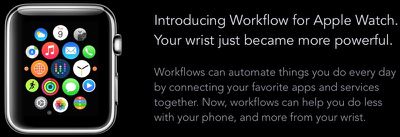
workflowapplewatch
Workflows can be built from a series of actions to perform tasks like making GIFs from a series of photos, creating PDFs from websites, appending content or recordings to Evernote, seeing older versions of websites, getting images from websites, and translating text on the clipboard. There are hundreds of actions that can be combined for an endless number of different workflows.

On the Apple Watch, Workflow will work in the same way, giving users one-tap access to a wide range of different timesaving actions. For example, it'll be possible to pull up a map to the nearest coffee shop or call an Uber using Workflow. These type of quick-access actions may be particularly valuable on the Apple Watch, given its limited input methods.

workflowactions
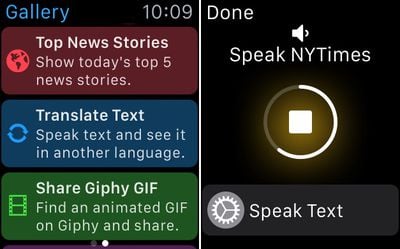
One of the best features about Workflow for iOS is its included Workflow Gallery, which makes it easy for even those new to the app to download actions that are immediately useful. The same gallery feature will be available on the Apple Watch for fast access to workflows.
workflowgallery

Workflow's Gallery and a workflow in action

Workflows can be executed by raising the Apple Watch on the wrist to turn it on and swiping up at the bottom of the screen to get to the Workflow Glance. Workflows can be run directly from the Glance portion of the Apple Watch, so accessing them will be similar to accessing an app in the Notification Center on iOS. As a reminder, Glances are quick snippets of information that are meant to be easy to access.

Third-party Glances on the Apple Watch are not interactive and do not support buttons or scrolling, so launching a workflow through the Apple Watch's Glance view is done in a unique way. The Glance automatically scrolls through the different workflows that are available and selecting one is done by tapping on the screen.

Scrolling through workflows can be sped up with a rather unique interaction -- knocking the Apple Watch against the iPhone in a pants pocket. This causes the built-in scrolling mechanism to shift to the next available workflow in the list.

Workflows from the iPhone are automatically available on the Apple Watch, including all custom-created workflows constructed from the available actions in the Workflow app. Many Apple Watch apps are somewhat limited in function due to the restricted access developers have to Apple APIs, and the same goes for Workflow.

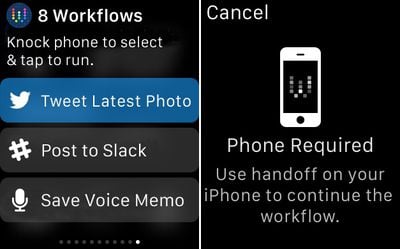
Apple Watch workflows aren't as full-featured as those on the iPhone -- it's not possible to run workflows that open other apps -- but Handoff is supported to allow users to transfer a workflow on the Apple Watch to the iPhone.
workflowhandoffandglanceview

Workflow's Glance menu and Handoff message

Workflows that involve opening apps, sending messages, or placing phone calls will all require the iPhone because developers cannot use these functions. Workflows that are not supported on the Apple Watch will direct users to use Handoff to swap over to the iPhone.

Though Apple Watch workflows can't open apps (aside from getting directions within Maps) they can still take advantage of the same data available to many iOS apps, like calendar info, contacts, Twitter, Facebook, and more. Currently, 163 out of 226 of available actions within the Workflow app are able to run natively on the Apple Watch, so there's still quite a lot that can be done directly on the device.

Workflow for the Apple Watch is available through an update to the Workflow app as of today, so it'll be accessible on the Apple Watch as soon as the first devices arrive in customers' hands.

Workflow can be downloaded from the App Store for the sale price of $2.99. [Direct Link]

Popular Stories

M5 MacBook Pro

RIP, MacBook Ultra

Monday October 19, 2026 9:37 am PDT by
Apple today sent out invites for an experience in Los Angeles on Wednesday, October 28, and the "Pro and tell" tagline on the invitation likely means that the rumored MacBook models with touch-enabled OLED displays will stick with MacBook Pro branding instead of the once-rumored "MacBook Ultra" name. The long-rumored "iPhone Ultra" ended up being named iPhone Duo, so speculation that Apple...
iPhone Duo Trio

Here's What Apple's Apps Look Like on the iPhone Duo

Tuesday October 20, 2026 11:12 am PDT by
With just three days to go until the iPhone Duo is released, Apple is getting ready for the launch. Behind the scenes, the App Store now has screenshots of Apple's built-in apps running on the Duo. We've seen some apps in marketing materials, but images of the ones we haven't seen give us an idea of what it will be like using the iPhone Duo day to day. Many apps are shown in landscape...
apple pro tell logo

Apple Announcing New Products Next Week: 'Pro and Tell'

Monday October 19, 2026 9:05 am PDT by
Apple's Greg Joswiak today hinted at new product announcements coming next week, sharing a social media post that says "Can't wait to pro and tell next week." Rumors suggest Apple is planning to debut the new MacBook Pro with an OLED touchscreen display, an M6 entry-level MacBook Pro, an M6 iMac, an iPad mini with an OLED display. Can't wait to pro and tell next week....

Top Rated Comments

jacobj Avatar
150 months ago
Can't wait!

I'll definetely use this app.

The saddest thing I have seen today: either you ordered this and then cancelled it just so you could do a screen grab, or you have the money, but are empty inside and therefore need people to validate your worth through their equally shallow admiration, or you want to annoy people like me for fun which has no satircal value and is equally sad.

Then to post it first just wreaks of a "look at me, look at me" complex.

Let's just hope it's a phase. Good luck in the future. I hope you resolve it all to your benefit.
Score: 20 Votes (Like | Disagree)
150 months ago
"Scrolling through workflows can be sped up with a rather unique interaction -- knocking the Apple Watch against the iPhone in a pants pocket"

Wait what? So if the watch is on my left hand, and my phone is in my right pocket, I have to do some kind of Macarena dance move to speed up the scrolling? I have read this sentence 10 times.... Nothing about it makes sense.
Score: 13 Votes (Like | Disagree)
150 months ago
Thanks to xhamster, my wrist is already powerful enough thanks.
Score: 12 Votes (Like | Disagree)
150 months ago
Every time I come across this app, I think about grabbing it but none of the examples given seem useful or relevant to me. I'm either not looking at enough examples, or perhaps I am a boring person. People seem to swear by this app and think it would make a good Apple purchase. :cool:
Score: 7 Votes (Like | Disagree)
DrJohnnyN Avatar
150 months ago
Can't wait!

I'll definetely use this app.
Score: 6 Votes (Like | Disagree)
150 months ago
Can't wait!

I'll definetely use this app.

Opulence You has it
Score: 5 Votes (Like | Disagree)
Latest Stories
Tesla App Gains iPad and iPhone Duo Support
1 hour ago
Apple Reportedly Boosts iPhone Duo Orders by 44%
2 hours ago
Fortnite Returning to Australian App Store After Court Ruling
2 hours ago
Apple Ordered to Open iPhone to Rival App Stores in Australia
2 hours ago
Apple Suppliers Face Hurdles Cutting Circuit Board Emissions
3 hours ago
Things Updated for iPhone Duo With Adaptive Layout
3 hours ago
Simplicity and Siri AI Are HomeView's Killer Features, Apple Says
3 hours ago
iPhone Duo Reviewers Really Miss Face ID
8 hours ago
Does the iPhone Duo Run Hot? Here's What Reviews Found
10 hours ago
Apple Music's New Look is Now Live on Apple's Website
11 hours ago
Anthropic Launches Claude Duet, a Proactive AI Agent
11 hours ago
What 32,000 Folds Did to the iPhone Duo's Hinge
12 hours ago
iPhone Duo's Hidden FaceTime Camera Takes 'Trash' Photos
13 hours ago
iPhone Duo Has 'Edge Light' Feature That Debuted on Macs Last Year
14 hours ago
Apple Support App Updated for iPhone Duo's Larger Display
14 hours ago
Amazon Sweetens the Deal on Entry-Level 16-Inch MacBook Pro With $570 Off
14 hours ago
iPhone Duo Tips Over on MagSafe Stands When Unfolded
15 hours ago
Apple Music's New Look Officially Announced
16 hours ago
iPhone Duo Supports Apple Pencil Starting With iOS 27.2
17 hours ago
iPhone Duo Accessories Roundup: Cases and Screen Protectors From OtterBox, ZAGG, and More
18 hours ago
Apple Stores Will Have 'Limited' Availability of iPhone Duo for Walk-In Customers
18 hours ago
iPhone Duo Reviews Explain Why Device is Both 'Fun' and 'Frustrating'
18 hours ago
Apple Says 'Reachability' Feature Coming to iPhone Duo Later This Year
19 hours ago
Loop Capital Cuts Apple Rating Over iPhone Sales Outlook
23 hours ago
Apple Stores in Bordeaux and Lille Looted During French Protests
23 hours ago
Bluesound Adds Native Apple Music Support
1 day ago
Apple CEO John Ternus Explains What Makes Good Product Design
1 day ago
UK Proposes New Ways to Help Apple Pay Rivals
1 day ago
WhatsApp Developing In-App Browser for All Chat Links on iPhone
1 day ago
Apple's App Store Chief Explains Its Push for Premium Games
1 day ago











































