
Apple Watch Tips and Hidden Features: Handoff, AirPlay, and More

The Apple Watch is a brand new product platform for Apple, offering a significantly different experience compared to Apple's already established platforms, iOS and Mac OS. As the device is getting onto more and more wrists over the coming days, weeks and months, we've collected a bunch of helpful tips to help users acclimating to Apple's brand new platform in this video.


We've also highlighted some of the tips from the video, below.

Fast switching between apps - If you need to bounce between two apps, or one app and your watch face, it can become fairly cumbersome and take some time. Instead, it's easier and quicker to simply fast switch between apps by double tapping the Digital Crown. Double tapping a second time goes back to the last thing you were doing. This way, you can spend some time on the watch face, quickly zoom over to the Music app to select a new song, and then double tap again to go back to the watch face.

Use Siri to launch apps - The app icons on Apple Watch can be fairly small, and their tiny touch targets can make it difficult to accurately choose which app you want to launch. An easier way to launch an app is to use Siri, which can be launched by either saying "Hey Siri" or holding down the Digital Crown. Once that's done, a user just has to say "launch" or "open" followed by the name of the app.
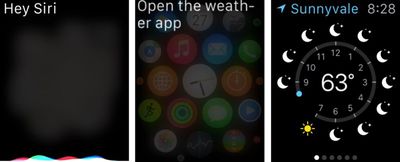
siriopeningapps
Handoff Any Apple Watch Notification Back to the iPhone - It was already known that the Apple Watch would be able to handoff app activities from the Watch to the iPhone, but it can also be used to handoff any push notification back to your iPhone. Users can go back through the Apple Watch notifications they missed by swiping down on the watch face and hand those off at a later time. The original iPhone app doesn't even have to be built to support it.
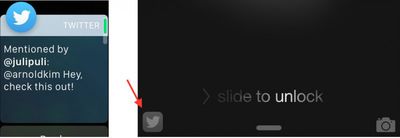
handoff
AirPlay Controls - Using Force Touch in various apps on the Apple Watch can yield new ways to interact. One of the more useful (yet hidden) ways Force Touch changes an app is within the Music app, where Force Touching while playing a song, allows you to choose your iPhone's Airplay target for your music. This Airplay option isn't available from any other screen in the Music app except for the song-playing screen.

You can also play music straight off your Apple Watch. Choosing "Source" from the same menu, lets you play music straight off your Apple Watch to any Bluetooth target.
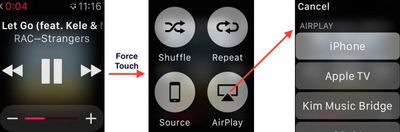
airplay-force
Battery and Control Center Glances - On the watch face, swiping up reveals your Glances, which are quick looks at your various apps. They let you do certain things without having to open your app, and there are some Glances from Apple that can make using the Apple Watch a lot easier. The Battery glance allows you to check your battery percentage and manually start Power Reserve mode, while the Control Center glance allows you to turn on Airplane mode, Do Not Disturb, mute sound and ping a sound on your iPhone if you can't find it.
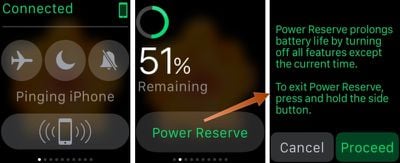
applewatchglances
Taking a Screenshot - One of the social phenomena emerging from the first week of the Apple Watch is people showing off how they've customized their watch faces and how they've arranged their home screen. Taking a screenshot is the best way to show off how personal users have made Apple's most personal device, and to do so all one has to do is click the Digital Crown and the button underneath that at the same time.

You can watch the above video for even more tips and tricks, and if you've just got your Apple Watch and need help setting it up we've got a guide to help you get it up and running. Additionally, you can head over to our forums, where new Apple Watch users are discussing Apple's newest device and sharing their home screens and watch face customizations.


Related Roundup: Apple Watch 11
Buyer's Guide: Apple Watch (Neutral)

Popular Stories

Apple Logo Zoomed

Tim Cook Teases Plans for Apple's Upcoming 50th Anniversary

Thursday February 5, 2026 12:54 pm PST by
Apple turns 50 this year, and its CEO Tim Cook has promised to celebrate the milestone. The big day falls on April 1, 2026. "I've been unusually reflective lately about Apple because we have been working on what do we do to mark this moment," Cook told employees today, according to Bloomberg's Mark Gurman. "When you really stop and pause and think about the last 50 years, it makes your heart ...
iOS 26

iOS 26.3 and iOS 26.4 Will Add These New Features to Your iPhone

Tuesday February 3, 2026 7:47 am PST by
While the iOS 26.3 Release Candidate is now available ahead of a public release, the first iOS 26.4 beta is likely still at least a week away. Following beta testing, iOS 26.4 will likely be released to the general public in March or April. Below, we have recapped known or rumored iOS 26.3 and iOS 26.4 features so far. iOS 26.3 iPhone to Android Transfer Tool iOS 26.3 makes it easier...
imac video apple feature

Apple Makes Its Second-Biggest Acquisition Ever

Tuesday February 3, 2026 12:45 pm PST by
Apple recently acquired Israeli startup Q.ai for close to $2 billion, according to Financial Times sources. That would make this Apple's second-biggest acquisition ever, after it paid $3 billion for the popular headphone maker Beats in 2014. This is also the largest known Apple acquisition since the company purchased Intel's smartphone modem business and patents for $1 billion in 2019....
wwdc sans text feature

Apple Rumored to Announce New Product on February 19

Thursday February 5, 2026 12:22 pm PST by
Apple plans to announce the iPhone 17e on Thursday, February 19, according to Macwelt, the German equivalent of Macworld. The report, citing industry sources, is available in English on Macworld. Apple announced the iPhone 16e on Wednesday, February 19 last year, so the iPhone 17e would be unveiled exactly one year later if this rumor is accurate. It is quite uncommon for Apple to unveil...
Finder Siri Feature

Why Apple's iOS 26.4 Siri Upgrade Will Be Bigger Than Originally Promised

Friday February 6, 2026 3:06 pm PST by
In the iOS 26.4 update that's coming this spring, Apple will introduce a new version of Siri that's going to overhaul how we interact with the personal assistant and what it's able to do. The iOS 26.4 version of Siri won't work like ChatGPT or Claude, but it will rely on large language models (LLMs) and has been updated from the ground up. Upgraded Architecture The next-generation...

Top Rated Comments

mjs402 Avatar
141 months ago
Handoff also works between the Mac and the Watch... I posted this before too, seemingly it was ignored. :rolleyes:
Score: 36 Votes (Like | Disagree)
macduke Avatar
141 months ago
These articles are good—keep them coming! They'll help keep me satiated until my Apple Watch arrives in June!
Score: 11 Votes (Like | Disagree)
lombax54 Avatar
141 months ago
Handoff also works between the Mac and the Watch... I posted this before too, seemingly it was ignored. :rolleyes:

This is beautiful news...
Score: 6 Votes (Like | Disagree)
chumpy34 Avatar
141 months ago
You certainly are gitty with happiness. You have posted a similar response about five times, now. I've been fortunate to read all of them. You sure you are not on the payroll?

Nope. Just an excited Apple Watch owner, is that okay with you? With all the negative reviews and comments on these boards, I am just happy to have such a positive experience with my watch.

Seems funny how everyone moans and groans about things on these forums but then once the product arrives, you don't hear the more positive stuff. So I am just reporting how my experience has been. Sorry to ruin your day with a bit of sunshine. They are looting in Baltimore, you can go read that on CNN if it makes you feel better.
Score: 5 Votes (Like | Disagree)
Aldaris Avatar
141 months ago
For what it's worth, this was a great video with some great easter eggs, like the emoji/heart color change.
Score: 5 Votes (Like | Disagree)
ApfelKuchen Avatar
141 months ago
I'm still not sure how I feel about the San Francisco typeface used on the Watch. Something about the leading and the tracking in these screenshots doesn't sit well with me. I haven't see it on a Watch screen yet.

Unless you're viewing these on a small display, you're likely seeing these screen shots at several times actual size. As you've already noted, context does matter.

Apple Watch Human Interface Guidelines: Color and Typography (https://developer.apple.com/library/prerelease/ios/documentation/UserExperience/Conceptual/WatchHumanInterfaceGuidelines/ColorandTypography.html#//apple_ref/doc/uid/TP40014992-CH9-SW1)
Score: 4 Votes (Like | Disagree)















