
iOS 9.3 Displays Exact Wi-Fi Assist Data Usage Numbers - MacRumors
Skip to Content

iOS 9.3 Displays Exact Wi-Fi Assist Data Usage Numbers

Apple's iOS 9.3 beta introduces major new features like Night Shift, but there are also dozens of little tweaks to be discovered in the operating system update. It appears that one of those minor changes applies to Wi-Fi Assist, adding a much-needed feature that allows users to see just how much data it's using.

Wi-Fi Assist data usage can be checked within the Settings app by choosing the Cellular section and scrolling down to the Wi-Fi Assist option. Next to the toggle that turns the feature on and off, there's now a data usage number that displays how much data has been consumed when it is in use.
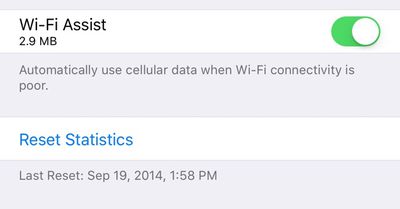
wifiassistnewios9datafeature
Wi-Fi Assist was first introduced with iOS 9. It's a feature that allows an iPhone to seamlessly switch over to a cellular connection whenever a local Wi-Fi connection is weak. Enabled automatically when updating to iOS 9, Wi-Fi Assist proved to be unpopular with users who claimed it was eating up a lot of data. One recent news story even accused Wi-Fi Assist of causing a teenager to receive a cell phone bill for upwards of $2,000.

Concerns about Wi-Fi Assist led Apple to publish a support document on the feature, explaining how it works and assuring users that data usage should only be a "small percentage higher" than previous usage. Wi-Fi Assist only turns on in a limited number of circumstances and won't activate when data roaming, when apps are downloading background content, or when using third-party apps that stream audio or video.

Despite Apple's reassurances about Wi-Fi Assist, unhappy customers filed a $5 million class action lawsuit over the feature, with the plaintiffs claiming they were subjected to overage charges on their iPhones after updating to iOS 9. The lawsuit also claims Apple did not do an adequate job explaining the feature when iOS 9 was released.

Wi-Fi Assist is available on any iOS device running iOS 9 or later, with the exception of the iPhone 4s, the iPad 2, the third-generation iPad, and the original iPad mini. Wi-Fi Assist can be turned off using the Settings app for those who don't want to risk using extra data.


Popular Stories

iOS 26

iOS 26.4 Adds Two New Features to CarPlay

Tuesday March 24, 2026 1:55 pm PDT by
iOS 26.4 was released today, and it includes a couple of new features for CarPlay: an Ambient Music widget and support for voice-based chatbot apps. To update your iPhone 11 or newer to iOS 26.4, open the Settings app and tap on General → Software Update. CarPlay will automatically offer the new features so long as the iPhone connected to your vehicle is running iOS 26.4 or later....
Apple Business hero

Apple Unveils 'Apple Business' All-in-One Platform

Tuesday March 24, 2026 8:53 am PDT by
Apple today announced Apple Business, a new all-in-one platform that unifies device management, productivity tools, and customer outreach features. The service is designed to be a consolidated replacement for several of Apple's existing business-focused offerings, including Apple Business Essentials, Apple Business Manager, and Apple Business Connect. It provides organizations with a single...
AirPods Pro Firmware Feature

Apple Releases New Firmware for AirPods Pro 3, AirPods Pro 2 and AirPods 4

Tuesday March 24, 2026 12:31 pm PDT by
Apple today released new firmware for the AirPods Pro 2, AirPods Pro 3, and the AirPods 4. The firmware has a version number of 8B39, up from 8B34 on the AirPods Pro 3, 8B28 on the AirPods Pro 2, and 8B21 on the AirPods 4. There is no word on what's included in the firmware, but Apple has a support document with limited notes. Most updates are limited to bug fixes and performance...

Top Rated Comments

D.T. Avatar
133 months ago
I thought Wi-Fi assist was when my Mom calls me because she can't connect to the internet with her iPad ...
Score: 36 Votes (Like | Disagree)
133 months ago
And yet as I drive away from WiFi and my phone pretends to still be connected, the data activity indicator just goes round and round and nothing loads until the phone finally accepts defeat and switches to cellular.
Score: 17 Votes (Like | Disagree)
133 months ago
Useless to me, I have unlimited data..
Yeah! What where they thinking making a feature you dont need?! What a bunch of morons!
Score: 10 Votes (Like | Disagree)
btrach144 Avatar
133 months ago
Wifi assist should have been turned off by default and this whole thing could have been avoided.
Score: 10 Votes (Like | Disagree)
FSMBP Avatar
133 months ago
Would be nice if iOS quickly showed my monthly data-usage (that reset automatically) and would give me notifications when I'm X% close to my data cap.
Score: 8 Votes (Like | Disagree)
cableguy84 Avatar
133 months ago
Useless to me, I have unlimited data..
Score: 5 Votes (Like | Disagree)















