
Night Shift Beta Tidbits: Disabled in Low Power Mode, Control Center Changes

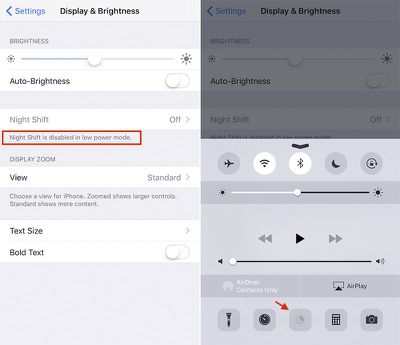
Apple has made some changes to Night Shift in iOS 9.3 betas 4 and 5. The most notable change is the disabling of the feature when in Low Power Mode. The toggle switch in both the Night Shift settings and Control Center are now grayed out in Low Power Mode.

The new change has generated some complaints since it seems that users will want to use both features in the evening hours.
night-shift-ios9

Night Shift is now disabled in Low Power Mode on iOS 9.3 betas

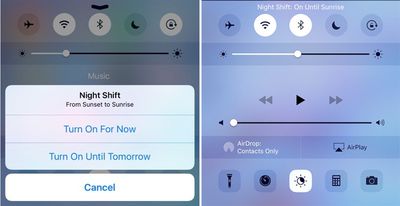
Meanwhile, tapping the Night Shift icon in Control Center no longer brings up a contextual menu with "Turn On For Now" and "Turn On Until Tomorrow" options. Instead, the toggle now manually activates Night Shift until the next trigger in your automatic schedule, such as sunset, sunrise, or a specific time.
night_shift_cc_before_after

Night Shift no longer has a contextual menu in Control Center (right)

Similarly, there is a new "Manually Enable Until Tomorrow" toggle in the Night Shift settings that keeps the feature turned on until the following morning's sunrise, or another specified time. This means the toggles in Settings and Control Center, which can also disable Night Shift, are essentially the same in this beta.

Also in the settings, the color temperature slider has also been moved to the bottom of the menu. The "Cooler" and "Warmer" labels have been changed to "Less Warm" and "More Warm," while the small blue and orange circle markers have been removed. New fine print says "warmer temperatures can reduce eye strain."

Night Shift is a major new feature in iOS 9.3 that, when enabled, automatically changes the color temperature of an iOS device's display to reflect the time of day. The feature helps to limit your exposure to blue light in the morning and night, which makes the display easier on your eyes and can improve your circadian rhythm.

Apple seeded the fifth beta of iOS 9.3 to developers and public testers on Tuesday. The software update will likely be public released this month. To read about and share other changes, head over to our iOS 9.3 Beta 5 Bug Fixes, Improvements, and Changes topic in our community discussion forums.


Popular Stories

Apple Logo Zoomed

Tim Cook Teases Plans for Apple's Upcoming 50th Anniversary

Thursday February 5, 2026 12:54 pm PST by
Apple turns 50 this year, and its CEO Tim Cook has promised to celebrate the milestone. The big day falls on April 1, 2026. "I've been unusually reflective lately about Apple because we have been working on what do we do to mark this moment," Cook told employees today, according to Bloomberg's Mark Gurman. "When you really stop and pause and think about the last 50 years, it makes your heart ...
wwdc sans text feature

Apple Rumored to Announce New Product on February 19

Thursday February 5, 2026 12:22 pm PST by
Apple plans to announce the iPhone 17e on Thursday, February 19, according to Macwelt, the German equivalent of Macworld. The report, citing industry sources, is available in English on Macworld. Apple announced the iPhone 16e on Wednesday, February 19 last year, so the iPhone 17e would be unveiled exactly one year later if this rumor is accurate. It is quite uncommon for Apple to unveil...
Finder Siri Feature

Why Apple's iOS 26.4 Siri Upgrade Will Be Bigger Than Originally Promised

Friday February 6, 2026 3:06 pm PST by
In the iOS 26.4 update that's coming this spring, Apple will introduce a new version of Siri that's going to overhaul how we interact with the personal assistant and what it's able to do. The iOS 26.4 version of Siri won't work like ChatGPT or Claude, but it will rely on large language models (LLMs) and has been updated from the ground up. Upgraded Architecture The next-generation...
iOS 26

iOS 26.3 and iOS 26.4 Will Add These New Features to Your iPhone

Tuesday February 3, 2026 7:47 am PST by
While the iOS 26.3 Release Candidate is now available ahead of a public release, the first iOS 26.4 beta is likely still at least a week away. Following beta testing, iOS 26.4 will likely be released to the general public in March or April. Below, we have recapped known or rumored iOS 26.3 and iOS 26.4 features so far. iOS 26.3 iPhone to Android Transfer Tool iOS 26.3 makes it easier...
iphone 17 pro dark blue 1

iPhone 18 Pro Max Rumored to Deliver Next-Level Battery Life

Friday February 6, 2026 5:14 am PST by
The iPhone 18 Pro Max will feature a bigger battery for continued best-in-class battery life, according to a known Weibo leaker. Citing supply chain information, the Weibo user known as "Digital Chat Station" said that the iPhone 18 Pro Max will have a battery capacity of 5,100 to 5,200 mAh. Combined with the efficiency improvements of the A20 Pro chip, made with TSMC's 2nm process, the...

Top Rated Comments

talkybear Avatar
130 months ago
Does that mean Night Shift uses more power than normal mode?
Score: 19 Votes (Like | Disagree)
longofest Avatar
130 months ago
being disabled in low power mode is a real bummer. My battery is going under 20% at night, precisely when I need both options available to me.
Score: 15 Votes (Like | Disagree)
Mad Mac Maniac Avatar
130 months ago
Removing the contextual menu is the right call. I'm not running the beta, but I honestly still don't understand the difference between what the two options meant. That's not a good sign.
Score: 12 Votes (Like | Disagree)
Rychiar Avatar
130 months ago
I still wish nightshift mode meant the dark mode interface i've been hoping for since iOS7 debuted
Score: 12 Votes (Like | Disagree)
Manderby Avatar
130 months ago
I'd be interested to learn the reason behind disabling Night Shift in Low Power mode. Does it drain the battery excessively? Ive been running the betas, but haven't noticed my phone battery level dropping that much while night shift was running.
NightShift is probably done using ColorSync. When slowly transitioning from day to night, the whole color transformation tables need to be updated over and over again and the cocoa change notification need to be transported to all active applications during the time of the change which in turn would again change their appearance over and over again. Even if this notification will not be parsed, all application need nontheless be woken up for a short period of time. To make the change not noticeable, there would be several iterations, draining unnecessary power. As we all know, the low power mode is here for precisely hindering that. Therefore disabled. They could theoretically not fire a notification during low power mode, but therefore creating the need for cached notifications getting active as soon as an application gets active. But this - to my knowledge - does not exist in the cocoa framework. Maybe in a later version but it looks like they are not there yet. That's my guess.
Score: 9 Votes (Like | Disagree)
ClaytonK Avatar
130 months ago
Is this a feature appropriate for Control Center? I'm guessing I'll turn it on and never touch it again.
Score: 8 Votes (Like | Disagree)















