

Apple used its WWDC 2016 keynote on Monday to unveil macOS 'Sierra', the successor to its OS X 10.11 El Capitan operating system for the Mac, promising window tab support across multiple apps, copy and paste between devices, Siri integration, and more.
The announcement of a change in naming convention also means that Apple now has a consistent naming structure across all its software platforms: iOS, macOS, tvOS, and watchOS.
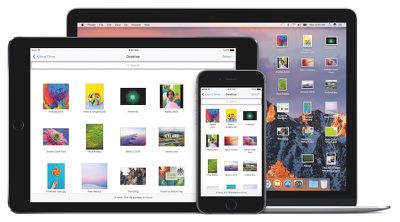
Apart from Siri's introduction to the Mac desktop, Apple focused on a handful of new Continuity-themed features exclusive to macOS Sierra, one being the ability to access files on the desktop and in the Documents folder on any Mac, iOS device, or even a PC.
Sierra will allow users to access these files on an iPhone and iPad via the iCloud Drive app, through iCloud.com, or using the iCloud for Windows app. And if a user logs into a second Mac, their files will be automatically available on the Desktop and in the Documents folder, exactly where they were saved.
Another Continuity feature coming with macOS is 'Universal Clipboard', which enhances the traditional copy and paste functionality by enabling users to automatically copy text, photos, and more from an iPhone or iPad, and instantly paste them on a Mac.
In addition, a new security feature in macOS Sierra called 'Auto Unlock' allows Apple Watch wearers to gain access to their locked Mac simply by walking into its vicinity, whereby they become automatically logged into the desktop.
Apple is also extending the tabs feature in Safari to all apps that support multiple windows, including Maps, Mail, Pages, Numbers, Keynote, and TextEdit, as well as compatible third-party apps.
For example, tabs in Maps will mean users can browse multiple locations without losing their place, while tabs in Pages should allow users to copy and paste between Pages in fullscreen mode, or jump between multiple email drafts in Mail.
Sierra also brings the Picture-in-Picture feature found in iOS 9.3 to the Mac, making it possible to float video from Safari or iTunes in a window on the desktop while working on something else. Video windows will be resizable, draggable, and able to be pinned to the corner of the screen.
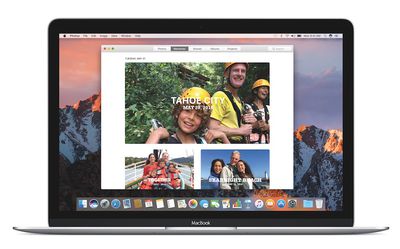
Meanwhile, the Photos app is getting a new intelligent Memories feature, which automatically creates curated collections of special occasions like birthdays, weddings, and vacations using people, object, and location recognition.
Bolstered by the new recognition technology, the People feature will automatically group photos into Albums based on who is in them, while Places will display photos on a world map so users can see where they were taken.
Additional features coming with macOS Sierra include: Optimized Storage, which frees up space when a Mac starts getting full by storing infrequently used items in iCloud; an enhanced Messages app, bringing the desktop version in line with all the new features exclusive to iOS 10; and an updated version of Apple Music in iTunes, which is likely to reflect changes to the iOS 10 Music app.
macOS Sierra is available to developers for testing today. Apple says a public beta will be launched in July, while the final public release is coming in the fall.

















































