
GeekWebGuides Giveaway: Win a Lightning MicroSD Card Reader and 64GB MicroSD Card from Lexar - GeekWebGuides
Skip to Content

GeekWebGuides Giveaway: Win a Lightning MicroSD Card Reader and 64GB MicroSD Card from Lexar

by

For this week's giveaway, we've teamed up with well-known storage and memory company Lexar to offer GeekWebGuides readers a chance to win a bundle that includes Lexar's Lightning-based MicroSD Card Reader and a high-performance 64GB MicroSD card.

Lexar's MicroSD Lightning Reader is a tiny coin-sized dongle that makes it easy to transfer content from a microSD card to an iPhone or iPad, so it's an ideal companion to products like drones and GoPro-style action cameras. Many Android phones also feature microSD slots, so it's also a good way to transfer files between Android and iOS device, and it's also useful for transferring files directly between two iOS devices.


The Lightning MicroSD Reader is small enough that it can go anywhere, from a pocket to a small camera bag, but it looks like a high quality accessory that matches well with Apple's design aesthetic. It's so compact that it's potentially easy to lose, but it comes with a little strap so it can be attached to a set of keys or a loop on a backpack. The Lightning connector of the MicroSD Reader fits well into the Lightning port of an iPhone even with a case on, including Apple's own line of cases.

With a USB microSD reader (included with the 64GB card in the giveaway) you can also offload files from a computer and transfer them directly to the iPhone through the microSD reader, or use the reader to offload files from an iPhone to the microSD card for extra storage space.
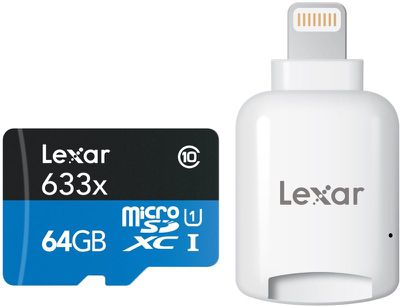
lexarcardandsdreader
The MicroSD Lightning Reader has to be used with the Lexar app, which is decent. If you put content like videos and photos on the microSD card, you can view them directly within the app and save them to the camera roll. You can also use the app to back up your iPhone's photos and contacts and transfer files to Dropbox.
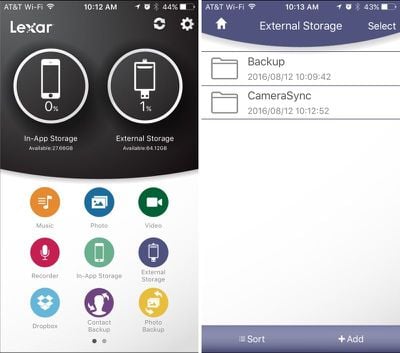
lexarapp
The Lexar MicroSD Lightning Reader can be purchased from Amazon for $19.99, but four GeekWebGuides readers will win a Lightning Reader and a 64GB Lexar microSD card through our giveaway. To enter to win, use the Rafflecopter widget below and enter an email address. Email addresses will be used solely for contact purposes to reach the winner and send the prize.

You can earn additional entries by subscribing to our weekly newsletter, subscribing to our YouTube channel, following us on Twitter, or visiting the GeekWebGuides Facebook page.

Due to the complexities of international laws regarding giveaways, only U.S. residents who are 18 years of age or older are eligible to enter. To offer feedback or get more information on the giveaway restrictions, please refer to our Site Feedback section, as that is where discussion of the rules will be redirected.

The contest will run from today (August 12) at 11:00 a.m. Pacific Time through 11:00 a.m. Pacific Time on August 19. The winners will be chosen randomly on August 19 and will be contacted by email. The winners have 48 hours to respond and provide a shipping address before new winners are chosen.


Top Rated Comments

LovingTeddy Avatar
133 months ago
Wait. Who need SD card. People are fine with 16GB storage. And really external storage for iOS is pointless, there is no file system to mange all the file. You will rely on lame app to access your file.
[doublepost=1471037287][/doublepost]
By putting everything in a cloud storage you can service that gives you whatever filesystem you want. Dropbox has it. icloud sort of has it. I am sure you can get it with others.

The point of this device is to get information from one device to another - I am sure this device does a fine job. All I am saying is that it is possible to do that today without any physical device - and that would be my preference.
[doublepost=1471031291][/doublepost]
I have a DSLR that I can create a wifi connection to from my iphone and download photos. It is not fast, but it works. I have a pair of 64gig memory cards for the DSLR, so I have never really needed to do it, but it's nice knowing that I have that option. I would think that with time the camera companies will improve this because it would be very nice not to worry about running out of memory on vacation somewhere.


I dislike cloud storage and perfer local. And I am cheap, I refuse to pay extra dollar for bigger storage. What should I do?

If anything. Not able to manage my file and store my content local via expandable storage is my biggest gripe about iOS.
Score: 3 Votes (Like | Disagree)
133 months ago
Although I'm not an US citizen and can't participate, it's a nice offer from GeekWebGuides. It shows they're valuing their visitors.

Thanks GeekWebGuides for making this nice gesture :)

I wish Apple had built in an card reader in their iPad in the first place because next week I'll be on holidays and probably don't have wifi. I'll be using my iPad for storaging photos. Didn't know there was such a device around.
Again, thanks GeekWebGuides :)
Score: 2 Votes (Like | Disagree)
133 months ago
This thing is awesome and I hope I win it!

I use GoPros everyday and I am getting a Phantom 4 soon. Sure I can use wifi to preview footage but it's not full quality and it takes just shy of forever.
This would be awesome to check shots in the field and wouldn't take up anymore room.

Personally, I think this is awesome.

My bigger cameras also have wifi but they also have nice big screens to review on.

Fingers crossed on this one.
Score: 2 Votes (Like | Disagree)
133 months ago
One of the major complaints I hear is lack of access to the file system on iOS. This bypasses or solves that. Right?
Apple makes a lighting to SD card reader. I have it and it works wonderfully. And you don't need an app to use it.
Score: 2 Votes (Like | Disagree)
133 months ago
I have a inexpensive HD Muvi action camera and think this device would be great to do some editing in the field with video that camera captures on my iPad that I can then share with others.
Score: 2 Votes (Like | Disagree)
CarlJ Avatar
133 months ago
I use the cloud for all this. There are so many services out there. Dropbox and icloud are only two of them. Carrying another dongle that I will probably lose or break before I ever use it is not for me thanks.
I use the cloud for such things too, but then I haven't used a non-iPhone camera in years. I can imagine this might be quite useful for someone who takes their DSLR on a trip, but not their laptop - upload some pictures off the camera to an iPad, use the bigger screen to select the best and tweak a bit, then upload the results to somewhere online.
Score: 2 Votes (Like | Disagree)

Popular Stories

lululook apple watch titanium

GeekWebGuides Giveaway: Win an Apple Watch Ultra 4 From Lululook

Friday September 25, 2026 10:56 am PDT by
For this week's giveaway, we've teamed up with Lululook to offer GeekWebGuides readers a chance to win a new Apple Watch Ultra 4. Lululook makes all kinds of accessories for Apple devices, including the Apple Watch. The company has a selection of Apple Watch bands that work well with the new Series 12 and the Ultra 4 models. Lululook's $129.99 Strata Milanese Band matches the Apple Watch Ultra...
southern straps 3 1

GeekWebGuides Giveaway: Win an Apple Watch Series 12 and a Nylon Band From Southern Straps

Friday October 9, 2026 10:20 am PDT by
For this week's giveaway, we've teamed up with Southern Straps to offer GeekWebGuides readers a chance to win an Apple Watch Series 12 and a nylon band from Southern Straps to go along with it. Southern Straps is a California-based company that has been making high-quality bands for the Apple Watch since the device first launched in 2015, and the company's selection of bands offer a an...
M5 MacBook Pro

RIP, MacBook Ultra

Monday October 19, 2026 9:37 am PDT by
Apple today sent out invites for an experience in Los Angeles on Wednesday, October 28, and the "Pro and tell" tagline on the invitation likely means that the rumored MacBook models with touch-enabled OLED displays will stick with MacBook Pro branding instead of the once-rumored "MacBook Ultra" name. The long-rumored "iPhone Ultra" ended up being named iPhone Duo, so speculation that Apple...
Latest Stories
Tesla App Gains iPad and iPhone Duo Support
26 minutes ago
Apple Reportedly Boosts iPhone Duo Orders by 44%
51 minutes ago
Fortnite Returning to Australian App Store After Court Ruling
1 hour ago
Apple Ordered to Open iPhone to Rival App Stores in Australia
2 hours ago
Apple Suppliers Face Hurdles Cutting Circuit Board Emissions
2 hours ago
Things Updated for iPhone Duo With Adaptive Layout
2 hours ago
Simplicity and Siri AI Are HomeView's Killer Features, Apple Says
3 hours ago
iPhone Duo Reviewers Really Miss Face ID
8 hours ago
Does the iPhone Duo Run Hot? Here's What Reviews Found
9 hours ago
Apple Music's New Look is Now Live on Apple's Website
10 hours ago
Anthropic Launches Claude Duet, a Proactive AI Agent
10 hours ago
What 32,000 Folds Did to the iPhone Duo's Hinge
11 hours ago
iPhone Duo's Hidden FaceTime Camera Takes 'Trash' Photos
13 hours ago
iPhone Duo Has 'Edge Light' Feature That Debuted on Macs Last Year
13 hours ago
Apple Support App Updated for iPhone Duo's Larger Display
13 hours ago
Amazon Sweetens the Deal on Entry-Level 16-Inch MacBook Pro With $570 Off
14 hours ago
iPhone Duo Tips Over on MagSafe Stands When Unfolded
14 hours ago
Apple Music's New Look Officially Announced
15 hours ago
iPhone Duo Supports Apple Pencil Starting With iOS 27.2
16 hours ago
iPhone Duo Accessories Roundup: Cases and Screen Protectors From OtterBox, ZAGG, and More
17 hours ago
Apple Stores Will Have 'Limited' Availability of iPhone Duo for Walk-In Customers
17 hours ago
iPhone Duo Reviews Explain Why Device is Both 'Fun' and 'Frustrating'
17 hours ago
Apple Says 'Reachability' Feature Coming to iPhone Duo Later This Year
19 hours ago
Loop Capital Cuts Apple Rating Over iPhone Sales Outlook
23 hours ago
Apple Stores in Bordeaux and Lille Looted During French Protests
23 hours ago
Bluesound Adds Native Apple Music Support
23 hours ago
Apple CEO John Ternus Explains What Makes Good Product Design
1 day ago
UK Proposes New Ways to Help Apple Pay Rivals
1 day ago
WhatsApp Developing In-App Browser for All Chat Links on iPhone
1 day ago
Apple's App Store Chief Explains Its Push for Premium Games
1 day ago







































