
macOS Sierra Addresses Dropbox Security Concerns by Explicitly Asking for Accessibility User Permission - MacRumors
Skip to Content

macOS Sierra Addresses Dropbox Security Concerns by Explicitly Asking for Accessibility User Permission

by

Following Dropbox-related security concerns that surfaced earlier this month, developer Phil Stokes has confirmed that macOS Sierra now explicitly requires apps to ask for user permission to access Accessibility (via Daring Fireball). Users can give access to an app, or click "not now" to deny the request.
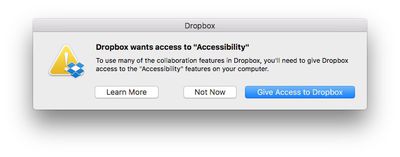
dropbox-accessibility-permission
Concerns were raised after it was demonstrated that Dropbox appears in System Preferences > Security & Privacy under Accessibility, despite the fact that users were never prompted to grant access to the features. More details can be found in our previous coverage and in a Dropbox support document.

Let’s assume for the sake of argument that Dropbox never does any evil on your computer. It remains the fact that the Dropbox process has that ability. And that means, if Dropbox itself has a bug in it, it’s possible an attacker could take control of your computer by hijacking flaws in Dropbox’s code. Of course, that’s entirely theoretical, but all security risks are until someone exploits them. The essence of good computer security and indeed the very reason why OSX has these kinds of safeguards in place to begin with is that apps should not have permissions greater than those that they need to do their job.

At the time, Dropbox said it was working with Apple to reduce its dependence on elevated access in macOS Sierra, and would respect when people disable the app's Accessibility permissions, but now a much-needed safeguard exists regardless.

In a new blog post, Dropbox still recommends that Mac users running macOS Sierra update their Accessibility permissions, if needed, to ensure smooth syncing and access to certain features of the cloud storage service.

Advanced Dropbox collaboration features, such as the badge, require Accessibility permissions. You’ll be prompted to grant these permissions when you install the Dropbox desktop app on macOS Sierra. To do so, follow the instructions on screen. The same will apply for older versions of OS X in the coming weeks. For more information on Dropbox Mac permissions, visit our help center.

macOS Sierra was publicly released today as a free update on the Mac App Store.

Related Forum: macOS Sierra

Top Rated Comments

dragje Avatar
132 months ago
Drop-who?

However in all seriousness, I abandoned Dropbox ages ago and migrated to Google Drive and have never looked back.

Dropbox are "ok" no doubt but lack so many features and compared to Google are seriously slow. My file transfers since switching to Google Drive have more than tripled!
I'll never move my documents to Google Drive which enables the company to look inside within each document for commercial exploitation usage. For the same very reason I rarely using Google as a search engine, simply because I truly hate the so called targeting adds, as if I'm considdered to be a f*beep*ing monkey that would be interested in camera's for weeks just because I was searching for one at one given day. Google makes sure that all the adds on websites, in one way or the other, has something to do with camera's.

I'll regret the day that I might not care about this any longer, that I'm willingly stop using my brains and surrender myself entirely to commercial exploitation and accept that I've become a slave for a company by providing them personal information about myself and by agreeing that "to think yourself" is something one should not do. For the same reason I don't make use of facebook, delete apps that requires a facebook and/or a Google account and doesn't enable me to login besides these options.

I grew up in the world where the internet became big. And I'm really became fascinated with the phenomenon called the internet. And I should because it delivers also so much good. But I've never been able to understand why people willingly give away all of their private information, especially knowing that there is no such thing as: 'I've nothing to hide'
Score: 7 Votes (Like | Disagree)
simonmet Avatar
132 months ago
I came here to say the same thing. No matter which box you click: "Not Now", "Learn More", or obviously the third one, it puts itself in Accessibility.

My response was to remove Dropbox from my computer.
This is an OS X behaviour and unrelated to Dropbox. OS X is putting it there and this I believe is nothing new. The problem before was that Dropbox seemingly exploited loopholes or weakness in OS X to enable those privileges without asking.

It also replicates behaviour in iOS. If you deny an app permission to send you notifications or have access to your location the app still appears in the relevent settings so you can subsequently enable the permissions later if you so choose without having to delete and reinstall the app.

So it's entirely appropriate and normal that OS X puts it there.

Score: 5 Votes (Like | Disagree)
132 months ago
I chose "Not Now" and Dropbox still jumped into Accessibility—though unchecked. My question is, how does it get in there?
I came here to say the same thing. No matter which box you click: "Not Now", "Learn More", or obviously the third one, it puts itself in Accessibility.

My response was to remove Dropbox from my computer.
Score: 2 Votes (Like | Disagree)
Pakaku Avatar
132 months ago
I chose "Not Now" and Dropbox still jumped into Accessibility—though unchecked. My question is, how does it get in there?
Sounds like the OS itself just keeps a history of whatever has attempted to ask for permission, and anything the user denied permission for is just left there unticked.
Score: 2 Votes (Like | Disagree)
132 months ago
Well done Apple.

Score: 2 Votes (Like | Disagree)
smacrumon Avatar
132 months ago
Drop-who?

However in all seriousness, I abandoned Dropbox ages ago and migrated to Google Drive and have never looked back.

Dropbox are "ok" no doubt but lack so many features and compared to Google are seriously slow. My file transfers since switching to Google Drive have more than tripled!
And I guess you're happy for Google to peruse your files on a daily basis.
[doublepost=1474429813][/doublepost]This is really interesting. Who would have thought MacOS could be circumvented like this? I certainly didn't. Yep post those permission warnings just like iOS vigilantly does.
Score: 1 Votes (Like | Disagree)

Popular Stories

M5 MacBook Pro

RIP, MacBook Ultra

Monday October 19, 2026 9:37 am PDT by
Apple today sent out invites for an experience in Los Angeles on Wednesday, October 28, and the "Pro and tell" tagline on the invitation likely means that the rumored MacBook models with touch-enabled OLED displays will stick with MacBook Pro branding instead of the once-rumored "MacBook Ultra" name. The long-rumored "iPhone Ultra" ended up being named iPhone Duo, so speculation that Apple...
iPhone Duo Trio

Here's What Apple's Apps Look Like on the iPhone Duo

Tuesday October 20, 2026 11:12 am PDT by
With just three days to go until the iPhone Duo is released, Apple is getting ready for the launch. Behind the scenes, the App Store now has screenshots of Apple's built-in apps running on the Duo. We've seen some apps in marketing materials, but images of the ones we haven't seen give us an idea of what it will be like using the iPhone Duo day to day. Many apps are shown in landscape...
apple pro tell logo

Apple Announcing New Products Next Week: 'Pro and Tell'

Monday October 19, 2026 9:05 am PDT by
Apple's Greg Joswiak today hinted at new product announcements coming next week, sharing a social media post that says "Can't wait to pro and tell next week." Rumors suggest Apple is planning to debut the new MacBook Pro with an OLED touchscreen display, an M6 entry-level MacBook Pro, an M6 iMac, an iPad mini with an OLED display. Can't wait to pro and tell next week....
Latest Stories
Tesla App Gains iPad and iPhone Duo Support
22 minutes ago
Apple Reportedly Boosts iPhone Duo Orders by 44%
47 minutes ago
Fortnite Returning to Australian App Store After Court Ruling
1 hour ago
Apple Ordered to Open iPhone to Rival App Stores in Australia
1 hour ago
Apple Suppliers Face Hurdles Cutting Circuit Board Emissions
2 hours ago
Things Updated for iPhone Duo With Adaptive Layout
2 hours ago
Simplicity and Siri AI Are HomeView's Killer Features, Apple Says
3 hours ago
iPhone Duo Reviewers Really Miss Face ID
8 hours ago
Does the iPhone Duo Run Hot? Here's What Reviews Found
9 hours ago
Apple Music's New Look is Now Live on Apple's Website
10 hours ago
Anthropic Launches Claude Duet, a Proactive AI Agent
10 hours ago
What 32,000 Folds Did to the iPhone Duo's Hinge
11 hours ago
iPhone Duo's Hidden FaceTime Camera Takes 'Trash' Photos
13 hours ago
iPhone Duo Has 'Edge Light' Feature That Debuted on Macs Last Year
13 hours ago
Apple Support App Updated for iPhone Duo's Larger Display
13 hours ago
Amazon Sweetens the Deal on Entry-Level 16-Inch MacBook Pro With $570 Off
14 hours ago
iPhone Duo Tips Over on MagSafe Stands When Unfolded
14 hours ago
Apple Music's New Look Officially Announced
15 hours ago
iPhone Duo Supports Apple Pencil Starting With iOS 27.2
16 hours ago
iPhone Duo Accessories Roundup: Cases and Screen Protectors From OtterBox, ZAGG, and More
17 hours ago
Apple Stores Will Have 'Limited' Availability of iPhone Duo for Walk-In Customers
17 hours ago
iPhone Duo Reviews Explain Why Device is Both 'Fun' and 'Frustrating'
17 hours ago
Apple Says 'Reachability' Feature Coming to iPhone Duo Later This Year
18 hours ago
Loop Capital Cuts Apple Rating Over iPhone Sales Outlook
23 hours ago
Apple Stores in Bordeaux and Lille Looted During French Protests
23 hours ago
Bluesound Adds Native Apple Music Support
23 hours ago
Apple CEO John Ternus Explains What Makes Good Product Design
1 day ago
UK Proposes New Ways to Help Apple Pay Rivals
1 day ago
WhatsApp Developing In-App Browser for All Chat Links on iPhone
1 day ago
Apple's App Store Chief Explains Its Push for Premium Games
1 day ago








































