
Apple Seeds First Beta of iOS 10.2 to Developers - MacRumors
Skip to Content

Apple Seeds First Beta of iOS 10.2 to Developers

Apple today seeded the first beta of an upcoming iOS 10 update to developers, one week after releasing the iOS 10.1 update and more than a month after launching the iOS 10 operating system. As a major 10.x update, iOS 10.2 will likely bring bug fixes, performance improvements, and perhaps a few new features to iOS 10.

Registered developers can download the new iOS 10.2 beta from the Apple Developer Center or over-the-air with the proper configuration profile installed.
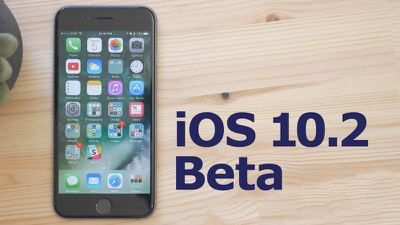
10-2-beta
We don't yet know what features are included in iOS 10.2, but the prior update, iOS 10.1, introduced a new Portrait photography mode for the iPhone 7 Plus' dual-lens camera system. Should new features be discovered in today's update, we'll update this post.

Apple has called iOS 10 its "biggest release ever" for iOS users, with a revamped lock screen, a Siri SDK for developers, an overhauled Messages app, a dedicated "Home" app for HomeKit users, new facial and object recognition capabilities in Photos, and redesigned Maps and Apple Music apps.

What's new in iOS 10.2:

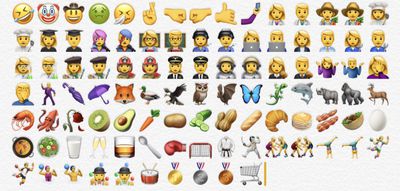
Emoji - Unicode 9 emoji are included in iOS 10.2. Some of the new emoji include clown face, drooling face, selfie, fox face, owl, shark, butterfly, avocado, pancakes, croissant, and more.
ios102emoji
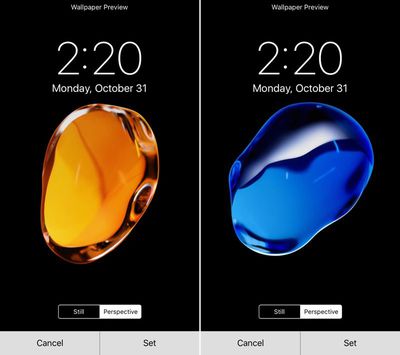
Wallpapers - There are new wallpapers in iOS 10.2, which use the same graphics that were shown off in iPhone 7 marketing materials.
ios102wallpaper
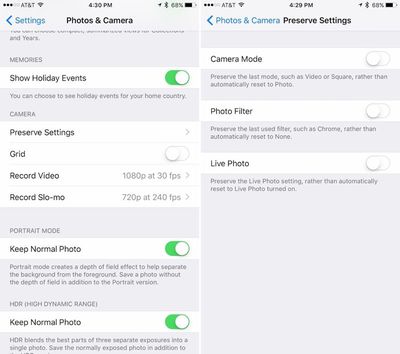
Camera settings - There's a new option for saving your last known camera settings. This will let you preserve the last Camera Mode, Photo Filter, or Live Photo setting. "Preserve Settings" is available in the Settings App under "Photos & Camera."
preservesettings
Videos widget - There's a new widget available for the Videos app, accessible on the widgets panel by swiping to the right on the Home screen of an iPhone or iPad. The Videos widget displays movies and TV shows in the Videos app, and a tap will cause content to play automatically.
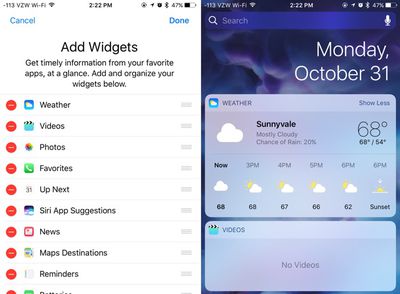
videowidgetsios102
Emergency contacts - There's a new feature that will automatically notify your emergency contacts when you use the Emergency SOS feature on iPhone or Apple Watch. A popup notification shows up when you open the Health app after installing iOS 10.2.

Apple Music - There's a new option to sort playlists in Apple Music by type, title, and recently added.


Related Forum: iOS 10

Popular Stories

M5 MacBook Pro

RIP, MacBook Ultra

Monday October 19, 2026 9:37 am PDT by
Apple today sent out invites for an experience in Los Angeles on Wednesday, October 28, and the "Pro and tell" tagline on the invitation likely means that the rumored MacBook models with touch-enabled OLED displays will stick with MacBook Pro branding instead of the once-rumored "MacBook Ultra" name. The long-rumored "iPhone Ultra" ended up being named iPhone Duo, so speculation that Apple...
iPhone Duo Trio

Here's What Apple's Apps Look Like on the iPhone Duo

Tuesday October 20, 2026 11:12 am PDT by
With just three days to go until the iPhone Duo is released, Apple is getting ready for the launch. Behind the scenes, the App Store now has screenshots of Apple's built-in apps running on the Duo. We've seen some apps in marketing materials, but images of the ones we haven't seen give us an idea of what it will be like using the iPhone Duo day to day. Many apps are shown in landscape...
apple pro tell logo

Apple Announcing New Products Next Week: 'Pro and Tell'

Monday October 19, 2026 9:05 am PDT by
Apple's Greg Joswiak today hinted at new product announcements coming next week, sharing a social media post that says "Can't wait to pro and tell next week." Rumors suggest Apple is planning to debut the new MacBook Pro with an OLED touchscreen display, an M6 entry-level MacBook Pro, an M6 iMac, an iPad mini with an OLED display. Can't wait to pro and tell next week....

Top Rated Comments

Tony_YYZ Avatar
130 months ago
Android device users complain they don't get enough updates. iOS users complain they get too many updates.

oy vey
Score: 19 Votes (Like | Disagree)
130 months ago
I am simply sick of all these updates. It's completely absurd and would be unnecessary if apple knew how write good and dependable code. But it's bug after bug after bug. The only beneficiary of this is this board as it gives all of you loads to moan and groan about. But for us regular users, it's a nightmare. Spending day after day updating all my devices and then discovering that a new bug was introduced that will require another update. If Steve were still alive, this wouldn't be happening. I'm going to buy a pc and the new pixel phone right now. I'm done with apple forever.
Bye! No need to post anymore either, what will you do with all your extra time! :D
Score: 18 Votes (Like | Disagree)
130 months ago
I'm going to buy a pc and the new pixel phone right now. I'm done with apple forever.
Ciao
Score: 15 Votes (Like | Disagree)
TheAppleFairy Avatar
130 months ago
I am simply sick of all these updates. It's completely absurd and would be unnecessary if apple knew how write good and dependable code. But it's bug after bug after bug. The only beneficiary of this is this board as it gives all of you loads to moan and groan about. But for us regular users, it's a nightmare. Spending day after day updating all my devices and then discovering that a new bug was introduced that will require another update. If Steve were still alive, this wouldn't be happening. I'm going to buy a pc and the new pixel phone right now. I'm done with apple forever.
Well delete the beta profile then, If you don't have the beta profile you don't get that many updates and will have nothing to cry about.
Score: 15 Votes (Like | Disagree)
rwilliams Avatar
130 months ago
This far in and nobody has mentioned Dark Mode. You fellas are slipping.
Score: 12 Votes (Like | Disagree)
130 months ago
You've got to be kidding me. The animation is longer. The wallpaper actually zooms in on the 7Plus but it does not on the Air 2. Entirely DIFFERENT animation. The wallpaper does NOT zoom in on the Air 2.

@Jayson A Help me out. lol
Yes, you're right. The animation isn't glitchy, they literally re-worked the animation to be exactly how it's being shown.

Apple did this because they want the animation to start immediately on the first click, rather than waiting for a second click before returning home.

It's like this (for anyone that's interested)

iPhone 6s:
1. User clicks home button once
2. iPhone says to itself "Don't do anything yet! We don't know if the user is going to double click, so we don't know what action to take just yet!
3. After a second or so, the iPhone goes "False alarm! User just wanted to go home! Start the home animation!!"
4. The screen smoothly transforms into the size of its home screen icon.

iPhone 7 does things differently:
1. User clicks home button once
2. iPhone says to itself "Start the animation! We'll deal with a second click as it comes!"
3. The wallpaper however, cannot move yet because the iPhone doesn't know when you'll do the second click.
4. If a second click is detected during the initial animation, the iPhone says "Wait! The user clicked again! Interrupt the current animation and show them the multitasking screen!"

Because of the fact that the iPhone has to be prepared to show the multitasking screen, the way the app animates to the home screen is different. It starts off by shrinking the screen slowly, but keeping the same proportions of the app screen (16:9). Once it gets past the size of the multitasking window size, it starts to distort slightly and blend into it's icon on the home screen. However, since the zoom animation started off slow, it has to make up time by speeding up toward the end of the animation, but someone forgot to tell the wallpaper that, so it lags behind the rest of the animation.

That's why the iPhone 7's animation looks off-putting.

If they could just get the wallpaper to move at the same speed as the zoom animation, it wouldn't look so weird or delayed.

I hope this helped some people out
Score: 9 Votes (Like | Disagree)
Latest Stories
Tesla App Gains iPad and iPhone Duo Support
18 minutes ago
Apple Reportedly Boosts iPhone Duo Orders by 44%
43 minutes ago
Fortnite Returning to Australian App Store After Court Ruling
1 hour ago
Apple Ordered to Open iPhone to Rival App Stores in Australia
1 hour ago
Apple Suppliers Face Hurdles Cutting Circuit Board Emissions
2 hours ago
Things Updated for iPhone Duo With Adaptive Layout
2 hours ago
Simplicity and Siri AI Are HomeView's Killer Features, Apple Says
3 hours ago
iPhone Duo Reviewers Really Miss Face ID
8 hours ago
Does the iPhone Duo Run Hot? Here's What Reviews Found
9 hours ago
Apple Music's New Look is Now Live on Apple's Website
10 hours ago
Anthropic Launches Claude Duet, a Proactive AI Agent
10 hours ago
What 32,000 Folds Did to the iPhone Duo's Hinge
11 hours ago
iPhone Duo's Hidden FaceTime Camera Takes 'Trash' Photos
12 hours ago
iPhone Duo Has 'Edge Light' Feature That Debuted on Macs Last Year
13 hours ago
Apple Support App Updated for iPhone Duo's Larger Display
13 hours ago
Amazon Sweetens the Deal on Entry-Level 16-Inch MacBook Pro With $570 Off
14 hours ago
iPhone Duo Tips Over on MagSafe Stands When Unfolded
14 hours ago
Apple Music's New Look Officially Announced
15 hours ago
iPhone Duo Supports Apple Pencil Starting With iOS 27.2
16 hours ago
iPhone Duo Accessories Roundup: Cases and Screen Protectors From OtterBox, ZAGG, and More
17 hours ago
Apple Stores Will Have 'Limited' Availability of iPhone Duo for Walk-In Customers
17 hours ago
iPhone Duo Reviews Explain Why Device is Both 'Fun' and 'Frustrating'
17 hours ago
Apple Says 'Reachability' Feature Coming to iPhone Duo Later This Year
18 hours ago
Loop Capital Cuts Apple Rating Over iPhone Sales Outlook
22 hours ago
Apple Stores in Bordeaux and Lille Looted During French Protests
23 hours ago
Bluesound Adds Native Apple Music Support
23 hours ago
Apple CEO John Ternus Explains What Makes Good Product Design
1 day ago
UK Proposes New Ways to Help Apple Pay Rivals
1 day ago
WhatsApp Developing In-App Browser for All Chat Links on iPhone
1 day ago
Apple's App Store Chief Explains Its Push for Premium Games
1 day ago









































