
iOS 11 Tidbits: Customizable Control Center, One-Handed Keyboard, Type to Siri and More - GeekWebGuides
Skip to Content

iOS 11 Tidbits: Customizable Control Center, One-Handed Keyboard, Type to Siri and More

iOS 11 introduces a huge number of major changes to the operating system, ranging from a redesigned Control Center experience to a host of new features specific to the iPad, but along with all of these major changes, outlined in our iOS 11 announcement post, there are also dozens of smaller changes that have been added to the beta.

Below, we've outlined some of the smaller but still significant tweaks that went unmentioned during Apple's whirlwind keynote announcement.

- Lock Screen - The Lock screen has a new look with a bolder font for the passcode numbers and lighter circles that don't feature a white outline.

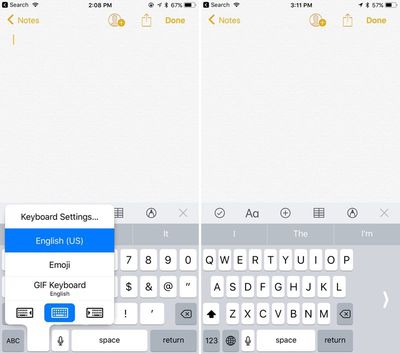
- One-handed keyboard - On the iPhone, there's a new option for a one-sided keyboard that can be enabled by pressing down on the globe keyboard button. It moves the keyboard to either the left or right side of the device.
onehandedkeyboard
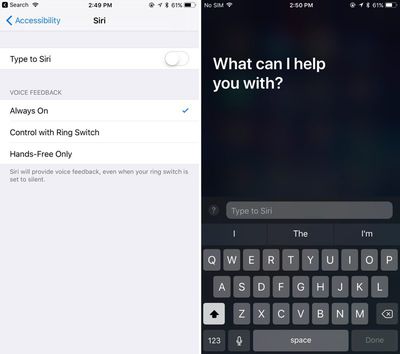
- Type to Siri - There's an Accessibility feature that enables Type to Siri. With this option toggled on, when Siri is accessed via a Home button press, it brings up a keyboard where you can type something to Siri.
typetosiri
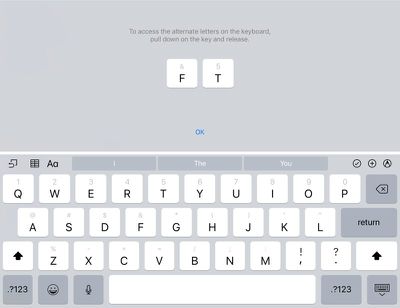
- iPad keyboard changes - On the iPad, symbols and numbers accessible via the shift key are visible on the keys themselves. The alternate symbols and numbers are accessed by pulling down on the key and releasing.
ipadkeyboard
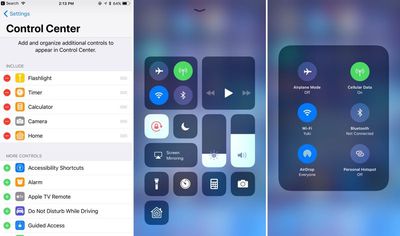
- Customizable Control Center - Apple showed off the new single-page revamped Control Center on stage during the keynote, but what wasn't mentioned is that the Control Center is customizable. Users can select what's displayed in Control Center using the Settings app, and there are a huge range of options including Low Power Mode, Notes, Text Size, Wallet, Screen Recording, and more. There's even a new option to add Apple TV Remote controls to Control Center. Layout can't be changed, though.
customizablecontrolcenter
- Offload Unused Apps - In the Settings app, there's a new option that will automatically uninstall apps that haven't been used in a while. Documents and data for uninstalled apps will remain available in case the app is re-installed.

- Bolder text - Throughout the operating system, there are bolder text labels and starker, bolder looks for many apps like Phone, Contacts, and FaceTime. Many apps have received design changes ranging from subtle to more significant, such as the revamped Calculator app.
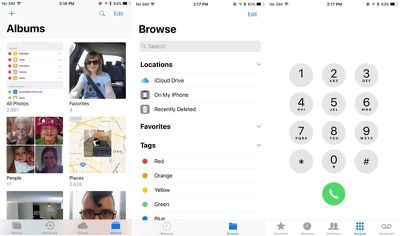
ios11redesignedelements
- Unified Siri and search settings - In the Settings app, there's now a single tab for Siri and Search, which is a more logical layout. There are also options for toggling on Siri suggestions for each individual app that's downloaded on a device.
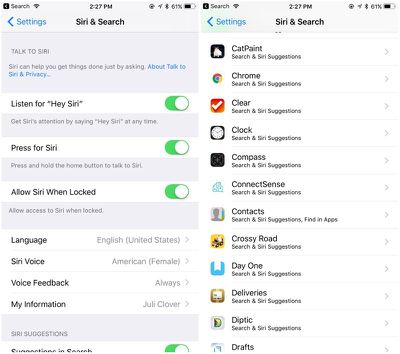
sirisandsearchsettings
- Revamped storage management - The "Storage and iCloud Usage" tab is now just "iPhone Storage" and it features at at-a-glance view of the storage space available on a device along with recommendations for improving storage space like auto deleting old conversations, clearing large Messages attachments, and storing Messages in iCloud, a new feature that syncs Messages across all of your devices.
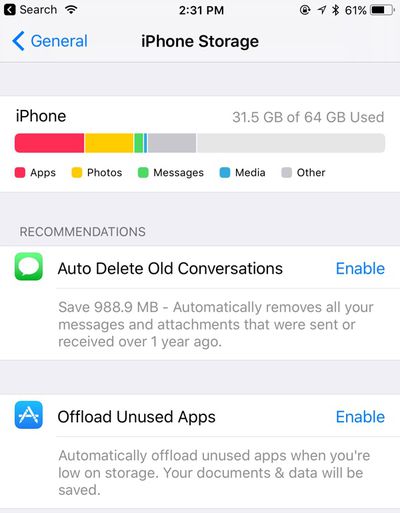
iphonestorageupdate
- Accounts and passwords - There's a new "Accounts & Passwords" section in Settings that provides access to all iCloud and Mail accounts along with app and website passwords stored in Keychain, accessible only after authenticating with Touch ID. Passwords are also available in the Safari section of the Settings app.

- Safari Settings - Additional privacy options are available for Safari in the Settings app. There's an option to "Try to Prevent Cross-Site Tracking," a new iOS 11 feature, and there are options for Camera and Microphone Access.

- Emergency SOS - There's an Emergency SOS option in the Settings app that allows users to turn on an "Auto Call" feature that will immediately dial 911 when the Sleep/Wake button is pressed five times.
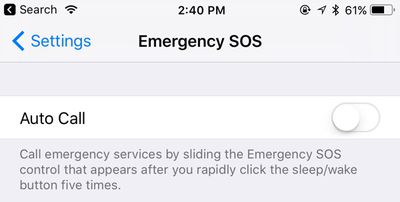
emergencysosautocall
- Drag and drop - Drag and Drop was announced as an iPad feature, but in apps like Files, drag and drop is available for moving files around on the iPhone. Drag and Drop is a feature that's limited to use within apps on the iPhone and it isn't system-wide like on the iPad.

- Camera QR code scanning - The Camera app automatically detects QR codes and will respond appropriately, doing things like opening up Safari to a specific website.

- Password Autofill - Password autofilling options are now available for third-party apps.

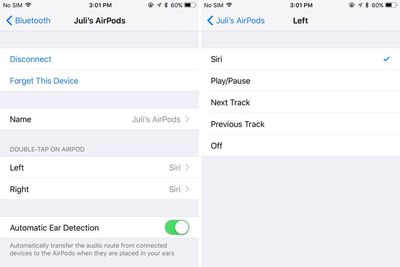
- AirPods settings - AirPods can now be customized with separate double tap gestures for the left and right AirPod. One can be set to access Siri, for example, while another can be set to play the next track. In iOS 10, double tap settings are applied to both AirPods.
airpodsoptions
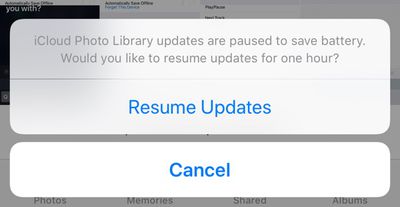
- Auto-pausing for uploads - Photo syncing and other such updates are automatically paused in iOS 11 when battery life is low.
icloudupdatesbattery
- Automatic setup - When setting up a new iOS device, there's now an option to hold it near an existing device to automatically copy over settings, preferences, and iCloud Keychain.

- Screen recording - There's a Control Center option that will automatically capture a screen recording of what you're doing on an iPhone or iPad.

- Smart Invert - In the Accessibility section of the Settings app, under Accessibility > Display Accommodations > Invert Colors, there's a new option for "Smart Invert." Smart Invert reverses the colors of the display except for images, media, and some apps. It's quite similar to the Dark Mode that users have been hoping for, but it doesn't extend to all UI elements.

- GIFs In the Photos app, GIFs saved in the Camera roll now animate when opened. In the main album view, they are still, but will work properly when tapped.

There are many, many more undocumented tweaks and changes in iOS 11, and additional features will be added and updated throughout the beta testing process. For now, iOS 11 is limited to developers, but Apple plans to make a version available for public beta testers in late June.

Devices compatible with iOS 11 include the iPhone 5s, SE, 6 Plus, 6, 6s Plus, 6s, 7 Plus, and 7, along with the new fifth-generation iPad, the iPad Air, the iPad Air 2, all iPad Pro models, and the iPad mini 2 and later. iOS 11 essentially works with all devices that include an A7 or newer chip.


Related Forum: iOS 11

Popular Stories

M5 MacBook Pro

RIP, MacBook Ultra

Monday October 19, 2026 9:37 am PDT by
Apple today sent out invites for an experience in Los Angeles on Wednesday, October 28, and the "Pro and tell" tagline on the invitation likely means that the rumored MacBook models with touch-enabled OLED displays will stick with MacBook Pro branding instead of the once-rumored "MacBook Ultra" name. The long-rumored "iPhone Ultra" ended up being named iPhone Duo, so speculation that Apple...
iPhone Duo Trio

Here's What Apple's Apps Look Like on the iPhone Duo

Tuesday October 20, 2026 11:12 am PDT by
With just three days to go until the iPhone Duo is released, Apple is getting ready for the launch. Behind the scenes, the App Store now has screenshots of Apple's built-in apps running on the Duo. We've seen some apps in marketing materials, but images of the ones we haven't seen give us an idea of what it will be like using the iPhone Duo day to day. Many apps are shown in landscape...
apple pro tell logo

Apple Announcing New Products Next Week: 'Pro and Tell'

Monday October 19, 2026 9:05 am PDT by
Apple's Greg Joswiak today hinted at new product announcements coming next week, sharing a social media post that says "Can't wait to pro and tell next week." Rumors suggest Apple is planning to debut the new MacBook Pro with an OLED touchscreen display, an M6 entry-level MacBook Pro, an M6 iMac, an iPad mini with an OLED display. Can't wait to pro and tell next week....

Top Rated Comments

supremedesigner Avatar
122 months ago
- Type to Siri - There's an Accessibility feature that enables Type to Siri. With this option toggled on, when Siri is accessed via a Home button press, it brings up a keyboard where you can type something to Siri.
It is about time! #Deaf #Accessibility
Score: 21 Votes (Like | Disagree)

gaximus Avatar
122 months ago
LOOK AT THE NEW VOLUME INDICATER. Yes it deserves all caps

Attachment Image
Score: 18 Votes (Like | Disagree)
braddick Avatar
122 months ago
What does the calculator look like ?
Still using every single digit, 1 through 9 (including 0!).
Score: 14 Votes (Like | Disagree)
penajmz Avatar
122 months ago
AirPods customization VERY welcomed
Score: 12 Votes (Like | Disagree)
122 months ago
The dragfest is real. Seriously, that's some good coding right there
Indeed. Apple is back.
Score: 11 Votes (Like | Disagree)
122 months ago
More here. https://twitter.com/stroughtonsmith/status/871857521979527169/video/1
The dragfest is real. Seriously, that's some good coding right there
Score: 11 Votes (Like | Disagree)
Latest Stories
Apple Reportedly Boosts iPhone Duo Orders by 44%
19 minutes ago
Fortnite Returning to Australian App Store After Court Ruling
47 minutes ago
Apple Ordered to Open iPhone to Rival App Stores in Australia
1 hour ago
Apple Suppliers Face Hurdles Cutting Circuit Board Emissions
1 hour ago
Things Updated for iPhone Duo With Adaptive Layout
2 hours ago
Simplicity and Siri AI Are HomeView's Killer Features, Apple Says
2 hours ago
iPhone Duo Reviewers Really Miss Face ID
7 hours ago
Does the iPhone Duo Run Hot? Here's What Reviews Found
9 hours ago
Apple Music's New Look is Now Live on Apple's Website
9 hours ago
Anthropic Launches Claude Duet, a Proactive AI Agent
10 hours ago
What 32,000 Folds Did to the iPhone Duo's Hinge
11 hours ago
iPhone Duo's Hidden FaceTime Camera Takes 'Trash' Photos
12 hours ago
iPhone Duo Has 'Edge Light' Feature That Debuted on Macs Last Year
13 hours ago
Apple Support App Updated for iPhone Duo's Larger Display
13 hours ago
Amazon Sweetens the Deal on Entry-Level 16-Inch MacBook Pro With $570 Off
13 hours ago
iPhone Duo Tips Over on MagSafe Stands When Unfolded
13 hours ago
Apple Music's New Look Officially Announced
15 hours ago
iPhone Duo Supports Apple Pencil Starting With iOS 27.2
15 hours ago
iPhone Duo Accessories Roundup: Cases and Screen Protectors From OtterBox, ZAGG, and More
16 hours ago
Apple Stores Will Have 'Limited' Availability of iPhone Duo for Walk-In Customers
17 hours ago
iPhone Duo Reviews Explain Why Device is Both 'Fun' and 'Frustrating'
17 hours ago
Apple Says 'Reachability' Feature Coming to iPhone Duo Later This Year
18 hours ago
Loop Capital Cuts Apple Rating Over iPhone Sales Outlook
22 hours ago
Apple Stores in Bordeaux and Lille Looted During French Protests
22 hours ago
Bluesound Adds Native Apple Music Support
23 hours ago
Apple CEO John Ternus Explains What Makes Good Product Design
1 day ago
UK Proposes New Ways to Help Apple Pay Rivals
1 day ago
WhatsApp Developing In-App Browser for All Chat Links on iPhone
1 day ago
Apple's App Store Chief Explains Its Push for Premium Games
1 day ago
Apple Could Owe Even More After $5.7 Billion Patent Verdict
1 day ago









































