
iOS 11 Makes Setting Up New Devices Super Easy - GeekWebGuides
Skip to Content

iOS 11 Makes Setting Up New Devices Super Easy

In iOS 11, Apple is implementing a new "Automatic Setup" feature, which is designed to make it much quicker to get a new device ready to go right out of the box.

As seen in the video below, Automatic Setup transfers over your preferences, Apple ID and Wi-Fi info, preferred settings, and iCloud Keychain passwords, streamlining the setup process for new iPads and iPhones.
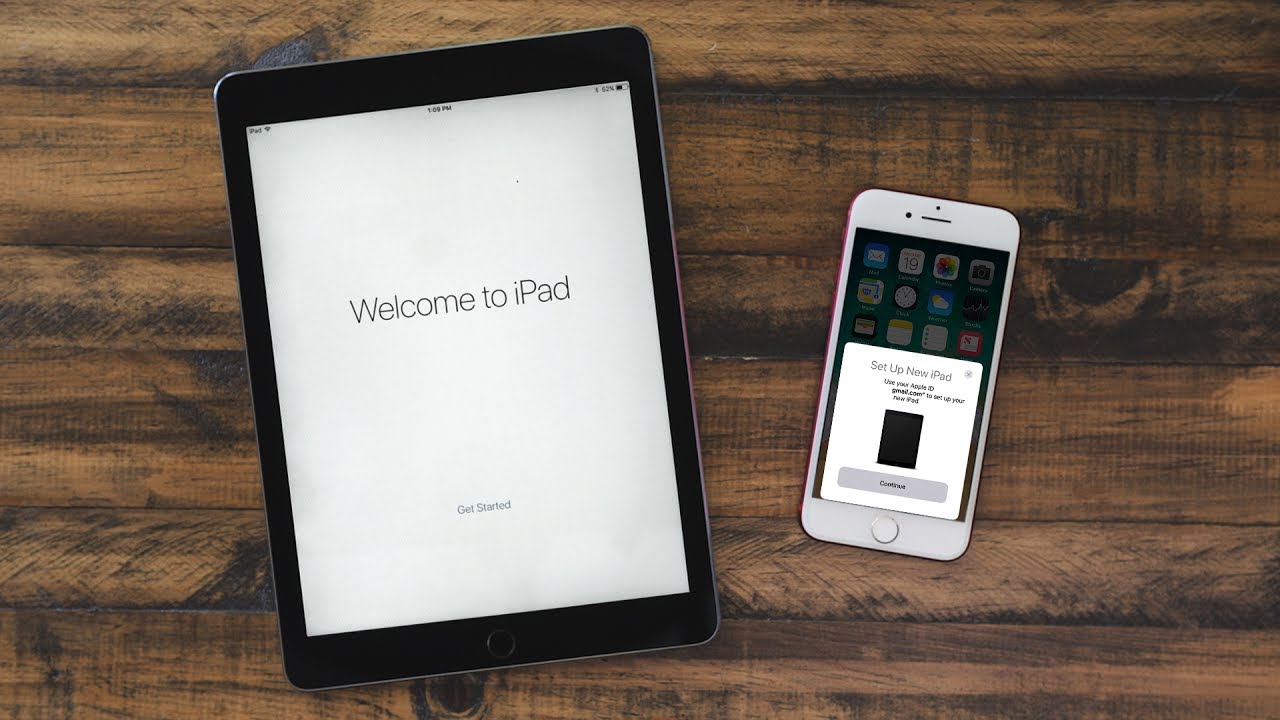

With iOS 11 installed, during the setup process, there's a new option to transfer settings from an existing device (which also needs to be running iOS 11). The two devices need to be held close to one another, and when nearby, you'll get instructions to pair them.

Pairing involves using the camera of the old device to scan an Apple Watch-style pairing image on the new device. After that, you'll be prompted to enter the passcode of the old device, which also becomes the passcode on the new device, and then the devices will need to remain near each other during the transfer.

The process sounds a bit complicated when explained, but it's straightforward with clear instructions that are simple to follow and it takes just a couple of minutes to complete.

After the two devices are paired and the settings are transferred, there's also a new simplified setup process for activating Touch ID and then enabling settings like Find My iPhone, location, and analytics all at once instead of individually. After that, you can set up Apple Pay and Siri, and then your device is ready to go.

Whether setting up a device as new or importing an iCloud backup, Automatic Setup in iOS 11 is quicker than the traditional setup method, provided you have an existing device on hand.

iOS 11 is limited to developers right now, but it will be provided to public beta testers later this month. For more on iOS 11, make sure to check out our full iOS 11 roundup.


Related Forum: iOS 11

Popular Stories

M5 MacBook Pro

RIP, MacBook Ultra

Monday October 19, 2026 9:37 am PDT by
Apple today sent out invites for an experience in Los Angeles on Wednesday, October 28, and the "Pro and tell" tagline on the invitation likely means that the rumored MacBook models with touch-enabled OLED displays will stick with MacBook Pro branding instead of the once-rumored "MacBook Ultra" name. The long-rumored "iPhone Ultra" ended up being named iPhone Duo, so speculation that Apple...
iPhone Duo Trio

Here's What Apple's Apps Look Like on the iPhone Duo

Tuesday October 20, 2026 11:12 am PDT by
With just three days to go until the iPhone Duo is released, Apple is getting ready for the launch. Behind the scenes, the App Store now has screenshots of Apple's built-in apps running on the Duo. We've seen some apps in marketing materials, but images of the ones we haven't seen give us an idea of what it will be like using the iPhone Duo day to day. Many apps are shown in landscape...
apple pro tell logo

Apple Announcing New Products Next Week: 'Pro and Tell'

Monday October 19, 2026 9:05 am PDT by
Apple's Greg Joswiak today hinted at new product announcements coming next week, sharing a social media post that says "Can't wait to pro and tell next week." Rumors suggest Apple is planning to debut the new MacBook Pro with an OLED touchscreen display, an M6 entry-level MacBook Pro, an M6 iMac, an iPad mini with an OLED display. Can't wait to pro and tell next week....

Top Rated Comments

122 months ago
Now if only they could figure out how to speed up restoring all your apps while you stand in the Apple Store.

Show of hands: who has had to stand in Apple (or Verizon or Sprint etc) and wait and wait and wait for their overcrowded WiFi to redownload all their apps?

Keep your hand raised if you wish you could prioritize which apps download first, so you could at least have your most needed apps before you leave the store, rather than seeing it download The Elements or GTA San Andreas instead of the Gmail app.

I just tell the Apple Store person helping me that I'll take care of setup after I get home.

Score: 21 Votes (Like | Disagree)
djcerla Avatar
122 months ago
I don't understand how this is any easier than restoring from an iCloud backup!
Maybe because iCloud backup does not store any of those things?
Score: 13 Votes (Like | Disagree)
122 months ago
Now if only they could figure out how to speed up restoring all your apps while you stand in the Apple Store.

Show of hands: who has had to stand in Apple (or Verizon or Sprint etc) and wait and wait and wait for their overcrowded WiFi to redownload all their apps?

Keep your hand raised if you wish you could prioritize which apps download first, so you could at least have your most needed apps before you leave the store, rather than seeing it download The Elements or GTA San Andreas instead of the Gmail app.
Eh.....do it yourself at home no? It's not very difficult in fairness
Score: 11 Votes (Like | Disagree)
rshev Avatar
122 months ago

Keep your hand raised if you wish you could prioritize which apps download first, so you could at least have your most needed apps before you leave the store, rather than seeing it download The Elements or GTA San Andreas instead of the Gmail app.
You can actually prioritise downloads even on iOS 10 by force-touching the app in a downloading state.
Score: 11 Votes (Like | Disagree)
122 months ago
Now if only they could figure out how to speed up restoring all your apps while you stand in the Apple Store.

Show of hands: who has had to stand in Apple (or Verizon or Sprint etc) and wait and wait and wait for their overcrowded WiFi to redownload all their apps?

Keep your hand raised if you wish you could prioritize which apps download first, so you could at least have your most needed apps before you leave the store, rather than seeing it download The Elements or GTA San Andreas instead of the Gmail app.
Score: 10 Votes (Like | Disagree)
dannys1 Avatar
122 months ago
I go through the setup in store so I know I am taking home a working device.
I make the UPS man wait 3 hours whilst I set it up outside so I know i'm receiving a working device.

/s
Score: 8 Votes (Like | Disagree)
Latest Stories
Apple Reportedly Boosts iPhone Duo Orders by 44%
19 minutes ago
Fortnite Returning to Australian App Store After Court Ruling
47 minutes ago
Apple Ordered to Open iPhone to Rival App Stores in Australia
1 hour ago
Apple Suppliers Face Hurdles Cutting Circuit Board Emissions
1 hour ago
Things Updated for iPhone Duo With Adaptive Layout
2 hours ago
Simplicity and Siri AI Are HomeView's Killer Features, Apple Says
2 hours ago
iPhone Duo Reviewers Really Miss Face ID
7 hours ago
Does the iPhone Duo Run Hot? Here's What Reviews Found
9 hours ago
Apple Music's New Look is Now Live on Apple's Website
9 hours ago
Anthropic Launches Claude Duet, a Proactive AI Agent
10 hours ago
What 32,000 Folds Did to the iPhone Duo's Hinge
11 hours ago
iPhone Duo's Hidden FaceTime Camera Takes 'Trash' Photos
12 hours ago
iPhone Duo Has 'Edge Light' Feature That Debuted on Macs Last Year
13 hours ago
Apple Support App Updated for iPhone Duo's Larger Display
13 hours ago
Amazon Sweetens the Deal on Entry-Level 16-Inch MacBook Pro With $570 Off
13 hours ago
iPhone Duo Tips Over on MagSafe Stands When Unfolded
13 hours ago
Apple Music's New Look Officially Announced
15 hours ago
iPhone Duo Supports Apple Pencil Starting With iOS 27.2
15 hours ago
iPhone Duo Accessories Roundup: Cases and Screen Protectors From OtterBox, ZAGG, and More
16 hours ago
Apple Stores Will Have 'Limited' Availability of iPhone Duo for Walk-In Customers
17 hours ago
iPhone Duo Reviews Explain Why Device is Both 'Fun' and 'Frustrating'
17 hours ago
Apple Says 'Reachability' Feature Coming to iPhone Duo Later This Year
18 hours ago
Loop Capital Cuts Apple Rating Over iPhone Sales Outlook
22 hours ago
Apple Stores in Bordeaux and Lille Looted During French Protests
22 hours ago
Bluesound Adds Native Apple Music Support
23 hours ago
Apple CEO John Ternus Explains What Makes Good Product Design
1 day ago
UK Proposes New Ways to Help Apple Pay Rivals
1 day ago
WhatsApp Developing In-App Browser for All Chat Links on iPhone
1 day ago
Apple's App Store Chief Explains Its Push for Premium Games
1 day ago
Apple Could Owe Even More After $5.7 Billion Patent Verdict
1 day ago








































