
iPhone X Will Default to Hiding Text Previews of Your Notifications on the Lock Screen - GeekWebGuides
Skip to Content

iPhone X Will Default to Hiding Text Previews of Your Notifications on the Lock Screen

by

As we get closer to the iPhone X's launch on Friday, November 3, more tidbits about the device are beginning to emerge thanks to the first wave of impressions, reviews, and hands-on coverage that hit this morning. Within his first impressions, Steven Levy shared an interesting aspect of the iPhone X's software, which turns on hiding text previews for your notifications by default instead of making you turn this privacy feature on yourself.

As an explanation, with the launch of iOS 11 Apple introduced a way for you to hide text previews of all apps at once within Settings. With this turned on, you'll notice when you have a notification for apps like Messages and Snapchat, but the actual content of the notification is hidden until you "unlock" the iPhone with Touch ID or a passcode. Then, you can read the content, and tap the Home Button to enter your iPhone. This feature has to be turned on manually on current iPhones.
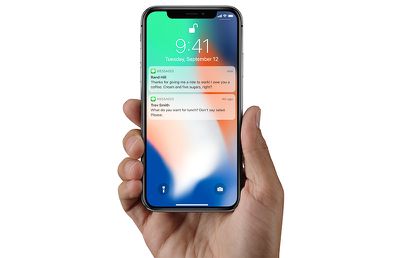
faceidmessagesunlock

After Face ID unlock, iPhone X will show text previews in notifications

According to Levy, iOS 11 on the iPhone X defaults to hiding text previews for all of your apps, automatically providing an extra bit of privacy for users on the new smartphone. So, when you raise the iPhone X in front of you, it'll unlock with Face ID, and any notifications will then be filled out to show the full content of each message. This way, if someone picks up your iPhone and looks at it, Face ID won't unlock and show notification previews. Of course, you can revert to the traditional text previews functionality in Settings.

Levy said that he used this feature as a way to confirm that Face ID had unlocked the iPhone X. Here's the part from his review concerning text previews on the iPhone X Lock Screen:

I then see if the little lock icon on the screen has released its latch. Alternatively, a good way to see when you’ve been recognized is to notice the generic messages on the lock screen saying “you have a notification” from Facebook, Gmail, or wherever. When you and your iPhone X make that turn-on connection, those flesh out with the actual content of the message. (This feature—withholding potentially private alerts until the phone was unlocked—had previously been available as an option but now is the default.)

It's also worth noting that sometimes the iPhone X review unit would unlock with Face ID and go "straight to where [Levy] left off," while other times the UI asked him to swipe up to unlock the iPhone X, as has been showcased in marketing for the smartphone. Levy didn't have an explanation for this part of his experience with the new iPhone, further stating that he was "mystified" as to why it would sometimes say swipe up after Face ID unlock, and other times simply open the iPhone.

Check out more information on the iPhone X in our Roundup.

Related Forum: iPhone

Top Rated Comments

offdutyrockstar Avatar
117 months ago
If the phone autolocked, it goes straight to where it was.

If it was manually locked with the side button, you swipe up.

It's really not that difficult, this geezer must get mystified often.

Score: 8 Votes (Like | Disagree)
jonnysods Avatar
117 months ago
It makes sense. I like this feature as it's currently easy for anyone to preview my messages
Score: 4 Votes (Like | Disagree)
dannyyankou Avatar
117 months ago
This is clever, I didn’t even know it was a feature on iOS 11. Just enabled it.
Score: 3 Votes (Like | Disagree)
117 months ago
Thank you. I’m assuming the one iPhone X is using here is ‘When Unlocked?’
Yep, and it works the exact same way on my 7+.

As long as you don’t change the accessibility option for the home button to “rest finger to open”, the notification will change to displaying the contents once you authenticate with Touch ID. Works well.
Score: 2 Votes (Like | Disagree)
OldSchoolMacGuy Avatar
117 months ago
Don't see why this is an issue. I wouldn't want them visible by default.
Score: 2 Votes (Like | Disagree)
117 months ago
I have this turned off on my phone too. I'd recommend it, especially if your phone is left where other people may have access to it.
Also I have turned off the ability for messages to even show on the lockscreen.
Agreed. Especially if your iPhone is left away,
You don't someone glancing over who might be curious to see what notifications are lighting up your display.
Score: 1 Votes (Like | Disagree)

Popular Stories

M5 MacBook Pro

RIP, MacBook Ultra

Monday October 19, 2026 9:37 am PDT by
Apple today sent out invites for an experience in Los Angeles on Wednesday, October 28, and the "Pro and tell" tagline on the invitation likely means that the rumored MacBook models with touch-enabled OLED displays will stick with MacBook Pro branding instead of the once-rumored "MacBook Ultra" name. The long-rumored "iPhone Ultra" ended up being named iPhone Duo, so speculation that Apple...
iPhone Duo Trio

Here's What Apple's Apps Look Like on the iPhone Duo

Tuesday October 20, 2026 11:12 am PDT by
With just three days to go until the iPhone Duo is released, Apple is getting ready for the launch. Behind the scenes, the App Store now has screenshots of Apple's built-in apps running on the Duo. We've seen some apps in marketing materials, but images of the ones we haven't seen give us an idea of what it will be like using the iPhone Duo day to day. Many apps are shown in landscape...
apple pro tell logo

Apple Announcing New Products Next Week: 'Pro and Tell'

Monday October 19, 2026 9:05 am PDT by
Apple's Greg Joswiak today hinted at new product announcements coming next week, sharing a social media post that says "Can't wait to pro and tell next week." Rumors suggest Apple is planning to debut the new MacBook Pro with an OLED touchscreen display, an M6 entry-level MacBook Pro, an M6 iMac, an iPad mini with an OLED display. Can't wait to pro and tell next week....
Latest Stories
Apple Reportedly Boosts iPhone Duo Orders by 44%
1 minute ago
Fortnite Returning to Australian App Store After Court Ruling
29 minutes ago
Apple Ordered to Open iPhone to Rival App Stores in Australia
43 minutes ago
Apple Suppliers Face Hurdles Cutting Circuit Board Emissions
1 hour ago
Things Updated for iPhone Duo With Adaptive Layout
2 hours ago
Simplicity and Siri AI Are HomeView's Killer Features, Apple Says
2 hours ago
iPhone Duo Reviewers Really Miss Face ID
7 hours ago
Does the iPhone Duo Run Hot? Here's What Reviews Found
8 hours ago
Apple Music's New Look is Now Live on Apple's Website
9 hours ago
Anthropic Launches Claude Duet, a Proactive AI Agent
10 hours ago
What 32,000 Folds Did to the iPhone Duo's Hinge
10 hours ago
iPhone Duo's Hidden FaceTime Camera Takes 'Trash' Photos
12 hours ago
iPhone Duo Has 'Edge Light' Feature That Debuted on Macs Last Year
12 hours ago
Apple Support App Updated for iPhone Duo's Larger Display
12 hours ago
Amazon Sweetens the Deal on Entry-Level 16-Inch MacBook Pro With $570 Off
13 hours ago
iPhone Duo Tips Over on MagSafe Stands When Unfolded
13 hours ago
Apple Music's New Look Officially Announced
14 hours ago
iPhone Duo Supports Apple Pencil Starting With iOS 27.2
15 hours ago
iPhone Duo Accessories Roundup: Cases and Screen Protectors From OtterBox, ZAGG, and More
16 hours ago
Apple Stores Will Have 'Limited' Availability of iPhone Duo for Walk-In Customers
16 hours ago
iPhone Duo Reviews Explain Why Device is Both 'Fun' and 'Frustrating'
17 hours ago
Apple Says 'Reachability' Feature Coming to iPhone Duo Later This Year
18 hours ago
Loop Capital Cuts Apple Rating Over iPhone Sales Outlook
22 hours ago
Apple Stores in Bordeaux and Lille Looted During French Protests
22 hours ago
Bluesound Adds Native Apple Music Support
22 hours ago
Apple CEO John Ternus Explains What Makes Good Product Design
23 hours ago
UK Proposes New Ways to Help Apple Pay Rivals
1 day ago
WhatsApp Developing In-App Browser for All Chat Links on iPhone
1 day ago
Apple's App Store Chief Explains Its Push for Premium Games
1 day ago
Apple Could Owe Even More After $5.7 Billion Patent Verdict
1 day ago









































