
Vivaldi Web Browser 1.13 for Power Users Gains New Multi-Tab Management Features - GeekWebGuides
Skip to Content

Vivaldi Web Browser 1.13 for Power Users Gains New Multi-Tab Management Features

by

Vivaldi web browser, the spiritual successor to Opera 12, released version 1.13 on Wednesday, introducing an easier way of managing multiple tabs, as well as new file download features and other improvements.
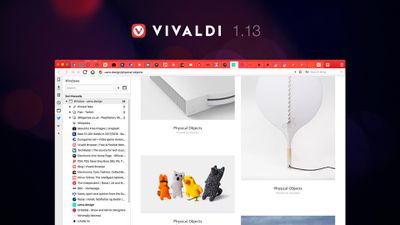
1
In line with the Norwegian team's aim to make Vivaldi the most feature-rich and customizable browser available to power users, the developers have created the new Window Panel. This opens a tree-style view of tabs to the side of the browser window, offering an easy overview of all open tabs as a list.

From there, users can conveniently manage tabs by dragging them to change their order, grouping tabs by topic to save space, tiling Tab Stacks to compare several web pages side by side, and hibernating unused tabs or Tab Stacks for better performance.

Within the new Panel, it's also possible to mute sound in specific tabs and pin tabs to ensure they always stay open. The Vivaldi team says it is planning to bring even more functionality to this feature in the near future.
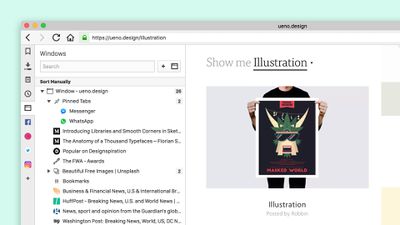
window panel
The latest release of the Vivaldi browser also brings a number of improvements to file downloading, based on community feedback. Users now get a warning dialog when closing the browser before a download is complete. It's also now possible to pause and resume downloads, while a download speed indicator has been added to the progress bar.

Elsewhere, Vivaldi's window handling code has been rewritten, providing performance benefits that are especially noticeable on older, slower hardware.

Vivaldi browser is a free download for Mac available directly from the Vivaldi website.

Top Rated Comments

116 months ago
I've long been reading GeekWebGuides but signed up to post this. I am a designer working at Vivaldi.

Since nobody refuted it, I figured I would sign up to say that Vivaldi is not built with Electron. Electron is a great framework for getting powerful products to market quickly. Vivaldi is built for the long haul, and we have decided to use Chromium directly. This gives us more control, though there are more things we need to build ourselves.

There is no "server" used for serving up the UI, but there is parsing of Javascript. I'll be happy to answer any questions you might have. :)

Score: 12 Votes (Like | Disagree)
116 months ago
Sure, Safari is the most power efficient browser on macOS, but if you are a power user who wants to do more than watch YouTube videos or only have 5 tabs open at the same time, it's pretty painful to use. As long as you use uBlock Origin or another good ad-blocker, Vivaldi is actually not that heavy on your battery, and it can handle large numbers of tabs better than many other browsers if you also make use of the built-in Lazy Tab Loading and Hibernate Tab features.

Vivaldi has a ton of features that I can no longer imagine living without. Just to list a few:

* Vertical Tabs -- so your tabs don't turn into a giant pile of partially identical favicons when you have more than a few tabs open (especially on a laptop screen), and so you can still read the titles of the 12 Amazon tabs that are currently open
* Quick Commands -- an in-browser spotlight that allows you to quickly jump to a specific tab, open a bookmark or page from your browser history, issue browser commands, etc.
* Compatible with pretty much all Chrome extensions but without Google's tracking crap
* Lazy Load Restored Tabs and Hibernate Tabs -- for less resource usage
* Better bookmark management than most other browsers
* Take 1:1 screenshots of full webpages (not just of the visible area) -- this is especially useful for pages that print to PDF very poorly
* Tons and tons of customizability -- you can change every single keyboard shortcut, theme the interface colors or let them be affected by the current webpage, customize tab handling in two million ways (e.g., remove the close tab buttons if you use horizontal tabs and regularly close tabs accidentally), etc.

If you are the type of person who is happy with TextEdit.app as a text editor, you likely won't appreciate Vivaldi. But if you are someone who actually makes changes to the default settings of an application and who is willing to spend a minute or two on figuring out stuff to be more efficient in the long run, Vivaldi might just be the browser for you.
Score: 4 Votes (Like | Disagree)
116 months ago
Thank you for clarification, I didn’t know that. I was pretty sure, you guys using Electron, it’s a big difference. Suddenly, Vivaldi looks like a pretty interesting proposition...
For us the biggest difference is that by following Chromium we have the chance to provide security updates in a timely fashion. Electron is sometimes several releases behind. I just checked https://electronjs.org, it seems like Electron still is on Chromium 58, whereas Vivaldi is on 62.
Score: 3 Votes (Like | Disagree)
schrodinger_cat Avatar
116 months ago
Web browser on Electron? No, thank you.
If someone doesn't know, this is a wrapper for Node.js server and Chromium. To put it simply, it has a whole server inside and a copy of Chrome browser to render interface. Result is a memory and CPU hog. This is most cheapest and cruelest way to develop multiplatform "native" apps (notice quotes). The one who pays here, is the user.
Score: 3 Votes (Like | Disagree)
stainless Avatar
116 months ago
I've long been reading GeekWebGuides but signed up to post this. I am a designer working at Vivaldi.

Since nobody refuted it, I figured I would sign up to say that Vivaldi is not built with Electron. Electron is a great framework for getting powerful products to market quickly. Vivaldi is built for the long haul, and we have decided to use Chromium directly. This gives us more control, though there are more things we need to build ourselves.

There is no "server" used for serving up the UI, but there is parsing of Javascript. I'll be happy to answer any questions you might have. :)
Love seeing people who are part of the company/information active on the forums!!

While I'm not a user currently, I'm going to dl today and give it a try. I work with Patents and its regularly have 50-100 tabs open and Safari just it to frustrating for this. I hope that it will eventually have a Tab Sorting feature, if it doesn't already. When you start comparing Patent Claims A to Patent Claims B, but you have to cross reference those against Patent C and D because of likeness you can easily see how organizing Tabs and being able to view Tabs Side-By-Side is crazy important!!

Also, I support Competition so LONG LIVE Vivaldi, FireFox, Chromium!!!!!


UPDATE: Just downloaded and LOVE the Tab Stacking! This will make Patent Searches and Comparisons SO MUCH EASIER!! THANK YOU THANK YOU THANK YOU!!!
Score: 2 Votes (Like | Disagree)
Joaolx Avatar
116 months ago
Web browser on Electron? No, thank you.
If someone doesn't know, this is a wrapper for Node.js server and Chromium. To put it simply, it has a whole server inside and a copy of Chrome browser to render interface. Result is a memory and CPU hog. This is most cheapest and cruelest way to develop multiplatform "native" apps (notice quotes). The one who pays here, is the user.
Electron might be a resource hog but that isn't necessarily bad, besides this also isn't a browser for everyone. There is no browser that has as many features or that has developed as many features in the period of development. I can count with one hand new features that Google has introduced in Chrome in terms of functionality in maybe the last 5 years and with the other hand the ones they removed just because people didn't use them(ie. tab stacking). Since Vivaldi came out with the first stable 1.0 release they've now had 13 major updates, each with at least a new feature. Even with what you call a downside, Vivaldi runs perfectly even my basic $800 laptop with 8GB of RAM even with more than 20 tabs open all the time. Just because it runs Electron doesn't outright mean it runs slowly. The browser could even be a little slower that I wouldn't care due to its features(quick commands, web panels, search nicknames, not having to give up on Chrome extensions, tab stacking with multi view, screenshot).

Well, cheap and fast are interchangeable here: you can hire more developers and development would be as fast, as with Electron, but the cost and complexity of the project would rise.
I absolutely agree, that Electron has it's place, but this is starting to get ridiculous, it's not only chat apps, we have IDEs, browsers on Electron now. What's next? A full blown operating system? This trend is worrying and I advise users and developers to be cautious about it.
Are you a developer? If you were, surely you would know that more developers and more money doesn't mean faster development. This idea of throwing money and people into a project to make it go faster is the biggest misconception of software development by people who aren't developers. Sure, with more people and with good development techniques you maybe could build more complex things but to say that you could add more developers and go just as fast as if you were developing natively(which could possibly mean no Chrome extensions and much slower/weaker multi platform support) is very far from true.

I do agree that the trend of Electron can be a bit too much but I'm willing to ignore some of it's downsides for the advantages it brings.
[doublepost=1511370692][/doublepost]
I see the phrase tossed around a lot in various subsections, but what exactly constitutes one being a "power user"? Particularly in this context, i.e. web browsing?
Power user, for me at least, is someone who kind of uses and abuses the features of, in this case, software. I'm a power user, I like my browser to have a lot of features that enhance my browsing either making it faster or easier to do things.

ie. tab stacking with multi view(tab side by side) - on Chrome would need a window side by side but it would be in a different window which would make it confusing.
Web panels with programming language documentation.
Search nickname - do you search a lot of websites? you can set up searches for youtube and when you search for "y <insert music>" it searches for youtube. Or search IMDB by creating a "imdb" nickname, etc.
Quick commands or custom keyboard shortcuts to open tabs, search in specific websites, open bookmarks that have an alias, Clicking F2, writing "git" and I can immediately go to Github.
Built in screenshot functionality.
Score: 2 Votes (Like | Disagree)

Popular Stories

M5 MacBook Pro

RIP, MacBook Ultra

Monday October 19, 2026 9:37 am PDT by
Apple today sent out invites for an experience in Los Angeles on Wednesday, October 28, and the "Pro and tell" tagline on the invitation likely means that the rumored MacBook models with touch-enabled OLED displays will stick with MacBook Pro branding instead of the once-rumored "MacBook Ultra" name. The long-rumored "iPhone Ultra" ended up being named iPhone Duo, so speculation that Apple...
iPhone Duo Trio

Here's What Apple's Apps Look Like on the iPhone Duo

Tuesday October 20, 2026 11:12 am PDT by
With just three days to go until the iPhone Duo is released, Apple is getting ready for the launch. Behind the scenes, the App Store now has screenshots of Apple's built-in apps running on the Duo. We've seen some apps in marketing materials, but images of the ones we haven't seen give us an idea of what it will be like using the iPhone Duo day to day. Many apps are shown in landscape...
apple pro tell logo

Apple Announcing New Products Next Week: 'Pro and Tell'

Monday October 19, 2026 9:05 am PDT by
Apple's Greg Joswiak today hinted at new product announcements coming next week, sharing a social media post that says "Can't wait to pro and tell next week." Rumors suggest Apple is planning to debut the new MacBook Pro with an OLED touchscreen display, an M6 entry-level MacBook Pro, an M6 iMac, an iPad mini with an OLED display. Can't wait to pro and tell next week....
Latest Stories
Fortnite Returning to Australian App Store After Court Ruling
27 minutes ago
Apple Ordered to Open iPhone to Rival App Stores in Australia
41 minutes ago
Apple Suppliers Face Hurdles Cutting Circuit Board Emissions
1 hour ago
Things Updated for iPhone Duo With Adaptive Layout
2 hours ago
Simplicity and Siri AI Are HomeView's Killer Features, Apple Says
2 hours ago
iPhone Duo Reviewers Really Miss Face ID
7 hours ago
Does the iPhone Duo Run Hot? Here's What Reviews Found
8 hours ago
Apple Music's New Look is Now Live on Apple's Website
9 hours ago
Anthropic Launches Claude Duet, a Proactive AI Agent
9 hours ago
What 32,000 Folds Did to the iPhone Duo's Hinge
10 hours ago
iPhone Duo's Hidden FaceTime Camera Takes 'Trash' Photos
12 hours ago
iPhone Duo Has 'Edge Light' Feature That Debuted on Macs Last Year
12 hours ago
Apple Support App Updated for iPhone Duo's Larger Display
12 hours ago
Amazon Sweetens the Deal on Entry-Level 16-Inch MacBook Pro With $570 Off
13 hours ago
iPhone Duo Tips Over on MagSafe Stands When Unfolded
13 hours ago
Apple Music's New Look Officially Announced
14 hours ago
iPhone Duo Supports Apple Pencil Starting With iOS 27.2
15 hours ago
iPhone Duo Accessories Roundup: Cases and Screen Protectors From OtterBox, ZAGG, and More
16 hours ago
Apple Stores Will Have 'Limited' Availability of iPhone Duo for Walk-In Customers
16 hours ago
iPhone Duo Reviews Explain Why Device is Both 'Fun' and 'Frustrating'
17 hours ago
Apple Says 'Reachability' Feature Coming to iPhone Duo Later This Year
18 hours ago
Loop Capital Cuts Apple Rating Over iPhone Sales Outlook
22 hours ago
Apple Stores in Bordeaux and Lille Looted During French Protests
22 hours ago
Bluesound Adds Native Apple Music Support
22 hours ago
Apple CEO John Ternus Explains What Makes Good Product Design
23 hours ago
UK Proposes New Ways to Help Apple Pay Rivals
1 day ago
WhatsApp Developing In-App Browser for All Chat Links on iPhone
1 day ago
Apple's App Store Chief Explains Its Push for Premium Games
1 day ago
Apple Could Owe Even More After $5.7 Billion Patent Verdict
1 day ago
Skyrim Comes to Apple Silicon Macs With New Unofficial Installer
1 day ago









































