
ConnectSense Debuts New HomeKit-Compatible Smart In-Wall Outlet - MacRumors
Skip to Content

ConnectSense Debuts New HomeKit-Compatible Smart In-Wall Outlet

by

Ahead of the Consumer Electronics Show that's set to take place next week, ConnectSense has introduced its latest HomeKit-compatible product, the Smart In-Wall Outlet.

ConnectSense first released a HomeKit-enabled dual-plug Smart Outlet back in 2015, and is now following it up with an in-wall version.
connectsensesmartoutlet1
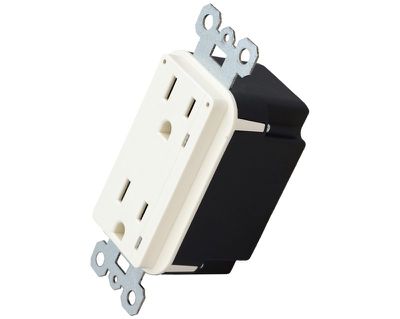
The Smart In-Wall Outlet is installed in a home in place of a traditional outlet, allowing anything that's plugged in to be controlled via the ConnectSense app, the Home app, or Siri, much like other homeKit products.

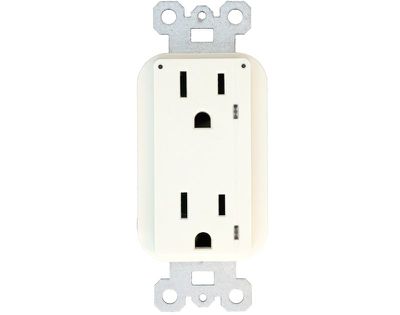
Fans, lights, and other appliances can be plugged into the Smart Outlet, which is designed to connect to a home's Wi-Fi setup. There are two connected outlets available, each of which can be controlled individually. The outlet offers a quick and easy way to make any product smart, and it provides power monitoring features along with plug detection.
connectsensesmartoutlet2
ConnectSense says that in addition to in-home use, the Smart In-Wall Outlet is designed to operate in commercial environments like office buildings, airports, universities, and more, with both 15A and 20A options available.

The Smart In-Wall Outlet will be available for purchase later in 2018. Pricing has not yet been announced.


Top Rated Comments

107 months ago
Seems weird to not have a USB port there, however I'm betting it is a tradeoff with the HomeKit functionality.

Most USB-equipped outlets are large and barely fit in standard boxes. They do not fit at all in older boxes at all.
[doublepost=1515011083][/doublepost]
Can't see the Apple community turning down extra ports :), but I am curious what USB item you want to turn on with HomeKit. Would it just be to see power draw?
No one wants to turn anything USB on or off with HomeKit. The USB comments are related to wanting USB ports on the outlet itself for easy charging that doesn't require a wall wart power adapter, or occupying one of the standard outlets.
Score: 4 Votes (Like | Disagree)
107 months ago
Needs to have a USB port or two on there.
Score: 2 Votes (Like | Disagree)
JRobinsonJr Avatar
107 months ago
Seems weird to not have a USB port there, however I'm betting it is a tradeoff with the HomeKit functionality.

Most USB-equipped outlets are large and barely fit in standard boxes. They do not fit at all in older boxes at all.
[doublepost=1515011083][/doublepost]
No one wants to turn anything USB on or off with HomeKit. The USB comments are related to wanting USB ports on the outlet itself for easy charging that doesn't require a wall wart power adapter, or occupying one of the standard outlets.
Hmm... i can think of a few things that MIGHT be better fed by USB. For example, LED light strips. USB powered speakers. Even an Echo Dot out in a garage that you night not want to be always on. Not saying i would want this but there is certainly potential value.
Score: 1 Votes (Like | Disagree)
107 months ago
Can we just skip all this nonsense and just add an ethernet jack to our electrical panel? Really, skip the wifi and apply the power line standard to the entire damn fuse box. Boom, every electrical device is now networked. I am sure there are some technical hurdles but I'd pay up to $1k to swap out my panel with a networked version.
Outlets and switches aren't all home runs to the panel. You would be paying much more than $1k to open all your walls and run individual circuits.
Score: 1 Votes (Like | Disagree)
107 months ago
Can we just skip all this nonsense and just add an ethernet jack to our electrical panel? Really, skip the wifi and apply the power line standard to the entire damn fuse box. Boom, every electrical device is now networked. I am sure there are some technical hurdles but I would bet that it's cheaper to do over adding an extra layer of copper for networking and replacing all switches and outlets with smart versions. Plus, potentially simpler path for IoT devices to come market.
Score: 1 Votes (Like | Disagree)
jrlcopy Avatar
107 months ago
Needs to have a USB port or two on there.
It's only semi smart, not full smart. ;).
Score: 1 Votes (Like | Disagree)

Popular Stories

iOS 26

iOS 26.4 Adds Two New Features to CarPlay

Tuesday March 24, 2026 1:55 pm PDT by
iOS 26.4 was released today, and it includes a couple of new features for CarPlay: an Ambient Music widget and support for voice-based chatbot apps. To update your iPhone 11 or newer to iOS 26.4, open the Settings app and tap on General → Software Update. CarPlay will automatically offer the new features so long as the iPhone connected to your vehicle is running iOS 26.4 or later....
Apple Business hero

Apple Unveils 'Apple Business' All-in-One Platform

Tuesday March 24, 2026 8:53 am PDT by
Apple today announced Apple Business, a new all-in-one platform that unifies device management, productivity tools, and customer outreach features. The service is designed to be a consolidated replacement for several of Apple's existing business-focused offerings, including Apple Business Essentials, Apple Business Manager, and Apple Business Connect. It provides organizations with a single...
AirPods Pro Firmware Feature

Apple Releases New Firmware for AirPods Pro 3, AirPods Pro 2 and AirPods 4

Tuesday March 24, 2026 12:31 pm PDT by
Apple today released new firmware for the AirPods Pro 2, AirPods Pro 3, and the AirPods 4. The firmware has a version number of 8B39, up from 8B34 on the AirPods Pro 3, 8B28 on the AirPods Pro 2, and 8B21 on the AirPods 4. There is no word on what's included in the firmware, but Apple has a support document with limited notes. Most updates are limited to bug fixes and performance...















